


What is Comp AI CRM?
Comp AI CRM is an open-source CRM developed by Comp AI, designed so that AI agents can do the most tedious part of the work themselves: understand who the customer is, record what has been observed along with evidence, then schedule a follow-up check automatically. According to the GitHub API (read on 04/11/2026), the trycompai/crm repository was created on 31/07/2026, has around 11,834 stars, 1,754 forks, is written in TypeScript and uses the MIT license. The latest release is v1.16.0, released on 22/10/2026. The project has no pricing page: you self-host it, with costs coming from the server, database, and AI model API calls. This post explains how Comp AI CRM works, what you need to run it, personal data risks, and when someone working solo should consider it.
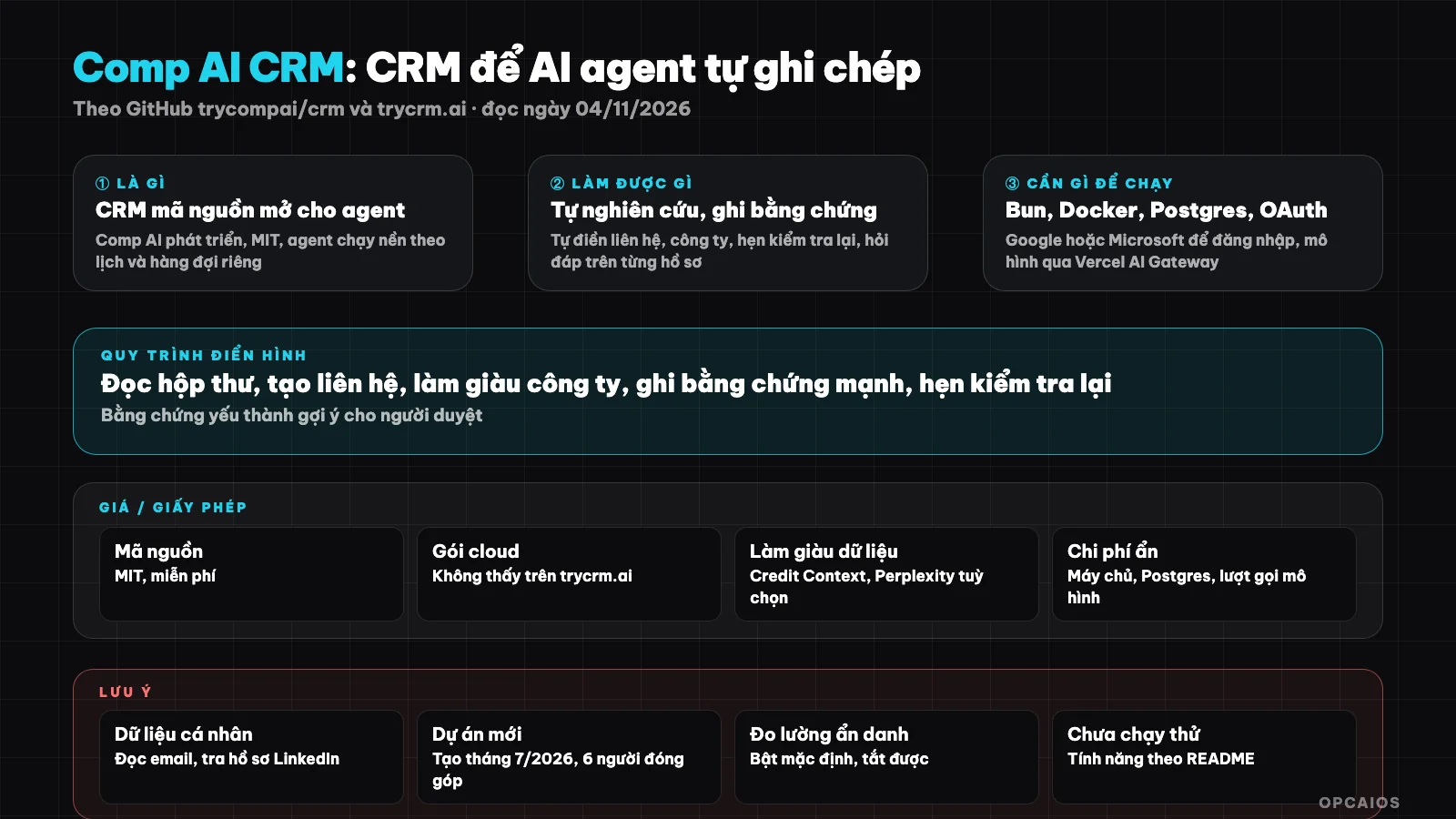
Agent runs on its own schedule, CRM is where the agent takes notes. Diagram: OPCAIOS.
What is Comp AI CRM and who created it?
Comp AI CRM is customer relationship management software with an AI agent at its center, released by Comp AI (the team behind trycomp.ai) on GitHub under the MIT license. The project homepage is trycrm.ai. The main idea: a CRM is not a form for people to fill in, but a notebook where an agent writes.
The README on GitHub (read on 04/11/2026) describes this approach quite directly. Most traditional CRMs are a database plus forms; many "AI-enabled" CRMs just add a chat interface. Comp AI CRM reverses this: an agent runs on its own deployment, on its own schedule, with its own job queue. The agent chooses which work to look at next, schedules its own follow-ups, spends a research budget and stops when it runs out. You close your browser and the agent keeps running. The agent's rules are firm, according to the README: never guess anything about a person. The tool only reports what has been observed, and a "proof ledger" rates confidence. Strong evidence goes into the profile; weak evidence becomes a suggestion for the reviewer. If you're not familiar with the concepts, see What is a CRM? and What is an AI agent?.
What can Comp AI CRM do?
Comp AI CRM auto-fills contact and company profiles, creates new agents from a one-line description, auto-schedules research follow-ups, and allows Q&A on each profile. The features below come from the README and trycrm.ai, read on 04/11/2026; we have not run it ourselves to confirm.
| Feature | Short description |
|---|---|
| Research agent runs in background | Built on eve (Vercel's agent framework); README lists 18 tools, 4 markdown-written skills, 1 scheduling engine |
| Auto-fills profiles | A new person in the email stream becomes a contact; companies get logo, industry, recent activity added |
| Evidence instead of guessing | The tool does not accept a "confidence score"; weak data becomes a suggestion for the reviewer |
| Auto-schedules follow-up | Agent calls the scheduling tool and must state why; the reason shows to the sales person |
| Agent tab on each profile | See each step the agent took, ask questions directly on the contact, company, or deal |
| Create agent from one line | Describe a workflow, an agent writes another agent that runs in its own queue |
| Service integrations | Choose "read-only" or "read and write" permissions; new tools must be approved before the agent uses them |
| Safe sandbox | Shell for agent has bash, grep, no outbound network and no database connection strings |
One point worth noting is the security design of the sandbox. The README explains that a shell with both database access and outbound network is a shape of data leakage, so the project separates those two things.
How much does Comp AI CRM cost, what is the license, and what are the hidden costs?
Comp AI CRM is free as open source under the MIT license, and I don't see any paid cloud packages on trycrm.ai (as of 04/11/2026). The real costs come from three places: infrastructure running three processes plus Postgres, model calls through Vercel AI Gateway, and optional data enrichment service keys.
| Item | Details (as of 04/11/2026, before tax, subject to change) |
|---|---|
| Source code | MIT, free, can be modified and used commercially |
| Infrastructure | Next.js application, NestJS API, agent and Postgres; README points toward deployment on Vercel |
| AI model | Called through Vercel AI Gateway; docs/agent.md documents the default model zai/glm-5.2-fast, changeable in settings |
| Data enrichment | Context key (logo, industry, LinkedIn profile) charged by credit; Perplexity for web search is optional |
| Anonymous measurement | Enabled by default; disable with CRM_TELEMETRY_DISABLED=1 |
The agent documentation notes that one brand lookup costs 10 Context credits and one profile enrichment costs 20 credits; the price per credit is on the Context page, which I haven't read yet. The README emphasizes the agent still runs without any keys: it reads your email history, meetings, and signatures from your mailbox directly, a source the project considers the best evidence.
How do I install Comp AI CRM and get started?
Installing Comp AI CRM requires Bun, Docker, and at least one OAuth login account from Google or Microsoft. The process according to the README involves cloning the repository, filling in the .env file, running Postgres with Docker, applying migrations, then running development mode. This is work for someone who knows the command line, not a one-click install.
- First, install Bun and Docker, then clone the repository and install libraries:
git clone https://github.com/trycompai/crm.git && cd crm
cp .env.example .env
bun install
- Next, fill in
.env:BETTER_AUTH_SECRET(generate withopenssl rand -base64 32),ALLOWED_SIGN_IN(domain name or a single email address allowed to sign in), and OAuth key pairs from Google or Microsoft. The README says if you leaveALLOWED_SIGN_INempty, no one can sign in, which is the safe approach. - Run the database and application:
docker compose up -d
bun run db:deploy
bun run db:seed
bun run dev
- Finally, open your browser to the application port the README specifies, sign in, and enter your Context key in settings if you want data enrichment. The
db:seedcommand is optional, only creating sample data to view.
When deploying for real, the README describes three independent deployments (application, API, agent) sharing one database and one authentication key. See also What is Docker? if you're not used to running services with containers.
Limits, risks, and personal data
The biggest risk of Comp AI CRM is personal data: the software reads the mailbox, calendar of the sales team, and looks up LinkedIn profiles of people being contacted. In Vietnam and many countries, collecting and processing personal information needs a clear legal basis; the section below is for reference only, not legal advice.
On email permissions, the README notes the Microsoft permission requested is Mail.Read read-only: the CRM does not send, reply, or delete messages. Reading messages only counts from the time of connection, it does not import old messages. Still, email content still goes into the context of the AI model through Vercel AI Gateway, so the data policy of the model provider also applies.
On LinkedIn profiles, data is retrieved through the Context service. I haven't cross-checked LinkedIn's terms and Context's terms; you should read them yourself before using for real customers. On Vietnam regulations, I haven't cross-checked the original text on personal data protection for this case; if using for business, ask a lawyer.
Other technical limits: the project is new as of July 2026 so it changes fast; designed as single tenant, no organization concept; small contributor team (GitHub API returns 6 contributors, as of 04/11/2026); and data enrichment costs credits. Finally, the star count on the trycrm.ai page displays differently from GitHub API's number, so trust the number on GitHub.
Comp AI CRM compared to other options
Comp AI CRM differs from other open-source CRMs in that the agent is central, not a secondary feature. The table below is a general description, not a measurement, based on public documentation from each project.
| Tool | Strengths | Considerations |
|---|---|---|
| Comp AI CRM | Agent self-researches, records evidence, MIT | New, few contributors, requires OAuth and infrastructure |
| Twenty | Large community, has cloud and self-host, customizable with code | License mostly AGPLv3, cloud charges per user |
| erxes | Combines marketing, sales, support via plugin architecture | Large system, many components |
| Custom-built CRM | Fits your exact process | You maintain everything |
Read more: What is Twenty CRM? and What is erxes?.
When to use Comp AI CRM?
Comp AI CRM suits small B2B sales teams with technical people who want an agent to self-research customers from the inbox instead of manual entry. It's not yet suitable for non-coders or those who need a stable CRM to run immediately.
| Situation | Recommendation |
|---|---|
| B2B team using Gmail or Outlook, many new contacts each week | Worth trying on sample data first |
| Solo worker, unfamiliar with command line | Pick a CRM with cloud version |
| Want to learn how to design agents with evidence | Read the code and docs/agent.md, highly worth studying |
| Sensitive customer data, strict regulations | Review legal before connecting the inbox |
Example (hypothetical): a three-person service company receives email from a new contact. The agent creates a contact, looks up the company, records the job title if evidence is strong enough, and schedules a follow-up check in 14 days with a reason.
OPCAIOS experience
We only added Comp AI CRM to the Repo list in the Utilities section on opcaios.org after reading the README and checking the repository is still active; we haven't tested it yet, so this section states the criteria we use to consider it, not an assessment after use. OPCAIOS builds its own CRM on the website and hasn't used Comp AI CRM, Twenty, or erxes. Our criteria:
- First, is the repository still active: latest code push is 01/11/2026, v1.16.0 released, pass.
- Next, license: MIT, free to learn and copy design ideas.
- Hidden costs: model calls and credits for data enrichment, need to set a budget cap.
- Finally, risks from terms and personal data when reading the inbox and checking LinkedIn.
For us, the biggest value is probably the "evidence instead of guessing" design approach, which we can learn to apply to our custom-built CRM.
Read more: What is CRM?, What is MCP?, What is Twenty CRM?, What is erxes?.
Frequently Asked Questions
Is Comp AI CRM free?
Yes, the Comp AI CRM source code uses the MIT license, which is free even for commercial purposes, according to GitHub (read on 04/11/2026). We don't see a paid cloud plan on trycrm.ai. However, you still pay for infrastructure: where you run the Next.js application, the NestJS API, the agent, and the Postgres database. You also pay for AI model calls through Vercel AI Gateway and, if you want to enrich data, credits for the Context service. The agent still runs without any external keys, since it reads your own email history.
Can someone without coding knowledge use Comp AI CRM?
It's difficult. Installing Comp AI CRM requires Bun, Docker, creating an OAuth application on Google Cloud or Microsoft Entra, filling in environment variables, and running migrations. When moving to production, you also have to deploy three separate services and configure domain names and cookies. If you're not comfortable with the command line, choose a CRM with a ready-made cloud version, or ask a technical person to set it up on test data first. For people who are learning, it's a good resource to read about how to design background-running agents on a budget and with evidence.
Does Comp AI CRM send emails on my behalf?
According to the README (read on 04/11/2026), with Microsoft, the permission requested is Mail.Read, read-only: the CRM lists and reads emails, it does not send, reply, move, or delete. Reading only counts from the time of connection, so old mailboxes are not re-imported. Other service connections have two permission levels "read-only" or "read and write," and new tools must be approved before the agent uses them. Even so, email content is still passed to the AI model for processing, so please read the data policy of the model provider.
What AI model does Comp AI CRM use?
Comp AI CRM calls models through Vercel AI Gateway, not tightly bound to one provider's SDK. The docs/agent.md documentation on GitHub (read on 04/11/2026) states the default model is zai/glm-5.2-fast and explains that the project intentionally doesn't use the most powerful model, since refusing incorrect answers is guaranteed by tools and an evidence ledger. The model is an option in the settings page, only models that support tool calling are listed. We haven't measured actual quality or cost.
What should I learn before self-hosting a CRM with an AI agent?
You should understand four foundations: what a CRM is used for in the sales process, how an AI agent differs from a chatbot, how to run services with Docker, and the principle of least privilege when connecting an agent to email or external tools via MCP. After that, try it on sample data, set a cap on model call costs, and review data protection regulations before using it with real customers. If you want a structured learning path, see OPCAIOS's AI application training course.
Source: GitHub trycompai/crm (README, docs/agent.md, .env.example, API, read on 04/11/2026), trycrm.ai page (read on 04/11/2026); not read/not verified: Context credit pricing, LinkedIn and Context terms, Vietnamese personal data legislation, agent quality in production; star count and pricing may change. Experience is from OPCAIOS.
Translated from Vietnamese with AI. Read the original.
Want to apply this in your business?
Book a free 30-minute call (Vietnam time, in English or Vietnamese).