


What is Google Analytics MCP? Google Analytics MCP is an open-source MCP server running on your machine, allowing AI assistants like Gemini CLI or Claude Code to read Google Analytics 4 data through natural language questions: list accounts and properties, run reports, funnel reports, and real-time reports. According to GitHub API (read 04/11/2026), the googleanalytics/google-analytics-mcp repository has around 3,628 stars, Apache-2.0 license, written in Python, created on 16/07/2025 and last code pushed on 03/11/2026. The analytics-mcp package on PyPI is at version 1.0.0, released on 03/11/2026, requiring Python 3.10 or higher. This post explains what the tool can do, what you need to prepare on Google Cloud, how to install it for Claude Code, access permission risks, and when to use it.
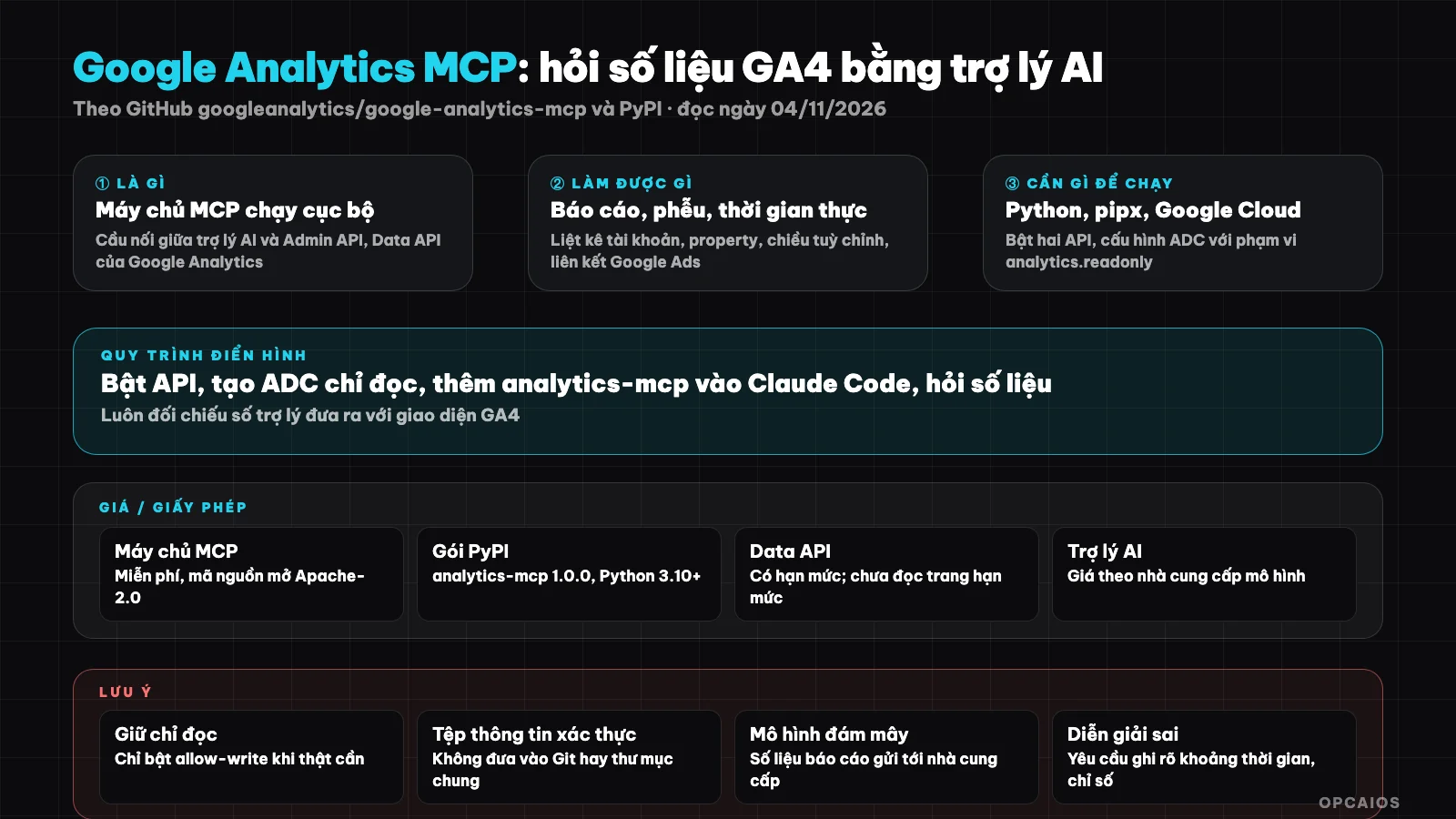
The AI assistant asks in words, the MCP server calls Google Analytics API on your behalf. Diagram: OPCAIOS.
What is Google Analytics MCP and who developed it?
Google Analytics MCP is a bridge between AI assistants and two Google Analytics APIs: Admin API (account info, properties, configuration) and Data API (report metrics). The repository sits within the googleanalytics organization on GitHub, an organization named after the Google Analytics product; the README does not state any support commitment level or SLA.
MCP (Model Context Protocol) is an open standard for AI assistants to call external tools in a unified way. According to the README (read 04/11/2026), the server runs locally on your machine, uses your own Google credentials, and exposes to the model a set of tools with clear names. When you ask "what's the most common event in the past 180 days", the assistant picks the run report tool, the server calls Data API, then the assistant reads the result and answers in words. You don't need to build reports in the GA4 interface yourself or write queries. The project has a discussion channel on Discord and setup videos on YouTube per the README. If you're not familiar with the two foundational concepts, read What is MCP? and What is GA4? first.
What tools does Google Analytics MCP provide?
Google Analytics MCP provides three groups of tools: account and property lookup, running main reports, and running real-time reports. Read-only by default; the only write tool is creating property annotations, which requires a separate flag. The list below follows the README, read on 04/11/2026.
| Tool | Function |
|---|---|
get_account_summaries |
List the user's Google Analytics accounts and properties |
get_property_details |
Return details of a property |
list_google_ads_links |
List links to Google Ads accounts of a property |
list_property_annotations |
Read property annotations |
create_property_annotation |
Create an annotation, requires --allow-write flag and analytics.edit scope |
run_report |
Run a report via Data API |
run_funnel_report |
Run a funnel report |
get_custom_dimensions_and_metrics |
Get custom dimensions and metrics of a property |
run_realtime_report |
Run a real-time report |
Beyond local mode, the README describes an HTTP multi-user mode: the server runs as a shared service, each user logs in with their own Google account via OAuth 2.0 instead of using a single server-side credential. This mode has two approaches. The first is to let an agent framework like Google ADK handle OAuth for each user, combined with stateless flags to run multiple instances in parallel. The second is to enable the built-in OAuth 2.1 server with a flag --oauth. The README notes the built-in OAuth server keeps client registrations, pending state, and refresh tokens in process memory, so you must run a single instance or use sticky sessions, and on restart users must log in again.
Is Google Analytics MCP Free?
Google Analytics MCP is free and open source under Apache-2.0. The costs come from the AI assistant you use and from Google's API quotas. We haven't read Google Analytics Data API's quota page this time, so we're not stating specific numbers.
| Item | Cost and conditions (as of 04/11/2026) |
|---|---|
| analytics-mcp server | Free, Apache-2.0, installed via pipx |
| Google Cloud project | Required to enable Admin API and Data API |
| Data API quota | Google applies quotas by property; quota page not yet reviewed |
| AI assistant | Gemini CLI, Gemini Code Assist, Claude Code, or other MCP client; pricing by provider |
| Multi-user HTTP mode | You pay for the server, domain, and OAuth setup |
AI assistant pricing doesn't include tax and may change. Hidden costs often come from tokens: a long report returns many rows, the model must read them all, so broad questions burn more tokens than narrow ones.
How Do I Install Google Analytics MCP for Claude Code?
Installing Google Analytics MCP takes three steps per the README: install Python and pipx, set up Google credentials, then declare the server to your AI assistant. The easiest place to get stuck is the credentials step, because you need the right read-only scope.
- First, install pipx following pipx's official docs.
- Next, in your Google Cloud project, enable Google Analytics Admin API and Google Analytics Data API.
- Set up Application Default Credentials (ADC) for an account with permission to view your GA4 property, with the
analytics.readonlyscope. The README suggests using an OAuth client as desktop or web, or impersonating a service account withgcloud. - Note down the credentials file path that the
gcloudcommand prints. - Finally, declare the server to your AI assistant, then type
/mcpto check thatanalytics-mcpappears.
Sample command to create ADC with OAuth client per the README:
gcloud auth application-default login \
  --scopes https://www.googleapis.com/auth/analytics.readonly,https://www.googleapis.com/auth/cloud-platform \
  --client-id-file=YOUR_CLIENT_JSON_FILE
Command to add to Claude Code per the README, replacing the two values with your credentials file path and project ID:
claude mcp add analytics-mcp \
  --scope user \
  -e "GOOGLE_APPLICATION_CREDENTIALS=PATH_TO_CREDENTIALS_JSON" \
  -e "GOOGLE_CLOUD_PROJECT=YOUR_PROJECT_ID" \
  -- pipx run analytics-mcp
With Gemini CLI, you add an mcpServers block to ~/.gemini/settings.json with the command pipx run analytics-mcp. See What is Claude Code? if you haven't used this tool yet.
What Are the Risks of Google Analytics MCP for Permissions and Data?
The main risks of Google Analytics MCP are access control and where data flows. The server runs locally, but report metrics go into the AI model's context, meaning they're sent to the model provider if you use a cloud model.
Points we drew from the README and general principles:
- Keep it read-only: grant only the
analytics.readonlyscope. Enable--allow-writeonly when you truly need to create annotations, because then credentials can edit. - Protect the credentials file: the ADC file lets you read every property the account can access. Don't put this file in a Git repo or a public sync folder.
- User data: GA4 mostly holds aggregated metrics, but custom dimensions can hold user IDs. Sending them to a cloud model requires checking data handling terms. This is reference only, not legal advice; we haven't cross-checked GDPR text or Vietnamese law.
- The model can misunderstand: the assistant might pick the wrong date range, wrong metric, or over-interpret the numbers. Ask the assistant to state the report parameters it ran, then check against the GA4 interface before deciding.
- Public HTTP mode: exposing the server to the Internet needs proper OAuth and HTTPS; the built-in OAuth server keeps tokens in memory and isn't fit for multi-instance runs.
How Does Google Analytics MCP Compare to Other Approaches?
Google Analytics MCP works well when you want to ask quick questions by voice in your AI assistant. The table below is a general description based on public docs, not measurements.
| Approach | Strengths | Limits |
|---|---|---|
| Google Analytics MCP | Ask by voice, combine with other MCP tools | Needs Google Cloud, ADC, model may misinterpret |
| GA4 interface | Intuitive, no install needed | Must build reports manually, hard to merge other data |
| Call Data API in code | Full control, run on schedule | Need to write and maintain code |
| Export to BigQuery | Query raw data with SQL | More complex setup, may incur costs |
When Should You Use Google Analytics MCP?
Google Analytics MCP suits people who already know GA4 and use an AI assistant that supports MCP, wanting to ask for data quickly without opening the dashboard. People without coding experience can still do it if they follow the instructional video patiently, but the Google Cloud and ADC steps require perseverance.
| Situation | Suggestion |
|---|---|
| Want to quickly ask about this week's traffic | Use Google Analytics MCP with read-only scope |
| Need accurate periodic reports for clients | Write code calling Data API or use GA4 reports, use MCP only to explore |
| Multiple people in a team need the same access | Consider HTTP mode with OAuth per person |
| Haven't set up GA4 for the website yet | Set up GA4 first, read the GA4 post |
| Sensitive data, don't want to send to the model | Use GA4 interface or local model |
Example (hypothetical): a shop owner asks Claude Code "which page had the highest bounce rate last month", the assistant runs run_report, lists five pages with parameters used, then the owner checks GA4 again before editing the pages.
OPCAIOS's Experience
We added Google Analytics MCP to the Repository list in the Utilities section on opcaios.org after reading the README and checking that the repository is still maintained; we have not tested it yet, so this section states the criteria we use to consider, not an evaluation after use. Currently opcaios.org uses a self-built traffic analytics system and Google Search Console; we have not installed this repository yet. Four criteria we examined:
- Is the repository still maintained: yes, code pushed on 03/11/2026 and just released version 1.0.0 on PyPI.
- License: Apache-2.0, can use commercially.
- Hidden costs: the tool is free, but costs effort configuring Google Cloud and model tokens when reading long reports.
- Can we replace the tool we're using, risks: this tool only reads GA4, does not read Search Console, so only useful if we use GA4 as the main source; main risk is protecting credential files.
Read more: What is GA4?, What are SEO and GEO?, What is Google Workspace MCP?, What is PostHog?.
Frequently Asked Questions
Can Google Analytics MCP read the old Universal Analytics?
The README only mentions that the server uses Google Analytics Admin API and Google Analytics Data API, which are two APIs for Google Analytics 4. The README does not mention Universal Analytics, so I understand the tool is built for GA4 properties; this is a conclusion from the API names, not yet verified by running it myself. If your website does not yet have a GA4 property, you need to create one and install the measurement tag first, wait for data to accumulate, then there will be something for the AI assistant to read. The post GA4 là gì? explains how to get started.
Can Google Analytics MCP edit GA4 data?
By default, no. According to the README (read on 04/11/2026), the tools are mostly read-only: looking up accounts, properties, Google Ads links, custom dimensions, and running reports. The only write tool listed is create_property_annotation, used to create annotations on a property, and it only works when you add the --allow-write flag with analytics.edit scope to your credentials. If you don't need annotations, keep the scope read-only so the AI assistant cannot change the configuration, even if it misunderstands your request.
Can I use Google Analytics MCP with Claude instead of Gemini?
Yes. The README has setup instructions for Gemini CLI and Gemini Code Assist, but there is a separate section for configuring Claude Code using the claude mcp add command with two environment variables: the path to the credentials file and the Google Cloud project ID. Since this is a standard MCP server, in principle other MCP clients like Cursor or Codex can connect too, even though the README does not have setup instructions for them. The questions you send and the data returned will go through the model provider you choose, so check that provider's data terms.
Does Google Analytics MCP need a server or GPU?
It does not need a GPU. In default mode, the server is a small Python process running on your machine via the pipx run analytics-mcp command, and the AI assistant starts it automatically when needed. The heavy lifting is running the reports, done by Google's servers, and interpreting the data, done by the AI model. You only need a separate server if you want to run HTTP mode for multiple users, for example for a team sharing via OAuth; then you handle the domain, HTTPS, and OAuth setup according to the guide in the repository's example folder.
Where do I learn to use AI to analyze marketing data?
Start by understanding the metrics: what GA4 measures, what events and conversions are, then have the AI assistant read them for you. Once you have a foundation, try Google Analytics MCP with a few narrow questions, always ask the assistant to clearly state the time range and metrics, then compare with the GA4 interface. The posts GA4 là gì? and MCP là gì? are good starting points. If you want a structured roadmap, from measurement to automating reports with an AI agent for a one-person company, you can check out OPCAIOS's AI application training course.
Source: GitHub googleanalytics/google-analytics-mcp (README, API, Releases, read on 04/11/2026), PyPI analytics-mcp (read on 04/11/2026); not read: Google Analytics Data API quota page, TROUBLESHOOTING.md, multi-user example folder; not verified: support for non-GA4 properties, Google's support commitment level; star count and pricing may change. Experience is from OPCAIOS.
Translated from Vietnamese with AI. Read the original.
Want to apply this in your business?
Book a free 30-minute call (Vietnam time, in English or Vietnamese).