


What is PostHog?
PostHog is an open source platform that brings many tools for product teams into one place: user behavior analytics, web analytics, session replay, feature flags, A/B testing, error tracking, surveys, logs and data warehouse, along with an AI assistant and MCP server. According to GitHub's API (read on 04/11/2026), the PostHog/posthog repository was created on 23/01/2020, has around 40,600 stars, is written mainly in Python and still receives code pushes every day. The code is licensed under MIT, except for the ee directory. According to the pricing page at posthog.com/pricing (read on 04/11/2026), the free cloud version includes 1 million analytics events per month. This post goes through features, pricing, how to get started, personal data risks and when you should choose PostHog instead of GA4.
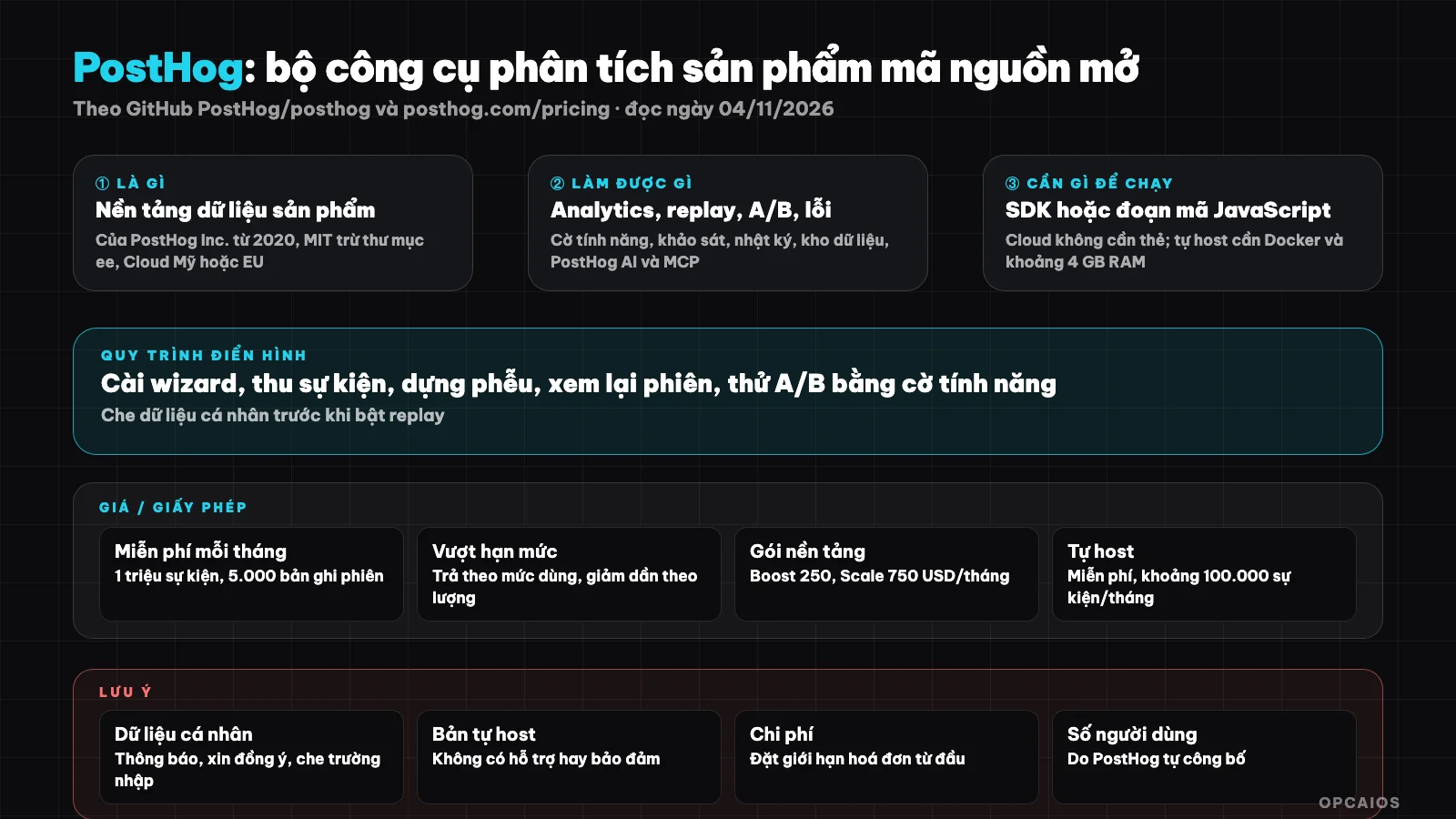
PostHog collects product data once and uses it for many analytics and experimentation tools. Diagram: OPCAIOS.
What is PostHog and who made it?
PostHog is a product of PostHog Inc., which open sourced the codebase in 2020. The company describes PostHog as the "context layer" for your product: where you store analytics data, errors, session recordings and business data for both people and AI agents to query.
At first, PostHog was an open source product analytics tool, competing with Mixpanel and Amplitude. According to the README on GitHub (read on 04/11/2026), by now it has become a suite of multiple products divided into six groups: analytics, session replay, system observability, release and iteration, talking with users, and data. The newest group is AI and agents: track costs and latency of applications using language models, analyze how agents use your MCP server, and PostHog AI to ask data questions in natural language. The README says over 500,000 teams are using it and 97% of users pay $0; the pricing page on the same day says over 600,000 companies. These are numbers the project announced, not verified. The company also publicly shares its internal operations handbook. If you're new to web analytics, read What is GA4 first to have a comparison point.
What are PostHog's main features?
PostHog has over ten products that share one data pipeline. You install the SDK once, then turn on each product as needed. The table below summarizes them according to the README, read on 04/11/2026.
| Feature | What it does |
|---|---|
| Product analytics | Funnels, retention, user paths; auto capture events or tag manually; query with SQL |
| Web analytics | GA-style dashboard: page views, conversions, web vitals, revenue |
| Session replay and heatmap | Replay real sessions on web, mobile apps; click and scroll maps |
| Feature flags and Experiments | Turn features on for a group of users; A/B tests with statistics |
| Error tracking, Logs, Tracing | Collect errors, logs and traces alongside product data |
| Surveys and Workflows | In-app surveys; auto send messages based on behavior |
| Warehouse and Data pipelines | Data warehouse, over 120 sources, push data to over 25 tools |
| AI observability and PostHog AI | Track apps using LLMs; assistant writes SQL, builds charts, finds session recordings |
| MCP | Bring PostHog data into Claude Code, Cursor, Codex via MCP |
How much does PostHog cost? What are the limits?
PostHog charges based on usage, not by the number of people on your team. Each product has a free allowance that resets every month; once you exceed it, you pay, and you can set a billing limit to avoid surprise charges.
According to posthog.com/pricing (read on 04/11/2026), prices are in USD, before tax, and may change:
| Item | Free per month | When exceeded (base rate) |
|---|---|---|
| Analytics events | 1 million | 0.00005 USD per event |
| Session recordings | 5,000 | 0.005 USD per recording |
| Feature flag requests | 1 million | 0.0001 USD per request |
| Errors | 100,000 | 0.00037 USD per error |
| Survey responses | 1,500 | 0.1 USD per response |
| Logs | 10 GB | 0.25 USD per GB |
| Platform plan | None | Boost 250, Scale 750, Enterprise 2,000 USD/month |
The free tier includes 1 project and keeps data for 1 year; the pay-as-you-go tier includes 6 projects and keeps data for 7 years. Unit prices decrease as usage increases. Startups under 2 years old and having raised less than 5 million USD can apply for 50,000 USD in credits over 12 months. The self-hosted version is free but costs in servers, operational effort, and comes with no support.
How do I get started with PostHog?
There are two paths: use PostHog Cloud (recommended) or self-host the hobby version with Docker. For most small companies, Cloud is faster and more stable; self-hosting makes sense when you must keep data on your own servers.
The steps from the README (read on 04/11/2026), first is to create an account, next is to install it in your app, finally is to connect an agent:
- First, sign up for PostHog Cloud in the US or EU region; no card needed.
- Next, run the installer in your project folder to have it automatically add PostHog to your app:
npx -y @posthog/wizard@latest
- Or add it by hand with JavaScript code, an SDK (Next.js, React, Python, Node, iOS, Android, Flutter...) or an API.
- Want to query data right in Claude Code or Cursor, add an MCP server:
npx @posthog/wizard mcp add
- Finally, if you want to self-host, the README gives a one-line command for Linux with Docker, recommending 4 GB RAM:
/bin/bash -c "$(curl -fsSL https://raw.githubusercontent.com/posthog/posthog/HEAD/bin/deploy-hobby)"
This command downloads and runs a script from the internet, so open it up and read it first. See also What is Docker and What is VPS if you plan to self-host.
Limits, risks, and personal data notes
The biggest risk with PostHog is not in the code but in the data you collect. Session recordings and auto-captured events can touch your customers' personal information, so you need to tell them, get their consent, and hide sensitive data before you turn it on.
First is the limit of self-hosting. Per the README (read on 04/11/2026), the hobby version should only be used up to about 100,000 events per month, after which PostHog recommends moving to Cloud, and the company offers no support or guarantee for the open-source version. Second is the license: most of the repo is under MIT, but the ee folder has its own license; if you need fully open code, use the posthog-foss repo that has had proprietary parts removed. Third is privacy. Look back at session recordings that play back what your customers actually did; if a form has a phone number, email, or address, you need to set up masking for those fields. For customers in Europe, GDPR applies; PostHog has an EU data region. Vietnam has its own personal data protection rules; we have not checked the original text against the law for this case, so the content is for reference only, not legal advice. Last is cost: auto-capturing events on a high-traffic page can exceed your allowance fast, so set a billing limit from the start.
One more thing: when you connect PostHog via MCP, the data from your queries will go into the context of the AI model you use. Only give read access as needed.
PostHog versus other options
PostHog is broader than most competitors because it bundles many tools into one. In return, it is more complex than a simple page view counter. The table below is a general overview, not a measurement.
| Tool | Strong at | Different from PostHog |
|---|---|---|
| PostHog | Product analytics, replay, feature flags, experiments all in one place | Longer learning curve, charged by usage |
| GA4 | Free, integrated with Google Ads and Search Console | No replay, feature flags; cannot self-host |
| Mixpanel, Amplitude | Deep product analytics | Cloud only, few bundled tools |
| Plausible, Umami | Simple page view counting, privacy-focused | No deep behavior analytics |
| Hotjar, Microsoft Clarity | Heatmaps and session replay | No deep funnels or experiments |
| RudderStack | Collect and route event data | Is a data pipeline, not an analytics dashboard |
When to use PostHog?
PostHog fits digital products with logged-in users, such as SaaS, apps, or online courses, where you need to know who does what and test changes. For a brochure website that only needs page view counts, GA4 or a simple tool is enough.
| Situation | Recommendation |
|---|---|
| SaaS or app needing funnels, retention, A/B tests | PostHog Cloud free plan, set a billing limit |
| Content website only needing views and traffic source | GA4 or Plausible is enough |
| Must keep data on your own server | Self-host hobby plan if under around 100,000 events per month |
| Want to query data with an AI agent | Turn on PostHog's MCP server, grant read-only access |
| Cannot code | Use the installer or ask an agent to add the snippet; do analysis on the web interface |
Example (hypothetical): an online course seller sees many customers enter the checkout page then leave. They build a funnel "view course, click buy, pay", review a few abandoned sessions that had payment data hidden, then use a feature flag to test two price display formats.
OPCAIOS experience
We added PostHog to the Repo list in the Tools section on opcaios.org after reading the README and checking that the repository is still maintained; we have not run it yet, so this section outlines the criteria we used to consider it, not an assessment after use. Currently opcaios.org uses self-built traffic analytics and Google Search Console; we have not yet installed PostHog.
Four criteria we examined, first the repository's health, last the risk:
- Is the repository still maintained: GitHub shows the latest code push on 04/11/2026, the project is very active.
- License: MIT for most of the code, separate
eedirectory; need to read carefully if planning to modify and redistribute. - Hidden costs: free tier is generous, but replay and self-capturing events can easily raise costs; self-hosting costs server and operational labor.
- Can it replace the tool we use: our self-built analytics are enough for a blog; PostHog is worth considering only when needing funnels, replay, and experiments for courses or a store.
Read more: GA4 là gì, Google Analytics MCP là gì, Tracardi là gì, SEO và GEO là gì, 6 công cụ đo lường website tốt nhất 2026.
Frequently Asked Questions
What is PostHog and how does it differ from Google Analytics?
PostHog is an open-source platform that combines product analytics, web analytics, session replay, feature flags, A/B testing, error tracking, and surveys in one tool, developed by PostHog Inc. since 2020. Google Analytics 4 focuses on measuring traffic and marketing conversions, tightly integrated with Google Ads. PostHog dives deep into individual user behavior within the product, can be self-hosted, and charges based on usage when exceeding the free tier. Many teams use both: GA4 for marketing, PostHog for product.
Is PostHog free?
Yes, in two ways. The cloud version has a monthly free tier for each product—for example, 1 million analytics events and 5,000 session recordings, according to posthog.com/pricing read on 04/11/2026, with no credit card required. The free plan is limited to 1 project and retains data for 1 year. Additionally, the source code is under MIT license (except the ee directory), and you can self-host for free, but you pay for the server, handle operations yourself, and get no support. Overage pricing is in USD, excludes taxes, and may change.
What kind of server does self-hosting PostHog require?
The README recommends a Linux machine with Docker and about 4 GB of RAM for the hobby version, installed with a single script command. This version should only be used for around 100,000 events per month; beyond that PostHog recommends moving to Cloud. The company provides no support or guarantees for self-hosted versions, so you're responsible for backups, updates, and security. If your only reason for self-hosting is to save money, compare it against Cloud's free tier first, since operating your own server is also a cost. We haven't run the hobby version ourselves to measure.
Does using PostHog's session replay violate privacy rights?
Session replay doesn't automatically violate privacy, but it's easy to accidentally capture personal data if configuration is careless. You should disclose it in your privacy policy, request cookie consent when required by law, and mask input fields like email, phone number, address, and payment information. For customers in Europe, GDPR applies and PostHog has an EU data region. Vietnam has its own personal data protection rules that we haven't compared against for this case. This content is for reference only, not legal advice.
Where can I learn to use analytics tools and AI for business?
You can start with PostHog's official documentation, which is quite comprehensive and has Markdown versions for AI to read, then try it on a small project with the free plan. Choose three key numbers to track first, such as signup rate, payment rate, and return rate, rather than turning everything on at once. Once you have data, you can connect PostHog via MCP to ask questions in natural language through Claude Code. If you want structured learning on how to bring AI into marketing, sales, and operations, see the AI application training course from OPCAIOS.
Sources: GitHub PostHog/posthog (README, LICENSE, API, read on 04/11/2026), pricing page posthog.com/pricing (read on 04/11/2026); not read/not verified: detailed self-hosting documentation, ee directory licensing, data masking options in session replay, user numbers disclosed by PostHog itself; stars and pricing may change. Experience is from OPCAIOS.
Translated from Vietnamese with AI. Read the original.
Want to apply this in your business?
Book a free 30-minute call (Vietnam time, in English or Vietnamese).