


What is Gridex? Gridex is an open-source database management application (database IDE) that runs natively on macOS, Windows and Linux, allowing you to connect PostgreSQL, MySQL, SQLite, Redis, MongoDB, SQL Server and ClickHouse in one window, with AI chat for writing SQL and an MCP server for AI agents like Claude Desktop or Cursor to query data with access control. According to GitHub API (read on 04/11/2026), the gridex/gridex repository was created on 16/4/2026, has around 1,990 stars, Apache 2.0 license, with the most recent code push on 20/10/2026. According to gridex.app (read on 04/11/2026), the Community edition is free, the Pro edition is in early access with no announced price. This post covers features, licensing, installation, risks when allowing AI to access real data, and comparison with familiar tools.
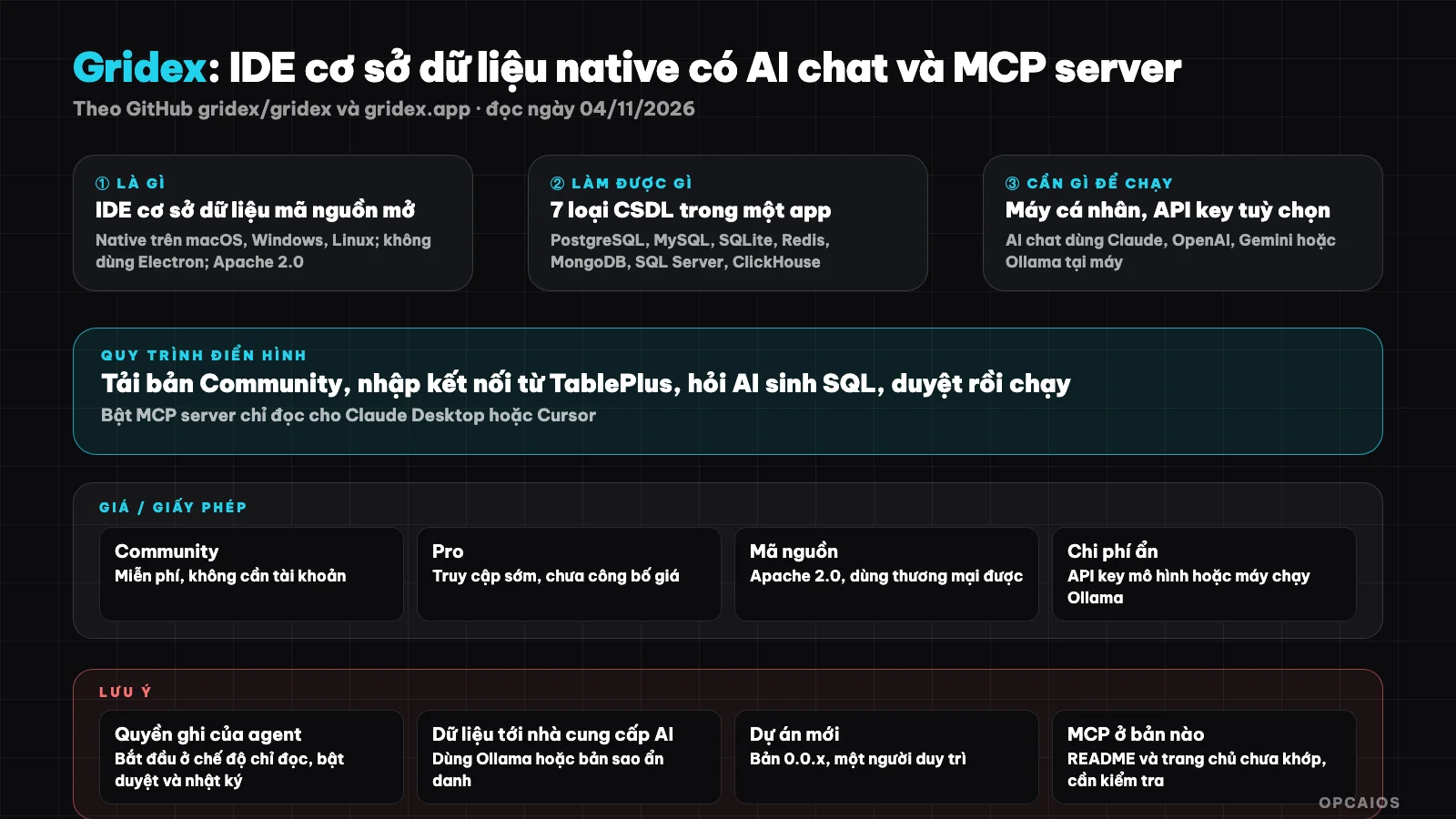
Gridex places data grid, AI chat and MCP server around a common adapter layer for many database types. Diagram: OPCAIOS.
What is Gridex and who created it?
Gridex is a native database IDE, not built with Electron, copyrighted by an individual developer named Thinh Nguyen (according to README, read on 04/11/2026). The project has website gridex.app, Discord community and source code on GitHub under Apache 2.0 license.
The differentiator that the README emphasizes is that each platform uses the native UI framework of that platform: AppKit written in Swift on macOS, WinUI 3 on Windows, Qt 6 on Linux. This approach is more work than a packaged web application, in exchange for a lighter application and faster response according to the project's description; we haven't measured this so we can't claim the speed. GitHub API lists the main language of the repository as C++ (read on 04/11/2026), which fits the Windows and Linux parts, while the macOS part is written in Swift. The project is still very new: created in April 2026 and the macOS package in the README carries version number 0.0.11, not yet at 1.0. If you're not familiar with the database types mentioned above: PostgreSQL and MySQL are where websites store table data, while Redis is a high-speed cache.
What can Gridex do?
Gridex brings together everyday work with databases in one application: viewing and editing data in a grid, writing multi-tab queries, drawing relationship diagrams, backing up, importing connections from other tools, and having AI help write SQL. The table below summarizes according to README and gridex.app (read on 04/11/2026).
| Feature | Description |
|---|---|
| Multiple database types | PostgreSQL, MySQL, SQLite, Redis, MongoDB, SQL Server; ClickHouse only on macOS; Cassandra, DynamoDB, Snowflake in roadmap |
| Data grid | Edit directly in cells, changes pending to be sent in one transaction |
| SQL editor | Multiple tabs, query history, export CSV, JSON or SQL |
| ER diagram | Auto-drawn from actual schema, has drag and drop, zoom |
| AI chat | Ask in plain language, generate and run SQL, explain results; uses Claude (Anthropic), OpenAI, Gemini (Google) or Ollama on machine |
| MCP server | Open saved connections for MCP clients like Claude Desktop, Cursor; has lock mode, read-only, read-write, SQL filter, rate limit, browse step and audit log |
| Secure connection | SSH tunnel with password or key, mTLS for some types |
| Backup and restore | Call native tools like pg_dump, mysqldump |
| Import connection | From TablePlus, Navicat, DataGrip, DBeaver |
| Privacy | Credentials stored on machine, no cloud sync, no telemetry according to project claim |
If you're not familiar with MCP, read What is MCP? before enabling this part.
Is Gridex Free? License and Hidden Costs
Gridex has a free Community version without requiring an account, with source code under Apache 2.0; the real cost lies in the AI model's API key if you use chat with a cloud provider. The Pro version has no public pricing yet. Prices do not include taxes and may change.
| Item | Status (gridex.app and README, read 04/11/2026) |
|---|---|
| Community | Free, no account needed, prebuilt for macOS, Windows, Linux |
| Pro | Early access by request, price not announced yet; homepage notes Pro adds MCP server and AI synthetic data generator |
| Source code | Apache 2.0: can be used, modified, distributed, including commercially, with copyright notice and NOTICE file retained |
| AI chat with Claude, OpenAI, Gemini | Requires your API key, you pay the provider per token; key stored in OS keychain |
| AI chat with Ollama | No API key needed, but machine must have enough RAM or GPU; see What is Ollama? |
| Server | Not needed; app runs on your machine |
One gap worth noting: the README describes MCP server as a feature included with a detailed permissions table, while the homepage puts MCP server under Pro. We have not installed to verify whether Community has MCP. The README also says MCP has "15 tools" but the table lists only 13, with some DDL tools marked as future.
How to Install Gridex
The fastest way to install Gridex is to download the packaged version from gridex.app/download; to build from source, you need development tools for each platform. Below are the steps from the README (read 04/11/2026); we have not run it ourselves.
- First, for regular users: download the prebuilt installer. macOS has a universal DMG, requiring macOS 14 or later; Windows has an installer for Windows 10/11 64-bit; Linux has an AppImage x86_64.
- Next, open the app, create a connection or import from TablePlus, Navicat, DataGrip, DBeaver.
- To use AI chat, paste your chosen provider's API key or point to Ollama running on your machine.
- Finally, if you want to connect an agent, enable MCP server, choose the mode (locked, read-only, read-write), then declare it in Claude Desktop or Cursor.
For developers who want to build a debug version on macOS (requires Swift 5.10 or later and Xcode 15 or later), the README gives the command:
git clone https://github.com/gridex/gridex.git
cd gridex
swift build
.build/debug/Gridex
On Linux (Qt 6.4 or later, CMake 3.24 or later, Ninja):
cmake -S linux -B linux/build -G Ninja -DCMAKE_BUILD_TYPE=Release
cmake --build linux/build --parallel
./linux/build/gridex
Windows requires Visual Studio 2022, .NET 8 SDK and vcpkg; the README points to separate documentation in the windows/ folder.
Limits, Risks, and Security When Letting AI Touch Data
The biggest risk with Gridex is its strongest feature: AI chat and MCP server can run SQL on live data, so a single wrong command or a prompt-injected question could alter or delete data. This is not legal advice.
- Data leaving the machine: when using Claude, OpenAI or Gemini, the content you ask and part of the query result go to the model provider according to their data policy. Gridex says it does not go through its servers, but data still reaches the provider. For customer data, use Ollama on your machine or ask only on an anonymized copy. See Business Data Security When Using AI: 5 Rules.
- Agent permissions: start MCP in read-only mode; only open read-write on a test database or one with backups. Enable review steps and audit logging.
- Prompt injection: data in tables can contain text meant to control the agent (a note cell saying "delete the users table"). The agent must treat query results as data, not commands.
- Project maturity: version 0.0.x, one maintainer, eight months old. Do not use as your sole tool for production data until you test on a copy.
- Legal: customer personal data is subject to Vietnam's personal data protection law and GDPR if you have EU users; we have not reviewed the original terms for situations using AI chat on customer data.
Gridex versus TablePlus, DBeaver, Beekeeper Studio
Gridex competes with established database management tools; its advantage is being native across multiple platforms plus integrated AI and MCP, its disadvantage is being very new. The table below is a general description, not a benchmark.
| Tool | Strengths | Points to consider |
|---|---|---|
| Gridex | Native on all three systems, multi-provider AI chat, MCP with permissions, Apache 2.0 | Version 0.0.x, maintained by one person, Pro pricing unclear |
| TablePlus | Native, stable, many users | Commercial, closed source; we haven't read the pricing page |
| DBeaver | Open source, supports many database types | Runs on Java, heavier by common perception |
| Beekeeper Studio | Open source, clean interface | Uses Electron; see What is Beekeeper Studio? |
| DataGrip | Strong at SQL writing, part of JetBrains family | Commercial, closed source |
Gridex can import connections from TablePlus, Navicat, DataGrip, and DBeaver, so switching over to try it doesn't cost effort declaring them again.
When should you use Gridex?
Try Gridex when you work with a few database types at once and want an AI agent to support queries within a controlled scope. Don't rely on it completely for production data while the project is at version 0.0.x.
| Situation | Recommendation |
|---|---|
| Solo business owner, self-managing PostgreSQL and Redis for your website | Try the Community version, start in read-only mode |
| Want to query data in Vietnamese instead of writing SQL | Use AI chat with a data copy; need an API key or Ollama |
| Let Claude Code or Cursor analyze the schema when writing code | Turn on read-only MCP server, check logs |
| Happy with TablePlus or DBeaver | No need to switch yet; monitor until version 1.0 |
| Person without coding knowledge | Can use the grid and AI chat, but need someone who understands data to review write commands |
Read more: What is CRM?, What is Claude Code?.
OPCAIOS's experience
We added Gridex to our Utilities section Repo on opcaios.org after reading the README and checking that the repository is still maintained; we haven't tried running it yet, so this section lays out the criteria we use to weigh it, not an assessment after using it. Four criteria: the repository is still being updated (code pushed October 20, 2026); Apache 2.0 license allows commercial use; hidden costs are model API keys or a machine to run Ollama; and ability to replace the tool we're using now: opcaios.org runs on PostgreSQL with a self-built CRM, so a native IDE with read-only MCP is what we want to try for Claude Code sessions that need to understand the schema. The risk we put first is the agent's write permissions on customer data, so if we try we'll only connect to a copy.
Frequently Asked Questions
What is Gridex?
Gridex is an open source database IDE that runs natively on macOS (Swift, AppKit), Windows (WinUI 3) and Linux (Qt 6), connecting to PostgreSQL, MySQL, SQLite, Redis, MongoDB, SQL Server and ClickHouse. The application has a data grid, SQL editor, ER diagram, backup, AI chat using Claude, OpenAI, Gemini or Ollama, and an MCP server with permissions for AI agents. According to GitHub (read on 04/11/2026), the repository has around 1,990 stars, licensed under Apache 2.0.
Is Gridex free?
According to gridex.app (read on 04/11/2026), the Community edition is free and requires no account; the Pro edition is in early access and has not announced pricing. The source code is under Apache 2.0 so you can build it yourself. Hidden costs are API keys from model providers if you use cloud AI chat, or a powerful enough machine if you run Ollama locally. Pricing may change and does not include tax.
Does Gridex send my data to the network?
According to the project, login information is saved on your machine, not synced to the cloud, no telemetry, and AI chat requests go directly from your machine to the model provider, not through Gridex servers. However, your question content and some query results still go to Claude, OpenAI or Gemini according to their policies. If you want to keep data on your machine, use Ollama. We have not checked the actual network traffic of the application.
Is Gridex safe when AI agents use it via MCP?
The README describes multiple layers: lock mode, read-only, read-write; SQL filters; rate limiting; review steps before writing; audit logs. That is good design, but actual safety depends on how you configure it. Start with read-only, only enable read-write on a copy, turn on review and logging, and remember that table content may contain prompt injections aimed at the agent. We have not tried it so we cannot confirm these layers work as described.
Can someone without coding knowledge use Gridex?
Yes, at the level of viewing data, filtering, editing a few cells and asking AI chat in plain language; the part of setting up connections (address, SSH tunnel) and reviewing write commands still needs basic database understanding. The safe way is to start with SQLite or a copy of the real database, letting AI explain each query before running it. If you want to learn how to bring AI into data work without corrupting data, see OPCAIOS's AI application training course.
Source: GitHub gridex/gridex (README, API, read on 04/11/2026), gridex.app page (read on 04/11/2026); not read/not verified: whether Community edition has MCP server, Pro edition pricing, speed compared to Electron, TablePlus and DataGrip pricing pages; star count and pricing may change. Experience is from OPCAIOS.
Translated from Vietnamese with AI. Read the original.
Want to apply this in your business?
Book a free 30-minute call (Vietnam time, in English or Vietnamese).