


What is InkOS?
InkOS is an open-source AI agent system for creative writing: long novels, short stories, scripts, scenes, fanfiction, translation and interactive games, with three interfaces: web Studio, terminal TUI, and CLI. According to GitHub API (read 04/11/2026), the Narcooo/inkos repository has around 11,000 stars, 2,000 forks, AGPL-3.0 license, created 12/03/2026 and last pushed 24/10/2026. The latest npm package is @actalk/inkos 1.8.0, released 17/08/2026, according to npm registry. The software is free; you pay for the language model yourself. This article answers what InkOS can do, how to install it, what it costs, copyright and license risks, and whether it suits Vietnamese writers.
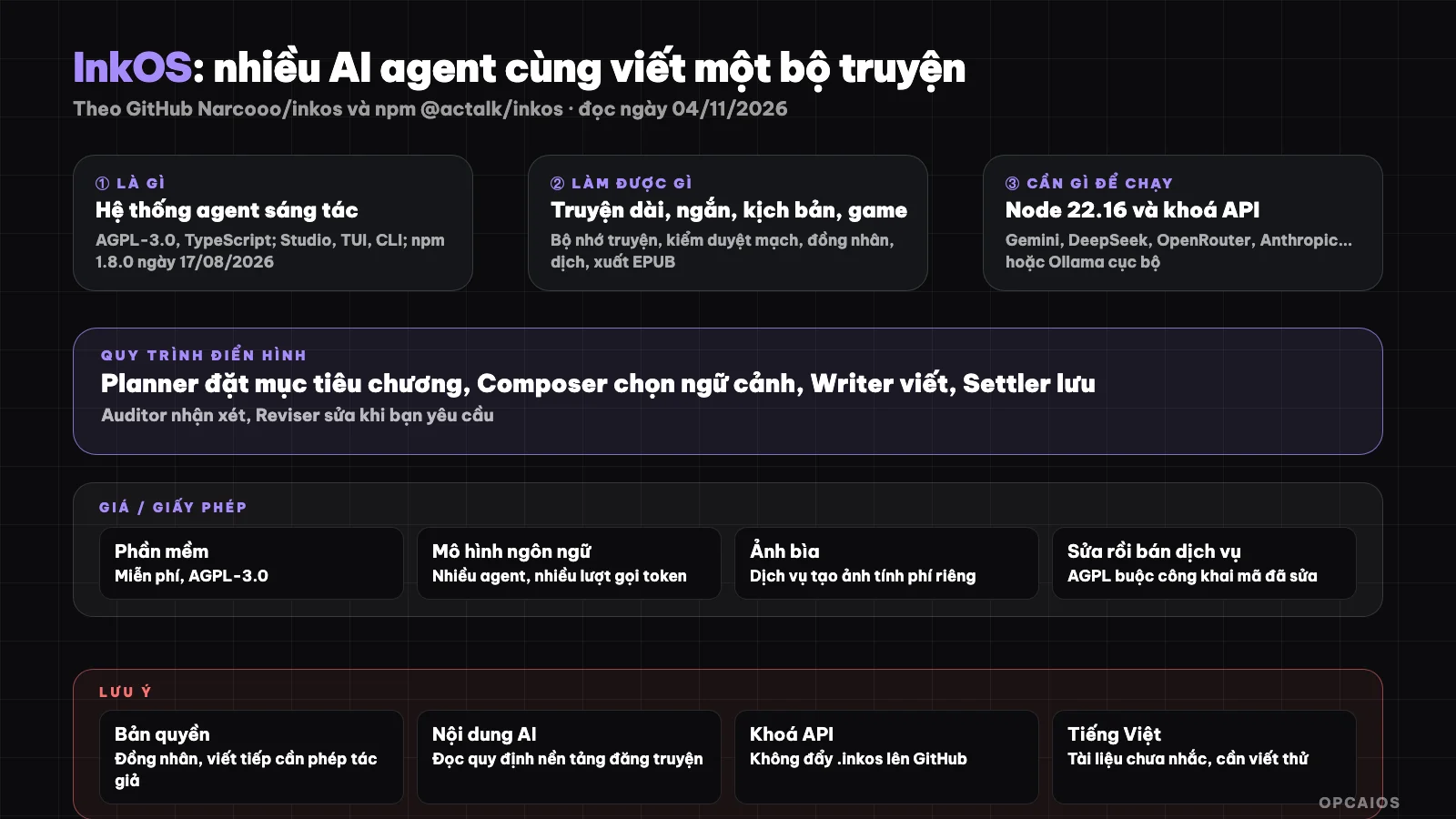
Multiple agents divide the work of writing one chapter, story memory maintains continuity across dozens of chapters. Diagram: OPCAIOS.
What is InkOS and who created it?
InkOS is a "writing desk" running on your machine, where multiple AI agents work on one chapter together instead of one long prompt sent to a chatbot. The repository belongs to GitHub account Narcooo, the npm package is under scope @actalk; the README does not mention a company name, we have not verified the author's identity.
The main README is written in Chinese, with English and Japanese versions (GitHub, read 04/11/2026). The project credits Kimi from Moonshot AI as sponsor, and the README advertises two paid API services. Those services are not mandatory: InkOS connects to many providers.
The core structure is a chain of agents. First, Planner reads the author's intent and current focus to set chapter goals. Next, Composer selects the right context snippets needed, Writer writes, Settler updates story state. Finally, an audit agent records evidence-based notes and Reviser edits on request. If you're unfamiliar with this concept, read What is an AI agent.
What can InkOS do?
InkOS handles many genres on the same platform: long novels, short stories, scripts, scenes, interactive games and translation. The table below paraphrases the README (GitHub, read 04/11/2026); the numbers are from the project, not yet verified:
| Feature | Meaning for writers |
|---|---|
| Multi-chapter novels | Build worldview, characters, outline, then write each chapter with planning |
| Long-term memory | JSON state, character facts, chapter summaries; check characters don't "remember" unseen events |
| InkOS Short | Produce complete short story: text, outline, notes, sales blurb, cover image suggestions |
| InkOS Play | Open world and branching narrative, with state, choices, self-generated illustrations |
| Fanfiction | Four modes: canon, au, ooc, cp, import material from source |
| Writing style analysis | Turn sample text into style guidelines for consistent writing |
| 19 ready skills | Long writing, commercial short stories, scripts, scenes, translation, cover images... |
| Multi-model routing | Each agent gets one model, e.g. Writer uses strong model, Auditor uses cheap model |
| Background writing | inkos up self-writes chapters, reports via Telegram or webhook |
| Book export | TXT, Markdown, EPUB |
InkOS uses standard skill files named SKILL.md, so Claude Code or other agents can call InkOS via inkos interact command. According to the README, skills only provide guidance, they do not escalate execution permissions.
How much does InkOS cost, what license, where are the hidden costs?
InkOS is free under AGPL-3.0, but each chapter is many language model calls, so the real cost lies in tokens. The table below summarizes (excluding tax, subject to change):
| Item | Details |
|---|---|
| Software | Free, AGPL-3.0 (GitHub API and npm, read 04/11/2026) |
| Language model | Pay per provider: Google Gemini, Moonshot, DeepSeek, MiniMax, OpenRouter, OpenAI or Anthropic-compatible endpoints |
| Run locally | Ollama, LM Studio supported; requires sufficiently powerful machine, README does not specify configuration |
| Cover images, illustrations | Requires separate configuration of an image generation service, charged separately |
| Web version | README links to web version; we have not read that page, pricing unclear |
| AGPL obligations | If you modify the code and provide it as a network service, you must make the modified code public |
The biggest hidden cost is the number of calls. One chapter goes through Planner, Composer, Writer, Settler and review, each step costs tokens. We have not measured how many tokens one chapter costs. See What is OpenRouter if you want one key to use many models.
How do you install InkOS?
InkOS installs via npm and requires Node.js 22.16 or higher. Steps per README (GitHub, read 04/11/2026):
- First, install Node.js 22.16+, then install InkOS globally:
npm i -g @actalk/inkos
- Next, create a project and open Studio:
inkos init my-novel
cd my-novel
inkos
- Open the local address shown in the log (README states default port 4567), go to model configuration, choose a provider, protocol, paste your API key and click test connection.
- Create a book and write the first chapter using
inkos book createtheninkos write next; theinkos doctorcommand helps diagnose configuration. - Finally, export the book using
inkos exportwith--format epubto read on your phone.
Note: README describes the 2.0 branch under development, while npm still has version 1.8.0, so some features in README may not be in your installed version. We have not run these commands.
Limitations, risks, security and legal
The most significant risk of InkOS is content copyright. Features like importing chapters from existing novels, writing co-authors from originals and imitating writing style all touch other people's works. Continuing, adapting or selling stories based on protected works without permission may violate copyright. We have not cross-checked Vietnam's Intellectual Property Law; this is not legal advice.
Second, transparency of AI content. README has a detect command to find AI traces and an "anti-detect" edit mode. Many story publishing platforms and contests have their own rules about AI-generated content; read the terms and disclose when requested, don't use tools to hide it.
Third, API keys. Per README, Studio stores keys in the project's .inkos/secrets.json. Don't push this folder to a public GitHub. The background run mode inkos up may continuously call APIs on its own, so set a spending limit.
Fourth, language. README says it supports Chinese and English originals; Vietnamese is not mentioned, we have not tried it. Finally, models can make things up: see What is AI hallucination.
Compared to other options
The table below is general description, not measurement:
| Option | How it differs from InkOS |
|---|---|
| Regular chatbots (ChatGPT, Claude, Gemini) | Easy to use, but doesn't automatically maintain story state over dozens of chapters |
| Sudowrite, NovelAI (paid services) | No installation needed, neat interface; locked to one provider, we have not read their pricing page |
| Obsidian plus AI | Flexible worldbuilding note vault, but you assemble the writing workflow yourself |
| Toonflow | Turns scripts into short films, animated comics; InkOS stops at text and cover images |
| Write yourself with Claude Code | Maximum flexibility, you design memory and review yourself |
When to use it?
| Situation | Suggestion |
|---|---|
| Writing a long-running web story, worried about losing character continuity | Suitable; memory and moderation are its strengths |
| Need a complete short story with sales introduction | Try InkOS Short |
| Want to make a branching text game | Try InkOS Play |
| Writing a continuation of someone else's story to sell | Not advisable without author permission |
| Writing in Vietnamese, never used command line before | Try it on one chapter first, check writing quality |
Example (hypothetical): someone writes a detective story to create a 30-chapter book, notes the author's intent as "one clue per chapter", sets Writer to use a powerful model, Auditor to use a cheaper model, writes 3 chapters then reads Auditor's feedback on the timeline before continuing. We haven't measured the cost for these 3 chapters.
OPCAIOS's experience
We added InkOS to the Repo list in the Utilities section on opcaios.org after reading the README and checking that the repository is still being updated; we haven't run it ourselves yet, so this section outlines the criteria we use to consider it, not an evaluation after using it. First, the repository is still being updated: push on 24/10/2026, npm version 1.8.0 on 17/08/2026. Next, licensing: AGPL-3.0 is fine for personal use, but anyone planning to modify and sell it as a service must open-source the code. Then, hidden costs: multiple agents mean multiple model calls, need to set a limit. Finally, risks: copyright when importing existing works, and Vietnamese not being mentioned in the documentation. We write blog posts using Claude Code with custom skills, we don't write stories, so InkOS is on the reference list for readers doing creative content.
Read more: What is an AI agent?, What is an LLM?, What is Ollama?, What is Toonflow?.
Frequently Asked Questions
Is InkOS free?
The software is free under the AGPL-3.0 license (GitHub API and npm, checked 04/11/2026), installed via npm. The real cost lies in the language model: each chapter goes through multiple agents, and each agent makes one or several API calls charged per token. Cover images require an additional image generation service. If you want to avoid API fees, you can run a local model through Ollama or LM Studio, though this requires a sufficiently powerful machine.
Can InkOS write Vietnamese stories?
It's unclear. The README (checked 04/11/2026) mentions support for Chinese and has a mode for original English writing via the --lang en parameter; Vietnamese is not mentioned. In theory, models like Gemini or Claude can write Vietnamese, but InkOS's skills, word-counting rules, and genre templates are designed for Chinese web novels. We haven't tried it, so I recommend writing a test chapter before investing heavily.
Which API provider does InkOS require?
InkOS doesn't mandate any particular provider. According to the README, Studio comes with a list including Google Gemini, Moonshot, MiniMax, DeepSeek, OpenRouter, Ollama, and many Chinese services, plus custom endpoints following the OpenAI Chat Completions, OpenAI Responses, or Anthropic Messages protocol. The README advertises the API service of the sponsor, but that's not a mandatory requirement. You can assign different models to different agents.
Does using InkOS to write fanfiction or write continuations infringe copyright?
Possibly. Fanfiction, adaptations, or continuations of protected works, especially when published commercially, typically require permission from the author or rights holder. InkOS is just a tool; responsibility rests with the user. Inputting another person's chapters to imitate their writing style also requires consideration. We haven't reviewed Vietnamese law; this is not legal advice. Consult a lawyer if you plan to commercialize.
Can someone without coding knowledge use InkOS?
Yes, if they're willing to learn a few commands. You need to install Node.js, run one npm command, then nearly everything else is done in Studio via your browser: configure the model, create a book, chat to write and edit. The hardest part is choosing a model and reading documentation mainly in Chinese and English. If you want to learn how to apply AI agents for creative content work systematically, check out OPCAIOS's AI application training course.
Source: GitHub Narcooo/inkos (README in Chinese, API, checked 04/11/2026: around 11,000 stars, AGPL-3.0, created 12/03/2026, last push 24/10/2026), npm registry @actalk/inkos (version 1.8.0 dated 17/08/2026, checked 04/11/2026); the project has no separate official website; not checked/not verified: InkOS web version and pricing, author identity, Sudowrite and NovelAI prices, the 19 skills figure (as claimed by the project), Vietnamese writing capability; star count and prices may change. The experience is OPCAIOS's. This post is not legal advice.
Translated from Vietnamese with AI. Read the original.
Want to apply this in your business?
Book a free 30-minute call (Vietnam time, in English or Vietnamese).