


What is Toonflow?
Toonflow is an open source platform for producing short films, animated comics, and videos using AI: write scripts, break down scenes, manage characters and settings, generate images, then create videos, all on an infinite canvas and self-hosted on your machine. According to the GitHub API (read 04/11/2026), the HBAI-Ltd/Toonflow-app repository has around 20,300 stars, 3,650 forks, MIT license, created 29/01/2026, last push 02/11/2026; the latest version is Toonflow 2.0.9 released 31/10/2026. The software is free, but image and video generation costs go to the model providers you plug in yourself. This post answers what Toonflow can do, what you need to run it, where the real costs are, copyright and security risks, and whether it's suitable for people who don't know how to code.
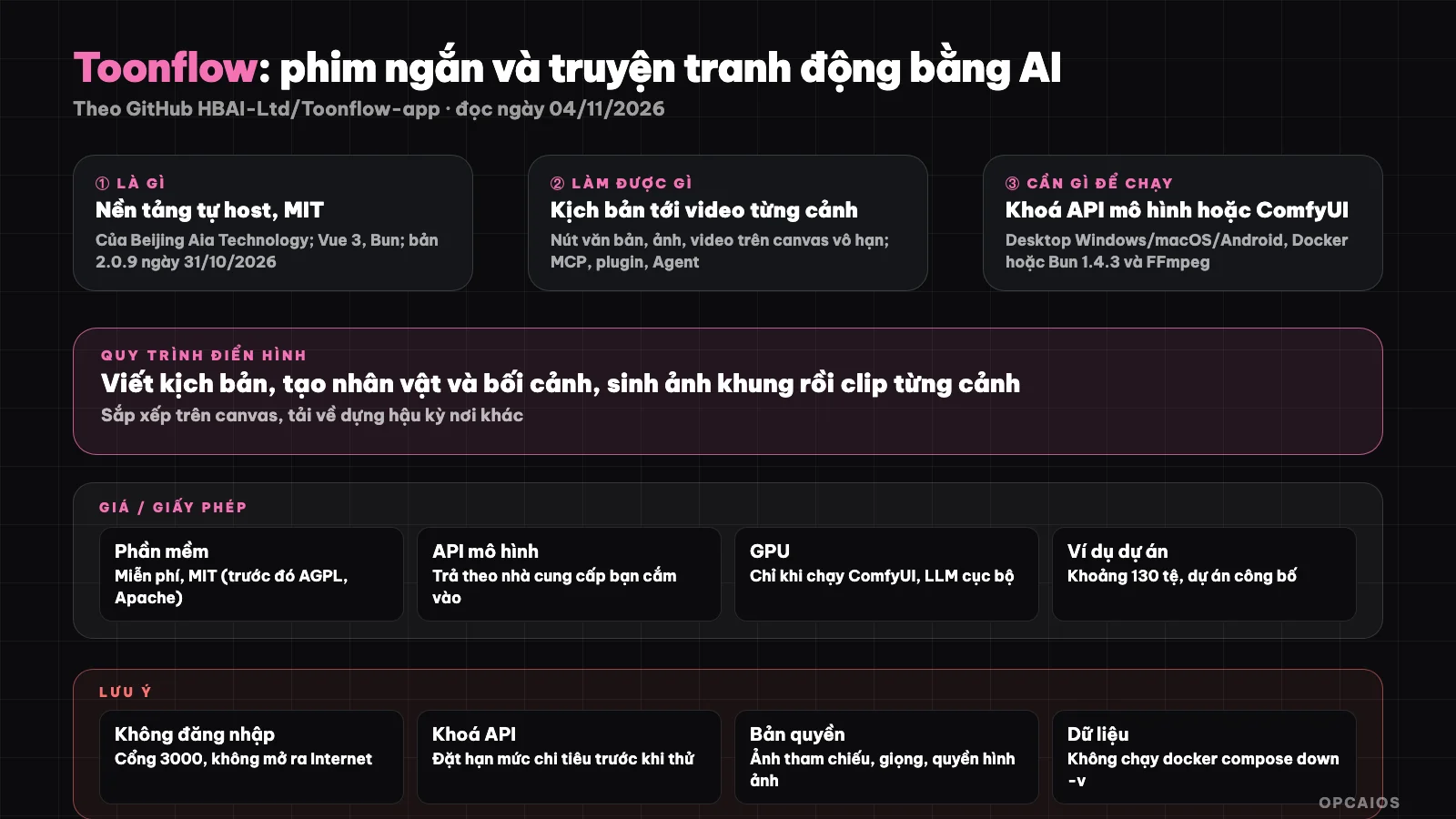
From script to each video scene on one canvas, with models you choose and pay for. Diagram: OPCAIOS.
What is Toonflow and who created it?
Toonflow is a self-hosted application for creating "short dramas" (episodic short films) and "comic dramas" (animated comics), two formats growing popular in the Chinese market. According to the README (GitHub, read 04/11/2026), the copyright belongs to Beijing Aia Technology Co., Ltd., the repository sits under the HBAI-Ltd organization and is also posted on Gitee and AtomGit.
The core idea is the infinite canvas: each part of the story is a node, text nodes hold scripts and scene descriptions, image nodes generate characters and settings, video nodes connect images with descriptions to produce clips. Users drag and drop, connect wires, then download the product to edit further. The README describes three expansion layers: MCP to connect external tools, a plugin marketplace, and "open agents" that let you write your own prompts, tools, and collaborate agent-to-agent. The interface has 21 languages, according to the README.
What can Toonflow do?
Toonflow brings four steps of an AI filmmaking workflow into one place and lets you choose a model for each step. The table below paraphrases the README (GitHub, read 04/11/2026):
| Feature | Meaning for content creators |
|---|---|
| Script and scene breakdown with text nodes, LLM-assisted | Write, edit, break down scenes on one screen |
| Character and setting assets | Keep faces, costumes consistent across many scenes |
| Image nodes | Generate frames for each scene from description and reference images |
| Video nodes | Pick video model, generation mode, produce clip for each scene |
| Infinite canvas | Arrange a whole episode spatially, see the big picture |
| Flexible models | Third-party API, local ComfyUI, LLM of your choice |
| Run many places | Windows, macOS, Android ARM64, Docker, Linux server |
The README makes clear that reference type, duration, resolution, and audio depend on the model and provider you pick; Toonflow is the editing suite, not the model. To understand the model part, read What is ComfyUI and What is LongCat-Video.
How much does Toonflow cost, what license, where are the hidden costs?
Toonflow is free under MIT, but every image or video generation costs the model provider, or burns GPU if you run ComfyUI locally. The table below sums up (before tax, may change):
| Item | Details |
|---|---|
| Software | Free, MIT (GitHub API, read 04/11/2026) |
| License history | README notes non-retroactive terms: pre-v1.0.8 under AGPL-3.0, v1.0.8 to v1.1.8 under Apache-2.0 plus supplementary agreement, current version MIT |
| Model API | Enter API keys in the web interface yourself; charged by provider |
| GPU | Only if running ComfyUI or LLM locally; README does not state minimum specs |
| Server | If hosted on VPS: machine rental, bandwidth, video storage |
| Plugin marketplace, official model platform | README links them, does not list prices; we could not read them |
As a reference figure, the README tells of a sample project that cost about 130 Chinese yuan on models: around 10 for language, 120 for video, under 1 for images, using Seedance 2.0, GPT Image 2, and Claude Opus 4.6. This is a number the project disclosed, not yet verified, and the README itself says it is an example, not a fixed price.
How to Install Toonflow?
Individual users should download the desktop version; those who want to run on a server should use Docker. According to the README (GitHub, read 04/11/2026):
- First, for personal computers: go to GitHub Releases, download the Windows version (Setup.exe), macOS (dmg, version 2.0.9 has both Apple Silicon and Intel) or Android ARM64 (apk). The Apple Silicon version is signed and notarized, but macOS may still ask for confirmation.
- Next, open the application, go to model settings and enter the API key of the image, video, or LLM provider you use.
- Create a project, drag the text scripting node, connect it to the image node, then the video node.
- Finally, preview and download the clip to edit further using editing software.
For servers, the README requires Git, Docker Engine and Docker Compose:
git clone https://github.com/HBAI-Ltd/Toonflow-app.git
cd Toonflow-app
docker compose up -d --build
Then open your browser to port 3000 on your local machine. The README recommends backing up using docker compose cp toonflow:/app/data ./toonflowBackup after stop, and warns against running docker compose down -v because this command deletes data volumes. Installing directly on Ubuntu requires Bun 1.4.3 and FFmpeg. We haven't tried installing it; see What is Docker if you're just starting out.
Limitations, Risks, Security and Legal Issues
The biggest risk with Toonflow is that the application has no login, so you absolutely should not expose port 3000 to the Internet. The README (read 04/11/2026) states plainly: the page and API have no authentication, the port is fixed at 3000, you must block it with a firewall and only expose it behind a reverse proxy with authentication. The approach the README suggests for individuals is to create an SSH tunnel from your machine to the server.
Second, API keys. You enter the key into the web interface; anyone who accesses port 3000 will use your key and you pay the bill. Set spending limits on the provider's side.
Third, copyright and image rights. Creating characters from photos of real people or copyrighted characters, using someone else's voice or face without permission, all of this could violate the law. We haven't cross-checked Vietnamese legal texts; this is not legal advice.
Fourth, the terms of the model provider and publishing platform: each API has its own content policy; TikTok and YouTube have rules about labeling AI content. The README also emphasizes that creators must review their own content.
Fifth, technical: Android only supports ARM64, and the README does not specify minimum system requirements.
Compared to Other Options
The table below is a general description, not a measurement:
| Option | How it differs from Toonflow |
|---|---|
| ComfyUI | Build model pipelines at a lower level, more powerful and complex; Toonflow can call ComfyUI as a backend |
| Web-based AI video services (paid per plan) | No installation needed, but locked into one provider, less data control |
| Remotion | Video from React code, graphics and data, doesn't generate scenes with AI |
| Manim | Mathematical animation using Python, entirely different purpose |
| Editing software (CapCut, DaVinci) | Cutting, compositing and post-production; Toonflow stops at scene creation, you still need these programs |
When Should You Use It?
| Situation | Recommendation |
|---|---|
| Want to try making a short AI film, already have image and video API keys | Good fit, start with the desktop version |
| Only need a few illustrations for an article | Too heavy; use regular image generation tools |
| Have a GPU server and ComfyUI | Toonflow acts as a story management layer on top |
| Don't want to pay for API | Must run models locally, need a powerful GPU |
| Team with multiple users sharing | Must add authentication yourself via a reverse proxy first |
Example (hypothetical): someone running a short story channel on TikTok writes a script with 8 scenes, creates two fixed characters, generates 8 keyframe images then 8 five-second clips, downloads them and edits and voice-overs in CapCut. We haven't measured the API cost for one such episode.
OPCAIOS Experience
We recently added Toonflow to the Repo list in the Tools section on opcaios.org after reading the README and checking that the repository is still being maintained; we haven't run a test yet, so this section outlines the criteria we used to consider it, not an evaluation after use. First, the repository is still being updated: push on 02/11/2026, version 2.0.9 on 31/10/2026. Next, the license: MIT in the current version, but the history of switching from AGPL to Apache to MIT shows we should re-read the license each time we upgrade. Then, hidden costs: all of it lies in model APIs and GPU, we need to set spending limits before trying. Finally, risks: there is no login feature, which is something we need to handle before deploying to a server, and generated content must respect copyright and image rights. We have our own process for building AI speaker videos, we don't yet need multi-scene shorts, so Toonflow is on our watchlist.
Read more: What is ComfyUI?, What is Docker?, What is VPS?, Create a TikTok Shorts channel using HeyGen, Suno, CapCut, 5 best open source AI video creation tools 2026.
Frequently asked questions
Is Toonflow free?
The software is free under the MIT license (GitHub API, read 04/11/2026), download the desktop version or install it yourself with Docker. The real cost lies in the models: each image, each second of video that calls a third-party API costs money according to the provider, or consumes electricity and GPU if you run ComfyUI locally. The README mentions a sample project cost around 130 CNY, a figure released by the project, not yet verified.
Does Toonflow need a GPU or API key?
Toonflow does not require a GPU. You enter the API key of the image, video, and LLM provider you choose; the README doesn't force any particular provider, just gives examples of Seedance 2.0, GPT Image 2, Claude Opus 4.6 in a sample project. To avoid API fees, you can plug in ComfyUI or a local LLM, which then requires a powerful enough GPU; the README doesn't mention minimum specifications.
Is Toonflow safe to install on a server?
It's only safe if you add a protection layer yourself. The README (read 04/11/2026) clearly states the application has no login, fixed port 3000, so you must block it with a firewall and only expose it via a reverse proxy with authentication. The simple way for one person is to keep the port closed and use an SSH tunnel from your personal machine. Remember to set spending limits for the API keys you've entered.
Can someone with no coding knowledge use Toonflow?
With the desktop version, yes: download, install, enter API keys, drag and drop nodes on the canvas. The hardest part is the models: choosing which video model, which parameters, because duration and resolution limits depend on the model. The Docker version and server deployment need basic command-line knowledge. The original documentation is in Chinese, the interface has 21 languages according to the README.
How is Toonflow different from ComfyUI?
ComfyUI is a tool for building image and video generation model pipelines at the technical node level; Toonflow is a story management layer on top: script, characters, scenes, then calls ComfyUI or APIs to generate each scene. Someone who needs to control each step of the model chooses ComfyUI; someone who needs to produce a film quickly chooses Toonflow. Want to learn how to connect AI tools into a content production workflow, check out OPCAIOS's AI application training course.
Source: GitHub HBAI-Ltd/Toonflow-app (README, API, LICENSE, release 2.0.9, read 04/11/2026: around 20,300 stars, MIT); not read/not verified: website toonflow.net (redirects to api.toonflow.net and shows no content when read 04/11/2026), official plugin marketplace and model platforms, 130 CNY cost figure released by the project; stars and prices may change. The experience is that of OPCAIOS. This post is not legal advice.
Translated from Vietnamese with AI. Read the original.
Want to apply this in your business?
Book a free 30-minute call (Vietnam time, in English or Vietnamese).