


What is a Short Link with Statistics?
A short link with statistics is a shortened address that, when clicked, records the click (timestamp, country, device, referral source) and then directs the clicker to the destination address. Dub is such a short link service with open source code on GitHub, and many people use Dub as a model when they want to build their own short link service on their own domain. This article does not recommend that everyone should build their own: using an existing service is usually faster and cheaper in terms of labor costs. This article compares the two approaches, lists the features worth building (expiration, password, redirect by device and country, A/B, preview before sharing, QR code, statistics, API), then discusses privacy when measuring clicks, abuse prevention, 301 or 302 redirects and their impact on SEO. We do not publish our own click counts.
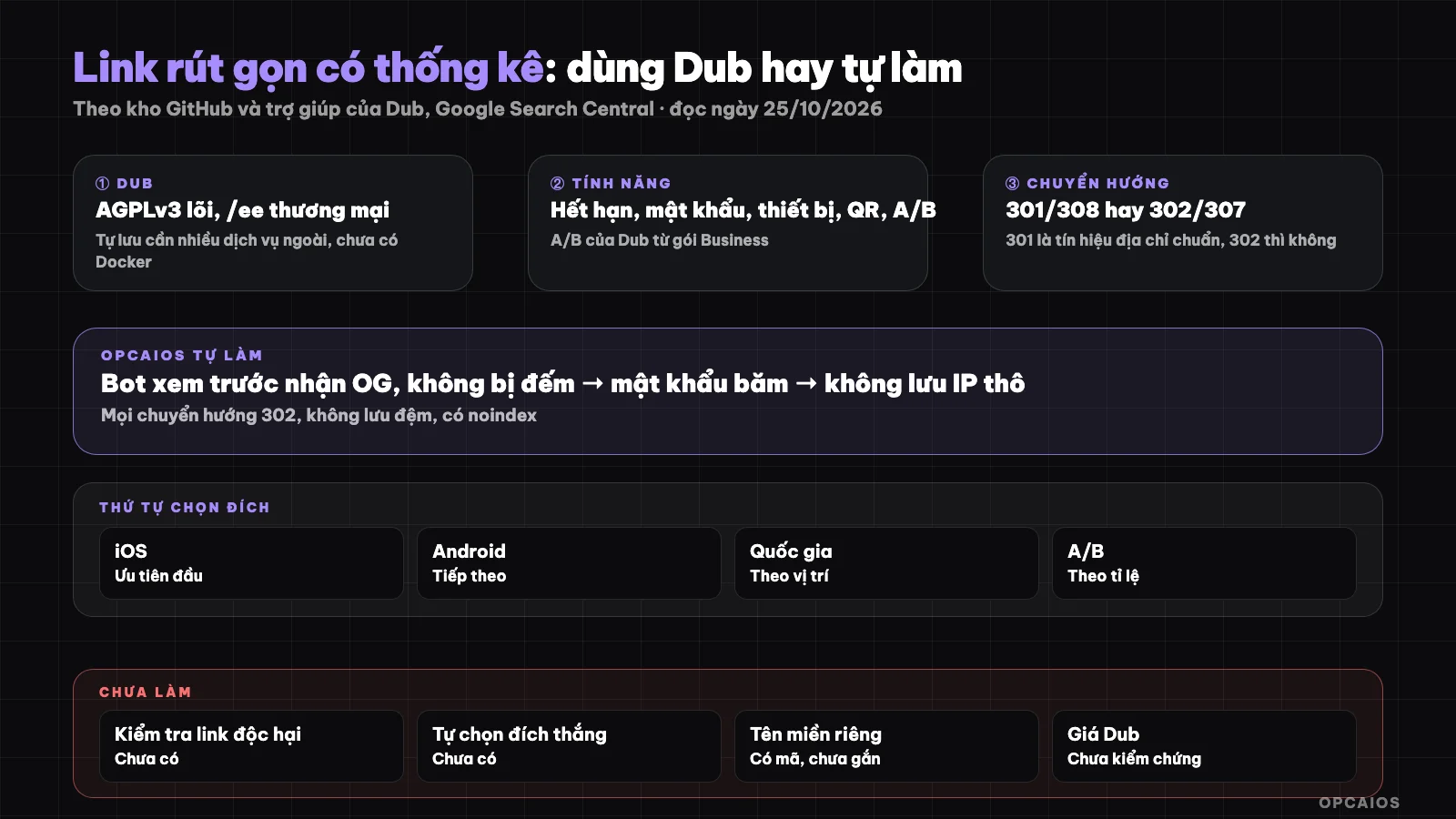
Order of processing a click: bot preview, password, expiration, destination selection, statistics recording, redirect. Diagram: OPCAIOS.
What is Dub and what is its license?
Dub is a short link platform, conversion tracking and partner program, with source code in the dubinc/dub GitHub repository. The README of the repository (read on 25/10/2026) states that the core part is open source under the AGPLv3 license, while the ee (Enterprise Edition) directory uses a separate commercial license. Dub is written in Next.js and TypeScript, uses Prisma, MySQL database via PlanetScale, Redis via Upstash, analytics via Tinybird and deploys on Vercel. Dub's self-hosting guide (read the same day) clearly states that accounts are needed at many of those services, does not yet support Docker, and reminds that AGPLv3 requires providing source code, including modifications, if you let others use your modified version over the network. This is a point to read carefully before copying Dub code into your own product. This section is for reference only, not legal advice.
What short link features does Dub have?
Dub's help center (read on 25/10/2026) lists the options when creating a link:
- UTM: attach campaign tracking parameters to the destination.
- Password: lock the link behind a password.
- By device: separate destination for iOS and Android.
- By location: separate destination by the clicker's country.
- Preview before sharing: set your own title, description, image that appears on social media.
- Expiration: after the set time, visitors see an "link expired" page or are redirected to an expiration address; the help page states this feature is from the Pro plan and up, and clicks after expiration are not counted.
- A/B: randomly split clickers to multiple destinations; the help page states this feature is from the Business plan, each destination at least 10%, runs for 2 weeks by default, maximum 6 weeks, the destination with the most conversions wins.
- QR code: has a QR code generator, custom logo only for paid plans.
We do not mention Dub's plan prices because we have not checked the pricing page.
Should you use a service or build your own short link?
Use a service like Dub when you need to get going immediately and don't want to maintain it yourself. Build your own when you already have your own website and database, want to keep click statistics together with your customer and order data, and are willing to operate it yourself.
| Criteria | Use a service | Build your own |
|---|---|---|
| Getting started | A few minutes | A few days of coding and testing |
| Cost | Monthly plan fees | Labor hours and server |
| Click data | At the provider | In your own database |
| Abuse prevention | Provider handles most | You handle it |
See also plan to unplug when tools raise prices.
In what order should a click be processed?
A click should be processed in a fixed order so results are predictable and statistics are clean:
- Bot preview the link (bot from social media, messaging app): return a page with Open Graph tags, do not count as a click.
- Password: if the link has a password and the browser hasn't entered it correctly, show an input field; limit the number of wrong attempts.
- Expiration: if expired, redirect to the expiration address or return a 410 code with a notification page.
- Select destination: iOS, Android, then country, then A/B ratio, finally the main destination; reattach UTM.
- Record statistics then redirect.
QR code is just the same link with an extra parameter to distinguish scans. On A/B testing with low traffic, see A/B test landing page when traffic is low.
How to measure clicks while respecting privacy?
Measuring clicks while respecting privacy means saving only what you need for reporting and avoiding storing personally identifiable data. IP addresses and location can be considered personal data under many legal frameworks, including Vietnam's Law on Protection of Personal Data (Law 91/2025/QH15, effective from 01/01/2026 according to summaries by PwC and EY); this section is for reference only, not legal advice. Four practical approaches:
- Don't store raw IPs. To count unique clickers, hash the IP together with browser information using a secret string that changes daily, and save only the shortened hash result.
- Location at country level, taken from information provided by a forwarding service or CDN, not pinpointed to a city.
- Browser information at group level: browser type, operating system, device type.
- State clearly in your privacy policy that the short link records clicks and how long you keep them.
Read more at 5 data security rules for business when using AI.
How do you prevent short links from being abused?
Preventing abuse means stopping short links on your domain from being used to direct to phishing pages, malware, or violating content. If your domain redirects to a harmful page, browsers and mail filters may flag your entire domain. Steps you should take:
- Only let people with admin accounts create links unless you really need a public service.
- Only accept destinations starting with http or https, block unusual protocols.
- Check destinations against a malicious URL list service like Google Safe Browsing if you open link creation to outsiders.
- Have a way to quickly disable a link and rate-limit link creation.
- Link passwords must be hashed, not stored in plain text.
Should you use 301 or 302 redirect for short links?
Use temporary redirects (302 or 307) for short links with analytics. Google Search Central documentation on redirects (read on 25/10/2026) explains that permanent redirects 301 and 308 are a strong signal that the destination should be the canonical address, while temporary redirects are not. With short links, the destination can change (by device, country, A/B test, expiration), so temporary redirects make more semantic sense. Browsers may also cache 301 redirects and go straight to the destination next time, causing clicks not to be counted. Include headers that forbid caching and an X-Robots-Tag noindex header so search engines don't index the short link itself. Short links don't help rankings; ranking belongs to the destination page. Read more at What is SEO and GEO.
OPCAIOS's experience
OPCAIOS built its own short link system with analytics in the admin panel, inspired by Dub's features but rewritten on top of the website's existing database, not running a self-hosted Dub version. Preview bots receive a page with custom Open Graph tags and are not counted. Links with passwords store hashed passwords, limit 8 wrong entries in 15 minutes, and correct entry lets the browser remember it for that link only. Expired links redirect to an expiration address or return a 410 page. Destination is chosen by iOS, Android, country, then A/B ratio; UTM is preserved. QR codes carry a marking parameter to separate scans. Analytics include clicks, unique clickers, QR scans, country, device, referrer, and leads or orders tied via UTM. We don't store raw IPs: clickers are identified by a hash that changes daily. All redirects are 302, not cached, with noindex. Links are managed via an internal API and MCP tool so AI agents can list, create, and read analytics. Not yet done: checking destinations against malicious URL lists (only admins create links), auto-picking the winning destination in A/B, teams; custom domains for links have the code but no domain bound yet.
Frequently Asked Questions
Can I build my own version using Dub's source code?
Yes, you can, because Dub's core is AGPLv3, but you need to read the license carefully. AGPLv3 requires you to provide source code, including your modifications, when others use your modified version over the network. The ee directory has a separate commercial license. Dub's self-hosting guide also requires many external services and doesn't yet support Docker. Rewriting the features you need in your own way is another option, but you can't copy the code. This is not legal advice.
Do shortened links harm SEO?
No, if you use them correctly. A shortened link is just a path to the destination page; search engines evaluate the destination page. Use temporary redirects (302 or 307), along with noindex on the shortened link itself, so the link doesn't show up in search results. Avoid redirecting to harmful pages, because the redirecting domain could get flagged. If you want to track the destination page on Google, see What is Google Search Console.
Can I count unique visitors without storing IPs?
Yes, approximately. Hash the IP along with browser information with a secret string that changes daily, then store only the shortened hash result. The same person on the same day gets the same code; the code changes the next day, so you can't track one person long-term. The number of unique visitors is therefore an estimate: someone switching networks or browsers gets counted twice, and multiple people on the same network with the same browser might be grouped together.
How is A/B testing on shortened links different from A/B testing a landing page?
A/B on links splits people clicking the same link to different destination pages at a set ratio; A/B on a landing page changes content on the same page. A/B on links is easier to set up because you just change the destination, but to know which destination is better you have to measure conversions at the destination page, for example through UTM parameters attached to each link. With low traffic, results are easily due to chance.
Where should a solo person start?
Start with a ready-made service for a few months to learn what features you actually need. When you see that you need click data alongside customer and order data, then build the minimum yourself: link, 302 redirect, unidentified click stats, expiration. Add password protection, device tracking, A/B later. If you want to learn how to ask AI agents to build tools like this safely, check out OPCAIOS's AI application training course.
Source: GitHub repository dubinc/dub (README), Dub self-hosting guide, Dub Help Center (creating links, expiration, A/B, custom QR codes), Google Search Central on redirects (read 25/10/2026); pricing of Dub plans not verified in this post, Google Safe Browsing documentation and full text of Law 91/2025/QH15 and Decree 356/2025/NĐ-CP not read in this post; OPCAIOS does not disclose click numbers. Experience is from OPCAIOS.
Translated from Vietnamese with AI. Read the original.
Want to apply this in your business?
Book a free 30-minute call (Vietnam time, in English or Vietnamese).