


What is ViMax?
ViMax is an open-source framework for creating videos using multiple coordinated AI agents: from a brief idea, a script, or even a full novel, it automatically writes the story, creates storyboards, designs characters, generates frame images, calls video generation models, and assembles them into multi-scene videos while maintaining character consistency. According to the GitHub API (accessed November 4, 2026), the HKUDS/ViMax repository has 12,851 stars, uses the MIT license, was created on March 30, 2025, with the most recent code push on September 30, 2026; the latest release is v1.2.0 (July 20, 2026). The code is free, but each video costs money through API calls to language models, image models, and video models. This post explains what ViMax is, who built it, what it can do, real costs, how to install it, risks, and when to use it.
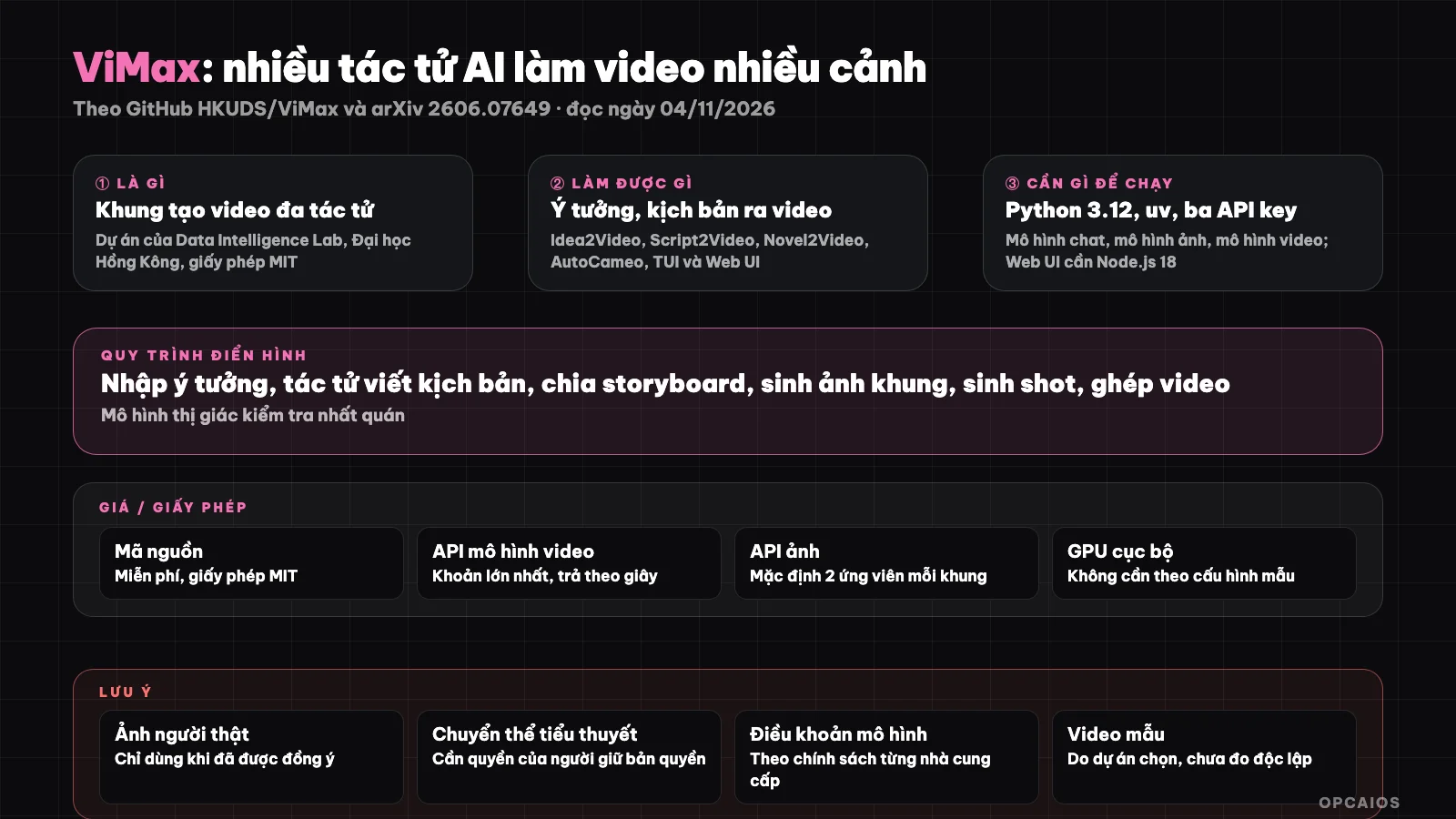
ViMax divides video production work among multiple agents, from writing the story to assembling scenes. Diagram: OPCAIOS.
What is ViMax and who created it?
ViMax is a research project by HKUDS, the Data Intelligence Lab at the University of Hong Kong, according to the organization name on GitHub (accessed November 4, 2026). The project has a technical report on arXiv with code 2606.07649, authored by Lingxuan Huang, Sizhe He, Hengji Zhou, Liqiang Nie, Lianghao Xia, and Chao Huang, submitted on June 2, 2026, with a revision dated July 21, 2026.
The problems ViMax addresses, according to the README, are three weaknesses of current AI video creation tools: most only generate a few seconds; characters and backgrounds change erratically between frames; and lack of scripts, sound, and narrative structure. ViMax solves this by dividing the work like a film crew. One agent handles story and script, one agent divides scenes and designs camera angles, one agent manages character reference images, then the video generation model creates each shot.
According to the abstract on arXiv (accessed November 4, 2026), this framework uses a hierarchical narrative engine with retrieval-augmented generation (RAG) to maintain story coherence, along with mechanisms for tracking character and scene state across shots. The agents use vision language models (VLM) to supervise and revise. For the concept of agents, see What is an AI agent?.
What are ViMax's main features?
ViMax has four main workflows: Idea2Video, Script2Video, Novel2Video, and AutoCameo, plus a TUI terminal interface and Web UI to chat with agents, edit plans, and control production. The table below summarizes the README on GitHub, accessed November 4, 2026.
| Feature | Short description |
|---|---|
| Idea2Video | From a brief idea to story, characters, script, storyboard, shots, and complete video |
| Script2Video | From a pre-written script to multi-scene, multi-shot video while preserving creative intent |
| Novel2Video | Convert long novels into video episodes with plot compression and character tracking |
| AutoCameo | Insert people or pets from reference images into the story while maintaining consistent appearance |
| Agent Loop and TUI | Brainstorm ideas, edit plans, continue previous sessions, control production |
| Web UI (from v1.2.0) | Manage named projects, upload files, view storyboards, view drafts, configure providers |
| Frame selection | Generate 2 candidate images for each frame for the vision model to choose from |
| Parallel generation | Create multiple shots and assets simultaneously to reduce total time |
According to the News section in the README, the project has added support for GPT Image 2 via OpenRouter, Seedance 2.0 Fast, Google Omni, and MiniMax chat models. The sample config file uses Gemini via OpenRouter for chat, Google Nano Banana for images, and Google Veo for video. The roadmap also lists support for MiniMax H3 and expansion through skills as ongoing work.
How much does ViMax cost, what's the license, and what are the limits?
ViMax is free with an MIT license, and there are no paid tiers. However, ViMax doesn't have its own model: all images and videos are generated through third-party APIs, so the real cost comes from those API bills and scales with the number of scenes and shots.
| Item | Details |
|---|---|
| Source code | Free, MIT license (GitHub, checked 04/11/2026) |
| Language model | Pay per token to an OpenAI-compatible provider, for example OpenRouter |
| Image model | Pay per image; by default 2 candidates per frame so image costs double |
| Video model | Pay per second of video from Veo, Seedance, etc. (usually the biggest expense) |
| Local GPU | Not needed per the template setup, since models run in the cloud |
| Operating system | README lists Linux and Windows |
I haven't looked up the pricing tables for Google Veo, Seedance, or OpenRouter for this post, so I won't give numbers; prices don't include tax and may change. The README makes clear that the 2-candidate feature costs "at a higher API cost", and you can set num_candidates: 1 to save money. Other limits: quality depends on which video model you have access to, and the sample videos in the README are chosen by the project for publication, not independently measured.
How do I install ViMax and get started?
Installing ViMax needs Python 3.12, the uv environment manager, API keys for chat, image, and video models; the Web UI also needs Node.js 18 or higher. Per the README (checked 04/11/2026), the basic steps are as follows.
- First, clone the code and set up the environment:
git clone https://github.com/HKUDS/ViMax.git
cd ViMax
uv sync
- Next, create your own config file from the template, then fill in the model, Base URL, and API keys for the three sections: llm, image, and video:
cp configs/agent.example.yaml configs/agent.local.yaml
- Run the command-line interface to chat with the ViMax agent:
vimax tui
- Or run the Web UI in the
webfolder:
cd web
npm install
npm run dev
- Finally, if you want to run the Idea2Video pipeline directly, fill in your idea, requirements, and style in
main_idea2video.py, configureconfigs/idea2video.yaml, then run that file.
The README lets you pass API keys via environment variables like VIMAX_LLM_API_KEY, VIMAX_IMAGE_API_KEY, VIMAX_VIDEO_API_KEY instead of writing them into a file. The Web UI listens only on localhost by default; when running on a remote server, the README recommends port forwarding over SSH instead of opening the port to the internet.
What are the copyright, real person imagery, and data risks with ViMax?
The biggest risks when using ViMax come from your inputs and real person imagery. Novel2Video turns novels into video: if the book is still under copyright protection, turning it into a video and publishing it publicly needs permission from the copyright holder. AutoCameo puts a person from a photo into a video: only use photos of yourself or someone who has clearly agreed, and don't use it to impersonate or create misleading content about real people.
The terms of service from the model providers are a second layer. Google, OpenAI, ByteDance, and other platforms all have their own policies for generated content, for instance banning images that mislead about real people. Many social media platforms also require labels on AI-generated content. I haven't compared the original text of each provider's terms; this section is just a reference, not legal advice.
On data: scripts, reference images, and prompts all get sent to the APIs you configure. With face images, that's sensitive personal data. Lastly, keep your agent.local.yaml file with API keys outside your Git repo and outside any public sync folders.
How does ViMax compare to other options?
ViMax differs from video models in that it's an orchestration layer, not a model itself. The table below is a general description, not a measurement.
| Tool | Strengths | Things to consider |
|---|---|---|
| ViMax | Turns ideas or novels into multi-scene video with an agent that checks consistency | Costs for image and video APIs, needs setup |
| Toonflow | Same direction—story to multi-scene short video | Process and supported models differ |
| LongCat-Video | Video generation model, can run locally | Needs strong GPU, doesn't handle scripting |
| ComfyUI | Node-by-node control, run models locally | Build the workflow yourself, hard for beginners |
| Remotion | Build video with code, frame-perfect control | Doesn't generate images with AI |
When should I use ViMax?
ViMax works well when I want to experiment with making narrative videos with multiple scenes from a good idea or script, accepting API costs and reviewing the results. If I only need a clip a few seconds long, calling the video model directly will be cheaper and faster.
| Situation | Recommendation |
|---|---|
| Testing a short film or trailer idea from a story | ViMax, Idea2Video flow |
| Already have a script, need storyboard and rough edit | ViMax, Script2Video flow |
| Self-written story, want to make it into multiple episodes | ViMax, Novel2Video flow |
| Only need a few-second ad clip | Call the video model directly |
| Need explainer video with text and accurate charts | Remotion or code-based editing tools |
Example (hypothetical): an OPC owner writes a three-scene script about a day working with an AI agent, runs Script2Video with 1 image candidate per frame to cut costs, reviews the storyboard in the Web UI, edits the dialogue, then has the video made.
OPCAIOS experience
I added ViMax to the Repo list in the Utilities section on opcaios.org after reading the README and checking that the repository is still maintained; I haven't run it myself yet, so this section states the criteria I use to consider it, not an evaluation after using it.
Four criteria I looked at. First, is the repository still being updated: the latest code push on 30/09/2026, version v1.2.0 in July 2026, with an accompanying technical report. Next, licensing: MIT for the code part, but generated content is still subject to each model provider's terms. Third, hidden costs: each multi-shot video means multiple calls to image and video APIs, so I need to test on a short script and set spending limits first. Finally, risks: only use photos of people who agreed to AutoCameo and only adapt content I have rights to.
Read more: What is an AI agent?, What is Toonflow?, What is InkOS?, What is ComfyUI?, 5 best open source AI video tools 2026.
Frequently Asked Questions
Is ViMax free?
ViMax source code is free under the MIT license, according to the GitHub API read on 04/11/2026. But using ViMax will almost certainly cost money, because it calls external APIs for three things: language models for writing stories and scripts, image models for generating frames and characters, and video models for generating individual shots. The video part is usually the most expensive. By default ViMax also generates 2 candidate images per frame for you to choose from, which doubles the image cost; you can reduce it to 1. We haven't read the price tables from the providers, so try running a short script before making a long video.
Does ViMax need a GPU?
According to the sample configuration in the README, ViMax does not need a GPU on your machine, because the chat model, image model, and video model all run on the cloud via API, for example Gemini via OpenRouter, Nano Banana, and Google's Veo. Your machine only runs the orchestration part in Python and the Web UI in Node.js. The README states that supported operating systems are Linux and Windows, with no mention of macOS. If you want to use models running locally instead of APIs, you have to configure the appropriate endpoints yourself; the README does not yet have separate guidance for that, and we have not tried it.
How long can ViMax make videos?
The README and arXiv report say ViMax targets long videos with multiple scenes, at the level of minutes or more, instead of a few seconds like typical video creation tools. The approach is to break the story into multiple scenes and shots, generate each shot and then stitch them together, with mechanisms to track characters and settings to maintain consistency. However, the project does not publish a specific length limit in the README, and each shot still depends on the limit of the video model you use. The actual length is also constrained by API costs. We have not measured it.
What are the risks of putting real people into videos with ViMax?
The AutoCameo feature allows you to bring a person or pet from a reference image into a video with consistent appearance. The risks are creating content that looks like a real person without their consent, which may violate rights to their image, cause misunderstanding, or be used for impersonation. Only use images of yourself or people who have agreed in writing, label content as AI-generated when posting, and comply with the model provider's policy. Face images are personal data and will be sent to the API you configure. This is reference information, not legal advice.
Can people who don't know how to code use ViMax?
Possibly, but not easily. Installing ViMax requires using the terminal, the uv tool, Node.js for the Web UI, and manually filling in a YAML config file with three sets of API keys. Once installed, the Web UI allows you to chat with an agent, upload files, view the storyboard and draft in a browser, so the daily use part is much easier. New users can ask an agent like Claude Code to install step by step and explain errors. To properly learn how to integrate AI tools into your content workflow, see OPCAIOS's AI application training course.
Source: GitHub HKUDS/ViMax (README, API, Releases page, read on 04/11/2026), arXiv 2606.07649 (abstract page, read on 04/11/2026); not read/not verified: full technical report, Chinese README, Google Veo price table, Seedance, OpenRouter, quality of sample videos released by the project; star count and prices may change. Experience is from OPCAIOS.
Translated from Vietnamese with AI. Read the original.
Want to apply this in your business?
Book a free 30-minute call (Vietnam time, in English or Vietnamese).