



Ghost CMS là gì?
Ghost CMS là nền tảng xuất bản mã nguồn mở viết bằng Node.js, gộp website, blog, thành viên đăng ký, gói trả phí và bản tin email trong một hệ thống. Theo GitHub API (đọc ngày 04/11/2026), kho TryGhost/Ghost được tạo ngày 04/05/2013, có khoảng 55.665 sao, dùng giấy phép MIT và có bản phát hành v6.74.0 ngày 03/11/2026. Bạn có thể tự cài Ghost miễn phí trên máy chủ riêng, hoặc thuê bản quản lý Ghost(Pro): theo trang giá ghost.org (đọc ngày 04/11/2026), gói rẻ nhất là 15 USD mỗi tháng nếu trả theo năm. Bài này giải thích Ghost làm được gì, chi phí thật khi tự host, cách cài theo tài liệu chính thức, rủi ro cần biết và khi nào nên chọn Ghost thay cho WordPress hay một website tự viết.
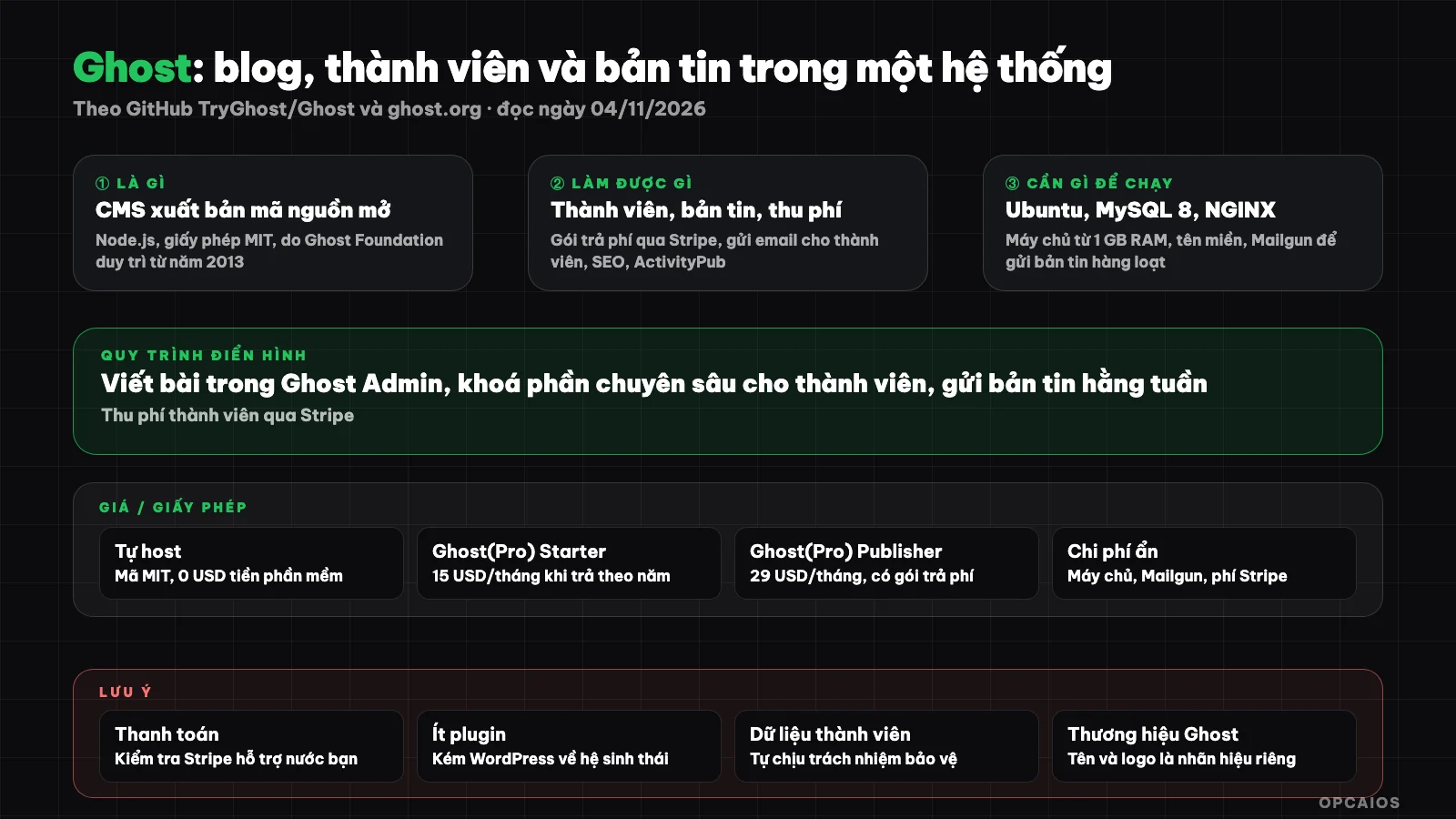
Ghost gộp website, thành viên, bản tin và gói trả phí trong một hệ thống. Sơ đồ: OPCAIOS.
Ghost CMS là gì và ai tạo ra Ghost?
Ghost là một CMS (hệ quản trị nội dung) dành cho người viết độc lập, toà soạn nhỏ và doanh nghiệp làm content marketing. Mã nguồn do Ghost Foundation duy trì trên GitHub, giấy phép MIT. README cho biết toàn bộ doanh thu của Ghost(Pro) chảy về Ghost Foundation để nuôi dự án.
Khác với WordPress vốn bắt đầu từ blog rồi mở rộng bằng hàng nghìn plugin, Ghost tập trung vào một việc: xuất bản và nuôi khán giả trả phí. Thành viên, bản tin email và thu phí có sẵn trong lõi, không cần cài thêm. Ghost cũng chạy được kiểu "headless": bạn dùng Ghost làm nơi soạn bài, còn giao diện là một ứng dụng riêng đọc dữ liệu qua Content API. README tự mô tả Ghost là CMS headless Node.js mã nguồn mở phổ biến nhất, và huy hiệu trên README ghi hơn 100 triệu lượt tải; đây là số do dự án công bố, chưa kiểm chứng. Nếu bạn đang chọn công nghệ cho website, xem thêm Next.js là gì? để so sánh hướng tự viết.
Ghost có những tính năng chính nào?
Ghost có đủ bộ công cụ cho một ấn phẩm sống bằng thành viên: trình soạn bài, giao diện (theme), thành viên miễn phí và trả phí, bản tin email, gói nhiều hạng, ưu đãi, bình luận và công cụ SEO cơ bản. Bảng dưới tóm tắt theo trang giá và tài liệu chính thức, đọc ngày 04/11/2026.
| Tính năng | Ghost làm gì |
|---|---|
| Thành viên (Members) | Người đọc đăng ký tài khoản, đăng nhập bằng liên kết gửi qua email, không cần mật khẩu |
| Gói trả phí | Thu phí thuê bao, phí một lần, tiền ủng hộ qua Stripe; nhiều hạng gói với quyền đọc khác nhau |
| Bản tin email | Gửi bài cho toàn bộ hoặc một nhóm thành viên, có nhiều bản tin, sửa liên kết sau khi gửi |
| Giao diện | Theme từ Marketplace hoặc tự viết; gói Starter của Ghost(Pro) chỉ dùng theme mặc định |
| SEO | Thẻ meta, dữ liệu có cấu trúc, sitemap XML, URL chuẩn, RSS |
| Mạng xã hội mở | Kết nối ActivityPub để bài được theo dõi từ Mastodon, Threads, Bluesky và các nền tảng khác |
| Gợi ý chéo | Giới thiệu ấn phẩm khác cho độc giả và được giới thiệu lại |
| API và webhook | Content API, Admin API, webhook để nối với công cụ khác hoặc dựng giao diện riêng |
Ví dụ giả định: một chuyên gia tài chính cá nhân viết bài miễn phí mỗi tuần, khoá phần phân tích chuyên sâu cho thành viên trả phí, rồi gửi bản tin vào sáng thứ Hai. Tất cả nằm trong một Ghost Admin, không phải nối ba bốn dịch vụ.
How much does Ghost CMS cost? Is self-hosting really free?
Ghost has two ways to use it: self-host the MIT open-source code for free, or rent Ghost(Pro) and pay based on the number of members. The pricing table below is from ghost.org/pricing on 04/11/2026, at the 1,000 member tier, before tax, and subject to change.
| Plan | Annual payment | Monthly payment | Main points |
|---|---|---|---|
| Self-host | 0 USD software cost | 0 USD | You pay for server, domain, email service |
| Starter | 15 USD/month (180 USD/year) | 18 USD/month | 1 admin, default theme, no paid tier |
| Publisher | 29 USD/month (348 USD/year) | 35 USD/month | 3 admins, custom theme, paid tier |
| Business | 199 USD/month (2,388 USD/year) | 239 USD/month | 15 admins, up to 10,000 members |
| Custom | Contact | Contact | Unlimited members, 99.9% SLA |
Publisher pricing scales with member count; according to the pricing table in the page source, at 100,000 members it's 329 USD per month if you pay monthly. Ghost doesn't charge transaction fees on paid tiers, but Stripe still takes Stripe's payment processing fee.
Self-hosting doesn't mean it's free. There are three hidden costs. First is the server: Ghost documentation requires a minimum of 1 GB RAM, see What is VPS?. Next is sending newsletters: Ghost documentation says self-hosted versions only support Mailgun for bulk email, not regular SMTP; Ghost says Mailgun is free up to 600 emails per month, we haven't checked Mailgun's pricing page. Finally there's your time for updates, backups, and security. For people unfamiliar with servers, that time is usually more expensive than a Ghost(Pro) plan.
How to install Ghost CMS and get started?
The official way is to use Ghost-CLI, a command-line tool installed via npm. According to the README and docs.ghost.org (read on 04/11/2026), the process has three steps:
- First, install Ghost-CLI globally using npm.
- Next, run a local version on your machine to try it, takes about a minute according to the README.
- Finally, on your actual server, run the full installation; Ghost-CLI asks for domain, MySQL info and can auto-configure NGINX, SSL with Let's Encrypt, and systemd.
npm install ghost-cli -g
ghost install local
ghost install
The Ubuntu installation documentation lists these requirements: Ubuntu 22.04, 24.04, or 26.04; NGINX 1.9.5 or later; a supported Node.js version; MySQL 8.0 or 8.4; systemd; at least 1 GB RAM and a domain with DNS already pointed. The documentation also notes that installations with Ghost-CLI use the ActivityPub service hosted by Ghost(Pro) and are not compatible with traffic analytics features; to self-host both, you need to use the new Docker Compose installation method. If you're not familiar with containers, see What is Docker?.
People without coding experience should start with Ghost(Pro)'s trial version: the pricing page has a try button for each plan, then think about self-hosting once you're sure your content model works.
Limitations, risks, and legal notes when using Ghost
Ghost is strong at publishing and members, but it's not a do-everything platform. There are four points to consider before choosing, based on what we read on 04/11/2026.
First is payments. Ghost's paid tiers go through Stripe. You need to check yourself whether Stripe supports the country where you register your business, and how to issue invoices and file taxes under the law where you operate; see What is Stripe?. Next is the ecosystem: Ghost has far fewer plugins than WordPress, so complex stores, scheduling, or large forums usually need to connect outside services. Third is personal data: the member list contains emails and payment history; you're responsible for protecting it and getting consent under personal data protection laws where you operate. Finally there's branding: the README says Ghost name and Ghost logo are trademarks of Ghost Foundation, with their own usage policy. MIT license lets you modify and use commercially, but doesn't give you the right to use the Ghost name as your own brand. This is for reference only, not legal advice; we haven't checked the original law texts.
Ghost vs WordPress, Substack and Self-Written Website
Ghost sits between WordPress (flexible, many plugins) and Substack (easy, but platform-dependent). The table below is a general description, not a measurement.
| Option | Strong At | Weak At |
|---|---|---|
| Ghost | Members, newsletters, paid tiers built-in; data ownership if self-hosted | Few plugins; payments depend on Stripe |
| WordPress | Huge plugin and theme ecosystem | Need to combine many plugins for members and email; easy to bloat |
| Substack | Quick start, built-in reader network | Little customization, branding and domain depend on platform |
| Self-Written Website (Next.js) | Build exactly what you need | Must build and maintain every feature yourself |
When Should You Use Ghost?
Ghost fits people who live by content and want to charge readers directly. The table below suggests based on situation.
| Situation | Suggestion |
|---|---|
| Write blog with newsletter, want to charge members | Ghost(Pro) Publisher or self-hosted Ghost |
| Just need free newsletter, don't want to worry about tech | Ghost(Pro) Starter or Substack |
| E-commerce site, booking, complex CRM | WordPress or self-written, Ghost is not the focus |
| Team with developers, want custom interface | Ghost headless via Content API |
| Low budget, willing to manage server yourself | Ghost self-hosted on VPS, plus Mailgun for newsletters |
OPCAIOS Experience
We recently added Ghost to the Repo list in the Tools section on opcaios.org after reading the README and checking that the repository is still maintained; we have not tested it yet, so this part states the criteria we use to consider it, not an evaluation after using it. The opcaios.org website is self-built with Next.js and does not use Ghost: blog, document store, training courses, email sequences and members are all written and run by AI agents like Claude Code. When considering a platform like Ghost, we look at four things. One is whether the repository is still being updated; Ghost has a release on 03/11/2026. Two is the license; MIT allows commercial use. Three is hidden costs: server, Mailgun, Stripe and maintenance time. Four is whether it can replace what we are already using; for someone who already has a self-written website, the answer is not yet, but for someone just starting to sell member tiers, Ghost saves a lot of build work.
Read more: Sell Member Tiers on a Solo Website, Paid Newsletter 1,000 Readers with AI, What is Email Marketing?, What are SEO and GEO?.
Frequently Asked Questions
Is Ghost free?
Ghost's source code is free under the MIT license, and you can install it on your own server without paying for the software. However, you still pay for the server (minimum 1 GB RAM according to Ghost documentation), domain name, bulk email service from Mailgun when sending newsletters, and Stripe fees if you charge members. If you don't want to manage it yourself, Ghost(Pro) has a Starter plan from 15 USD per month when paid annually, according to the pricing page at ghost.org read on 04/11/2026. The price does not include tax and may change, so please check the pricing page again before signing up.
How is Ghost different from WordPress?
Ghost focuses on publishing, membership, email newsletters, and paid plans, all built into the core. WordPress is a versatile content management system, powerful thanks to a very large ecosystem of plugins and themes, but to have paid membership and newsletters you usually need to combine multiple plugins. Ghost is written in Node.js, while WordPress uses PHP. In short, if you live off content and paid readers, Ghost is simpler; if you need a shop, scheduling, forums, and many unusual integrations, WordPress is more flexible. This is a general description; we have not measured the performance of the two platforms.
What kind of server do I need to self-host Ghost?
According to Ghost's installation documentation for Ubuntu (read on 04/11/2026), you need Ubuntu 22.04, 24.04, or 26.04, NGINX from 1.9.5, a supported version of Node.js, MySQL 8.0 or 8.4, systemd, a server with at least 1 GB RAM, and a domain with DNS already pointed. Ghost-CLI installs and configures NGINX, SSL, and systemd for you. This installation is not suitable for running locally or contributing to core code; if you want to try it on your personal machine, use the local installation command. If you want to self-host both analytics and ActivityPub features, the documentation recommends using Docker Compose installation.
Can Ghost send email newsletters?
Yes. Ghost sends newsletters to all or a group of free and paid members at no cost, offers multiple newsletters for readers to choose from, and email templates display well in popular email applications. On Ghost(Pro), email sending is already configured and the pricing page states there is no limit on the number of sends. With self-hosting, Ghost documentation says you must enter Mailgun's API key, because bulk email does not send reliably with regular SMTP and currently Mailgun is the only bulk provider supported. Member login emails use regular email configuration.
Can someone who doesn't know how to code use Ghost?
Yes, if you use Ghost(Pro). You sign up, choose a plan, write posts in the visual editor, enable membership and newsletters without touching the server. The hard part for someone who doesn't know code is self-hosting: installing Ubuntu, MySQL, NGINX, updating versions, backing up, and troubleshooting errors. Our advice is to try Ghost(Pro) first to validate your content model, then consider self-hosting once you have readers. If you want to use AI to build and operate a website, blog, newsletter for your one-person company, check out the AI application training course from OPCAIOS.
Source: GitHub TryGhost/Ghost (README, API, read on 04/11/2026), pricing page ghost.org/pricing and documentation at docs.ghost.org on Ubuntu installation and email newsletters (read on 04/11/2026); not read/not verified: Mailgun pricing page, Stripe terms by country, the 100 million downloads figure claimed by the project; numbers and prices may change. Experience is from OPCAIOS.
Translated from Vietnamese with AI. Read the original.
Want to apply this in your business?
Book a free 30-minute call (Vietnam time, in English or Vietnamese).