



Stripe is an online payment platform that allows websites and applications to receive money from cards, digital wallets and other methods, then transfer funds to the seller's account. Stripe is famous for its developer tools, pre-built checkout pages and recurring billing packages. According to Stripe's official pricing page (checked on 23/10/2026), the Standard plan charges 2.9% + $0.30 for each successful domestic card transaction. However, according to the list of supported countries on the official page, Vietnam is not yet included in that group, so businesses registered in Vietnam cannot open a Stripe account directly. This post answers four questions: (1) how Stripe works; (2) what the fees are; (3) the webhook technique worth learning for every payment gateway; (4) how Vietnamese sellers are currently collecting payments, based on the practical experience of integrating PayOS and SePay at OPCAIOS.
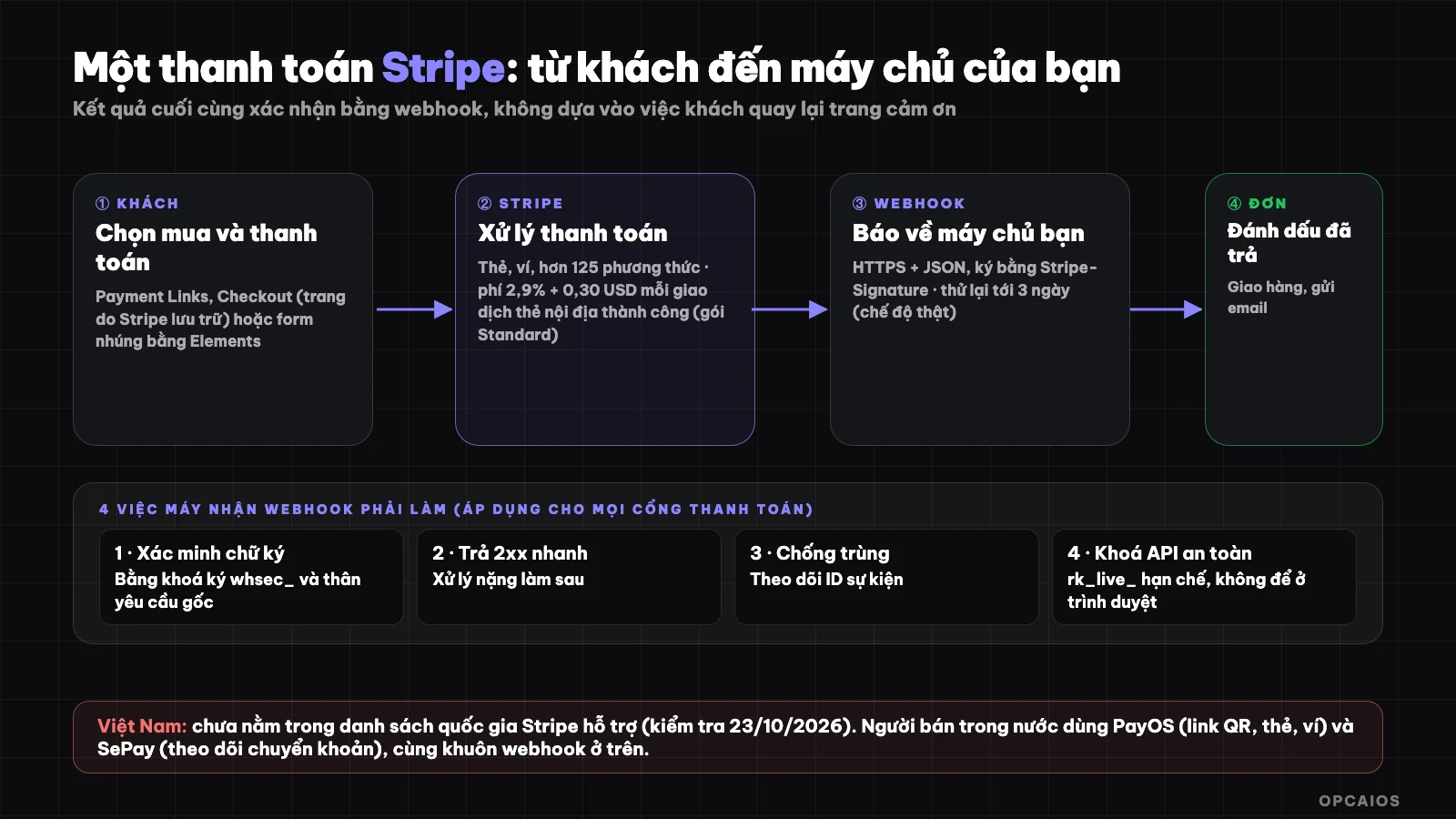
One payment through Stripe: customer pays, Stripe processes, webhook reports back to your server. Diagram: OPCAIOS.
What is Stripe?
Stripe is financial infrastructure for online businesses, including payment acceptance, recurring billing, invoicing, sales tax, fraud prevention and many other services. Stripe's homepage describes the platform as helping you accept payments, manage a business bank account and build a custom revenue model from the first transaction to the billionth. For example (hypothetically), a course seller can use Payment Links to collect money without writing code, while an app selling monthly subscription packages uses Billing.
The most common products with small sellers:
| Product | What it does |
|---|---|
| Checkout | Pre-built checkout page, Stripe stores and secures |
| Payment Links | Create payment links without writing code |
| Elements | Interface components to embed payment forms into your page |
| Billing | Collect recurring payments, subscription packages |
| Radar | Fraud prevention |
| Tax | Automatically calculate sales tax and VAT |
| Connect | Payments for marketplaces and multi-seller platforms |
| Atlas | Support for startup company formation |
According to Stripe's pricing page (checked on 23/10/2026), Stripe supports over 125 payment methods. The Standard plan charges 2.9% + $0.30 per successful domestic card transaction. First, small sellers usually start with Checkout or Payment Links. Second, anyone needing recurring payments uses Billing. Finally, multi-seller marketplaces use Connect.
Can Stripe be used in Vietnam?
According to Stripe's official "Global availability" page, Stripe is currently supported in certain countries and territories, and Vietnam is not on that list. In the region, the list includes Singapore, Thailand, Malaysia, Japan and Hong Kong, while Indonesia and India are in Preview form. When Stripe is supported in your country, you can sell to customers anywhere; so the requirement is the country where you register your business, not where your customers live.
For businesses in unsupported countries, this page states: you can use Stripe Treasury with stablecoins to manage money globally, but it clearly notes "payments are not yet supported" and offers an option to register interest. The list of supported countries changes over time, so check the official page before deciding. How to set up an entity in a supported country to use Stripe involves legal, tax and banking considerations; if you're considering this direction, ask an accountant or lawyer rather than following guides on the internet by yourself.
How Much Does Stripe Charge?
Stripe charges per successful transaction, with no setup fees or monthly fees. According to Stripe's official pricing page (checked 23/10/2026), the Standard plan is 2.9% plus $0.30 for each successful domestic card transaction. Example: a $100 domestic card transaction incurs 2.9% + $0.30, which is $3.20. The table below lists additional charges; first by card type, then currency conversion, finally disputes:
| Item | Fee |
|---|---|
| Domestic card | 2.9% + $0.30 per successful transaction |
| Manually entered card | Additional 0.5% |
| International card | Additional 1.5% |
| Currency conversion needed | Additional 1% |
| Klarna (buy now pay later) | 5.99% + $0.30 |
| Dispute | $15 per dispute received |
Additionally, the pricing page lists country-specific rates (under "Country-specific rates") and offers Custom plans for high-volume businesses. Payment Links use the standard fee table, with an optional custom domain at $10 per month. Since fees and terms vary by country and time, check the pricing page for your country.
How Does a Stripe Payment Work?
A Stripe payment involves three steps: the customer pays on Stripe's page or an embedded form, Stripe processes and reports the result via webhook, then your server updates the order. There are three common integration methods, from easiest to most flexible. The first is Payment Links, the second is Checkout, and the third is Elements:
- Payment Links: create a link in the dashboard, send to customers via email or message, no code needed. Good for selling courses, collecting deposits.
- Checkout: a pre-built payment page hosted by Stripe. According to the documentation, Checkout supports subscriptions, saving payment info for next time, Adaptive Pricing, and Managed Payments mode which handles sales tax and VAT across 80+ countries.
- Elements: build your own payment interface using Stripe components, most flexible but requires coding.
No matter which method you choose, according to Stripe documentation, the final payment result should be confirmed via webhook, not by the customer returning to a thank you page, since the customer might close their browser before the page loads. All three methods charge the Standard rate of 2.9% + $0.30 per successful domestic card transaction, and Payment Links uses the standard rate table. If you're new to the concept, read What is a Webhook?.
How Should I Safely Handle Stripe Webhooks?
A Stripe webhook is an HTTPS request in JSON format that Stripe sends to your address when an event occurs, such as a customer completing payment or a recurring charge succeeding. According to Stripe's official documentation (checked 23/10/2026), the receiver must do four things:
- Verify the signature: check that the request came from Stripe using the
Stripe-Signatureheader and thewhsec_signing secret for the endpoint. - Keep the original request body intact: Stripe needs the raw body to verify the signature.
- Return a 2xx code very quickly, before processing complex logic.
- Guard against duplicate processing: track event IDs, don't rely on event creation time to determine order.
Regarding retries, according to Stripe documentation: in live mode, Stripe tries to send an event for up to 3 days with increasing intervals; in test mode, Stripe retries 3 times over a few hours. This is also the standard pattern for all payment gateways: verify, prevent duplicates, reply fast, process later. For example, a course store should unlock access for a student only after the webhook has verified the signature and confirmed the correct amount, rather than trusting the thank you page.
How Should I Protect Stripe API Keys?
API keys determine who can do what with your Stripe account, so they need to be guarded like passwords. According to official documentation: the secret key in test mode starts with sk_test_ and has full permissions within the test environment; in live mode, you should use restricted keys (starting with rk_live_) that grant only the permissions you need, instead of the full-permission secret key sk_live_. Restricted keys help limit damage if exposed.
The accompanying rules: don't embed secret keys or restricted keys in source code or browser-based applications; store them in your server's secret vault or environment variables. When testing, use the test environment (sandbox) with test cards: transactions there don't move real money and can simulate successful payments, declined cards, disputes, refunds, and 3D Secure authentication.
How Vietnamese Sellers Collect Money When They Can't Use Stripe
Sellers in Vietnam typically use payment gateways and domestic money transfer services with the same framework as Stripe. This is the real-world experience of OPCAIOS: the website opcaios.org receives money through two channels.
- PayOS: creates online payment links (QR code, card, wallet according to integration documentation), with webhook signed by HMAC-SHA256. The website verifies the signature, asks PayOS again whether the order has been paid and the amount is correct, then only marks it as paid.
- SePay: a bank transaction monitoring service that sends a webhook when money arrives with an authentication key. The website matches the transfer content with the order code, then unlocks the course or ships the product.
Both follow the same processing flow on the website, consisting of four steps: (1) authenticate the request; (2) prevent duplicate processing; (3) mark the order as paid; (4) send delivery email and notify the shop owner. This framework is the same as Stripe's webhook framework above, so skills learned from Stripe can be reused for any gateway.
Comparing the Direction of Stripe, PayOS and SePay
The table below is not a fee comparison:
Comparison table of direction (not a fee comparison):
| Criteria | Stripe | PayOS | SePay |
|---|---|---|---|
| Payment type | Card, wallet and more than 125 methods | Payment link: QR, card, wallet | Bank transfer, transaction monitoring |
| Main market | Global, according to supported country list | Vietnam | Vietnam |
| Seller account in Vietnam | Not yet supported according to official list | Yes | Yes |
| How to report results | Webhook signed Stripe-Signature |
Webhook signed HMAC-SHA256 | Webhook with authentication key |
Fees and conditions of PayOS and SePay are determined by each provider and change over time; check their official pages and compare based on actual cost per order, like the cost calculation method in the post Which AI model should I choose? for all usage costs.
How Does Stripe Connect with AI?
Stripe has an MCP server that allows AI agents to interact with Stripe's API and search its documentation and support center. According to the documentation, you connect the MCP client via OAuth (when accessing on behalf of your Stripe account, choose real or sandbox account and permissions for each environment) or via an API key dedicated to the agent when the AI application needs independent, continuous access. With real money, start with a test environment, grant minimum permissions, prioritize read permissions, and maintain manual review before any refund or change; see more in the post What is MCP?.
Things to Remember When Using Stripe or Any Payment Gateway
A few points to keep in mind before accepting real money:
- PCI compliance: according to documentation, anyone processing, transmitting or storing card data must comply with PCI DSS, and compliance is shared responsibility. Using Stripe-hosted payment pages (Checkout, Payment Links) helps you avoid touching card numbers directly.
- Payment disputes: according to the pricing page, a single dispute costs $15, and responding yourself also costs an additional $15 (this amount is refunded if you win); prepare delivery proof and clear refund policy.
- Tax and legal: selling across borders involves taxes and regulations from each country; Stripe's Managed Payments helps handle sales tax and VAT, but you still need professional advice.
- Confirm via webhook: don't ship based only on the customer returning to the thank you page.
- Automate the process after payment: you can use tools like n8n, Zapier or Make to record orders in spreadsheets, send messages, create invoices; or server-side functions like Supabase Edge Functions to receive webhooks; put Cloudflare in front of your endpoint to filter strange access.
Frequently Asked Questions
What is Stripe and what is it used for?
Stripe is an online payment platform for websites and applications to receive money from cards, e-wallets and many other methods, collect recurring payments, issue invoices and prevent fraud. It has a pre-built payment page and an API suite for developers.
Can Stripe be used in Vietnam?
According to Stripe's supported countries page (checked 23/10/2026), Vietnam is not yet on the list, so businesses registered in Vietnam cannot open accounts directly. The list may change, so check the official page.
How much does Stripe charge?
Stripe's Standard plan charges 2.9% + $0.30 for each successful domestic card transaction, according to the official pricing page (checked 23/10/2026). Additional fees apply depending on the case: 1.5% for international cards, 1% if currency conversion is needed and 0.5% for manually entered cards. Each chargeback received costs $15. Stripe has no setup fee or monthly fee. Hypothetical example: a domestic card order worth $100 incurs 2.9% + $0.30 in fees, that is $3.20, according to that fee schedule. The pricing page also notes that fees per country may differ and there is a Custom plan for high-volume businesses. So first check the correct fee schedule for your country, then add any additional fees, finally compare with local payment gateways.
What should sellers in Vietnam use instead of Stripe?
Usually local payment gateways like PayOS for QR payment links, cards, e-wallets, and services like SePay to track bank transfers. OPCAIOS uses both. Compare the fees and actual conditions of each provider based on cost per transaction.
What do payment webhooks need to do to be safe?
Verify the signature of every request, keep the original request body intact, return a 2xx code very quickly, prevent duplicate processing using event ID and handle heavy logic afterwards. If you want to build payment workflows and automate them for small businesses, see OPCAIOS's AI application training course.
Source: homepage, pricing page, supported countries page and official documentation of Stripe (Checkout, Payment Links, webhook, API keys, testing, security, MCP; checked 23/10/2026); OPCAIOS's experience integrating PayOS and SePay. Prices, country list and features may change; information about PayOS and SePay only describes how OPCAIOS integrates them, not a fee comparison.
Translated from Vietnamese with AI. Read the original.
Want to apply this in your business?
Book a free 30-minute call (Vietnam time, in English or Vietnamese).