


What is HubSpot?
HubSpot is a customer relationship management (CRM) platform that combines marketing, sales, and customer service into a single data system. What makes HubSpot popular with small businesses is its free CRM plan: according to the official website (checked 23/10/2026), this plan is free for up to two users and 1,000 contacts, with no expiration date. This 2026 updated article has four parts:
- What HubSpot does, the free plan, and paid plans ranging from $15 to $75 per seat per month.
- How to connect via API, webhooks, and MCP.
- When a business should build its own CRM like OPCAIOS did.
- General considerations when choosing any CRM.
For example, a two-person team currently logging customers into a spreadsheet can switch to the Free plan without spending money.
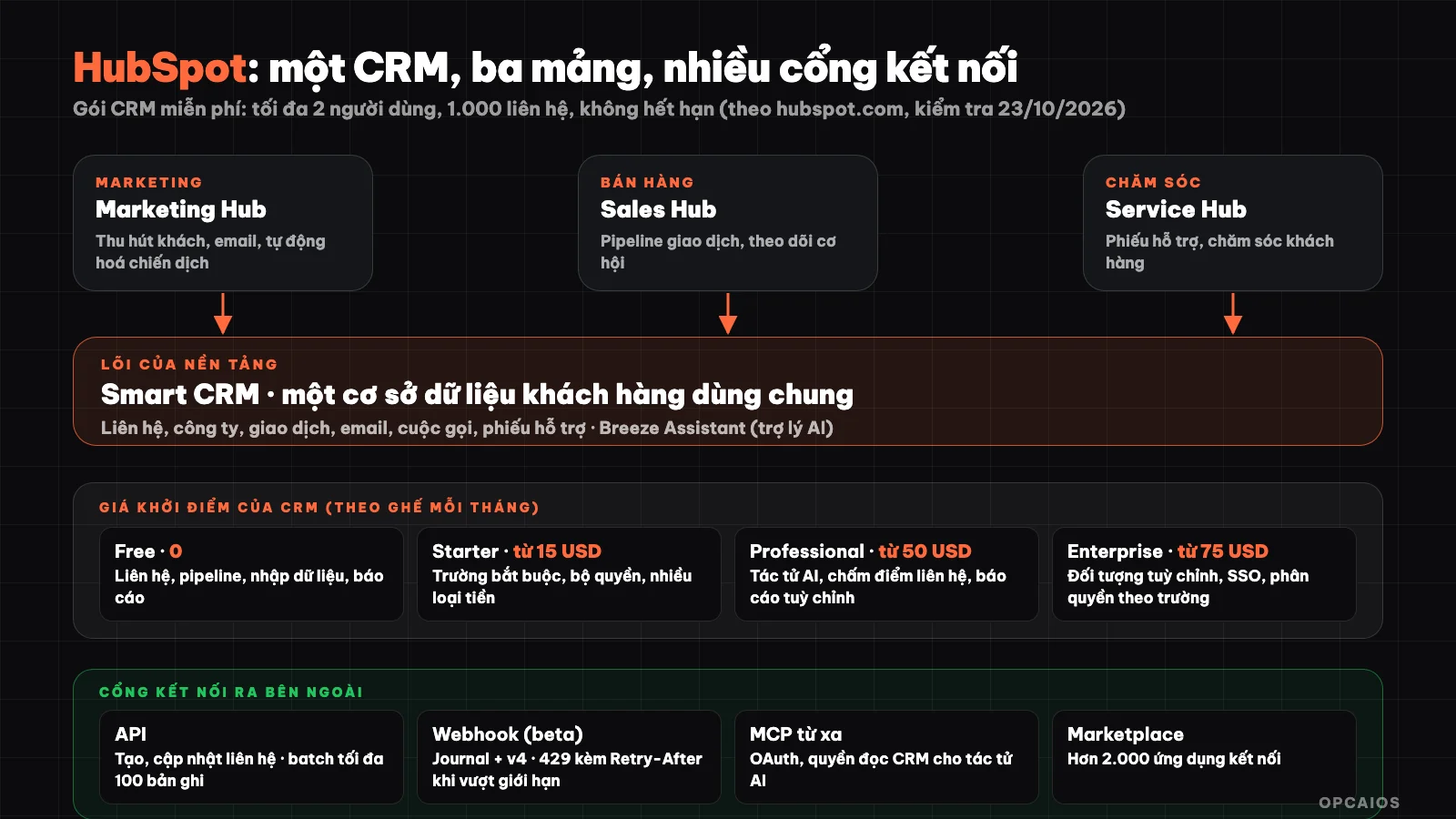
HubSpot brings three areas together around a customer database, and opens outward through API, webhooks, MCP. Diagram: OPCAIOS.
What is HubSpot?
HubSpot is a Customer Platform with CRM as its core, where marketing, sales, and customer service teams work together on a single dataset. HubSpot's homepage describes it as an agentic AI platform for all three areas. The CRM here is a database that stores every interaction with customers: contacts, companies, deals, emails, calls, and support tickets. HubSpot Marketplace, according to HubSpot (CRM page, checked 23/10/2026), has over 2,000 connected apps. The homepage lists main products, starting with Smart CRM, followed by Hubs by area and AI tools:
- Smart CRM: AI-powered CRM, the core of the entire platform.
- Marketing Hub, Sales Hub, Service Hub: attract customers and automate campaigns, manage pipelines, manage support tickets.
- Content Hub, Data Hub, Revenue Hub: content, data, and revenue.
- Agent Hub and Breeze Assistant: build AI agents and AI assistants within CRM.
- Small Business Bundle: Starter version of each product, for small businesses.
For example, a five-person shop can start with just the free Smart CRM and add Sales Hub when they need to manage pipelines.
What does HubSpot's free CRM include?
HubSpot's free CRM is a plan that lets you use a real CRM, not a trial version. According to HubSpot (CRM page, checked 23/10/2026), you get up to two users, 1,000 contacts, and unlimited customer data, completely free with no expiration date. The Free plan has five standout features:
- Contact management.
- Deal pipelines.
- CRM data import.
- Breeze Assistant, an AI assistant.
- Reporting dashboard.
HubSpot makes it clear you can upgrade from the free plan to a paid plan without moving your data, so this approach works well to test on real data without spending money yet. Also, the two-user and 1,000-contact limits are hard caps on the plan. For example, a three-person sales team or a list of 5,000 customers would need to pay.
How much does HubSpot CRM cost?
HubSpot CRM pricing is calculated per seat per month, increasing by plan. According to the official CRM page (checked 23/10/2026), the starting price for each plan is:
- Free: $0. Contacts, deal pipelines, data import, basic reporting, Breeze Assistant.
- Starter: from $15 per seat per month. Everything in Free, plus required fields, permissions, multiple currencies, remove HubSpot branding. Starter pricing has an offer only for new customers; HubSpot notes the offer has no fixed end date and may be discontinued at any time.
- Professional: from $50 per seat per month. Add customer service AI agent, duplicate management, contact scoring, calculated properties, custom reporting.
- Enterprise: from $75 per seat per month. Add custom objects, team organization, single sign-on (SSO), field-level permissions.
This is the starting price for CRM alone. Hubs like Marketing, Sales, or Service have separate pricing, and the detailed pricing page displays via JavaScript so this article doesn't include each Hub's numbers. For example, a four-person team on the Professional plan starting at 4 × $50 = $200 per month. Check the official pricing page for your account and region before deciding.
When Should You Use HubSpot?
HubSpot is a good fit for businesses that want a CRM that works out of the box, requires minimal programming, and is ready to pay per seat as they grow. A few real-world situations:
- Just starting to track customers: you're recording customers in spreadsheets and want a pipeline and task reminders. The Free plan is enough to try it out.
- Small sales team: you need to assign customers to team members, measure pipeline, and attach emails to customer records.
- Want to scale gradually: there's already a roadmap from Starter to Enterprise without changing systems.
On the other hand, think carefully if you have very specific sales processes (for example, matching bank transfer payments to orders), a large team (per-seat costs grow fast), or want to keep all customer data on your own infrastructure.
How Do You Connect HubSpot Through API and Webhooks?
HubSpot has a public API to create, read, and update CRM data from other systems. According to the developer documentation on the Contacts API:
- When creating a contact, you send properties like
email,firstname,lastnamein thepropertiessection. - Batch operations are limited to 100 records per request.
- You can update by an identifier property (
idProperty), for example using email as the key. The documentation notes that if you use email asidProperty, partial upsert is not supported; to do that you need a unique custom identifier property.
For webhooks, the current documentation covers Webhooks journal and v4 subscription API in beta form, which is not compatible with the old v3 webhooks. Journal allows your application to subscribe to real-time events, read back old event data, and take snapshots of CRM record state. Key points to know:
- Permission scopes: for example, to receive contact events you need
crm.contacts.readpermission, along with management permissions likedeveloper.webhooks_journal.read. - Rate limits: the subscription API is 50 requests per second per application, the snapshot API is 10 requests per second. Exceeding the limit returns a 429 code with a
Retry-Afterheader. The documentation notes these limits may change during beta. - Sequential processing: process journal files in time order using offset, save
currentOffsetfrom the response; journal file paths expire after a while so you need to download them soon. - Retry with backoff: use exponential backoff for temporary errors and rate limit errors.
If you're new to the concept, read What is a Webhook? and What is an API?. The processing pattern here is the same as any other gateway: authenticate, remember where you left off, and retry with backoff.
How Does HubSpot Connect to AI Via MCP?
The HubSpot MCP server is a gateway for AI tools to read and write CRM data, and HubSpot provides two types. According to official documentation (checked 23/10/2026):
- Remote server allows AI tools or MCP-compatible agents, like Claude (Anthropic), to read and write CRM data (contacts, deals, interactions).
- Developer server (runs locally) helps AI programming tools work with the HubSpot development platform through a command-line tool.
To use the remote server, first you create a user-level application on HubSpot's new development platform. Next, grant read permissions for the CRM objects you need to access. Finally, use the OAuth information to connect to the address mcp.hubspot.com through any MCP client. The documentation says the server supports OAuth 2.0 and will move to require OAuth 2.1 (with PKCE and refresh token exchange on each use).
Example commands from the documentation: summarize deals at a pipeline stage with values over $1,000, or summarize the five most recent support tickets from a customer. Safety advice is the same as with any MCP: start with read-only permissions, test on non-critical data, and keep a manual review step before any write operations. See also What is MCP?.
When Should You Build Your Own CRM Instead of Using HubSpot?
Building your own CRM makes sense when your processes are unique and you already have a website and your own database. This is OPCAIOS's real experience: opcaios.org doesn't use HubSpot but builds its own CRM within the same database. The self-built system has four parts:
- Customer intake.
- Tasks and processing time limits (SLA).
- Payments and customer sources.
- Zalo and Messenger inboxes.
The reason is that domestic bank transfers, customer sources from domestic social networks, and order data already exist within the website, so connecting them to a private CRM is simpler than syncing to an external system like HubSpot. This is a choice for OPCAIOS's scale, not a general recommendation.
Comparison by direction, not by quality assessment:
| Criteria | HubSpot | Self-built CRM |
|---|---|---|
| Time to start | Minutes with Free plan | Weeks to months |
| Cost | Free to pay per seat | Development and operating costs |
| Unique processes | By preset configuration, add via API | Your choice |
| Data | On HubSpot's infrastructure | On your infrastructure |
| Maintenance | HubSpot handles it | You handle it |
Many businesses start with HubSpot Free, measure what they actually need, then only build their own when requirements are clear. If you already have data in your own database like Supabase, two-way syncing via Make, n8n, or Zapier is also an option.
Notes When Using HubSpot or Any CRM
- Start from process, not tool: map out the steps from getting a customer to collecting payment before configuring.
- Clean data matters more than features: standardize how you write names, phone numbers, and customer sources from the start; duplicates are a common cause of wrong reports.
- Personal data: CRM contains customer personal information; collect only what's necessary, set permissions by role, and comply with current personal data protection regulations.
- Check limits and pricing carefully: Free plan has a ceiling on users and contacts, per-seat pricing changes over time; read the official pricing page.
- Restrict API keys and OAuth permissions: give each application only the minimum permissions needed, don't store keys in code running in the browser.
Frequently Asked Questions
What is HubSpot?
HubSpot is a customer platform with CRM as its core, bringing marketing, sales, and customer service into one data system. It has a free CRM plan and paid plans priced per seat.
Is HubSpot CRM free?
Yes. According to the official page (checked 23/10/2026), the free CRM supports up to two users and 1,000 contacts, with no limit on customer data and no expiration date. Going beyond those limits requires upgrading to a paid plan.
How much does HubSpot CRM cost?
According to the official CRM pricing page (checked 23/10/2026), the starting price is $15 per seat per month for Starter (with offers for new customers), $50 for Professional, and $75 for Enterprise, while the Free plan is $0 for up to two users. Other Hubs like Marketing, Sales, and Service have separate pricing tables, so check the pricing page. First, start with Free to measure your real needs. Next, upgrade only when you exceed 2 users or 1,000 contacts. Finally, compare the total per-seat cost against the cost of building your own. For example, a 3-person team on Starter costs around 3 × $15 = $45 per month, not counting other Hubs.
Can HubSpot connect with AI and automation tools?
Yes. HubSpot has a public API, webhooks (journal and v4 are in beta), over 2,000 apps in the Marketplace, and an MCP server for AI agents to read CRM data via OAuth. You can also connect via Make, n8n, or Zapier.
When should you build your own CRM instead of using HubSpot?
When your processes are unique, data already lives in your own system, and you have someone to maintain it. OPCAIOS builds its own CRM within its website. Want to set up customer flows and automate for a small business? Check out OPCAIOS's AI application training course.
Source: official site, CRM page, and official developer documentation of HubSpot (Contacts API, Webhooks journal v4, MCP; checked 23/10/2026); OPCAIOS's experience building its own CRM. Pricing, limits, and features may change; pricing for each Hub is not included because the pricing page cannot be read automatically.
Translated from Vietnamese with AI. Read the original.
Want to apply this in your business?
Book a free 30-minute call (Vietnam time, in English or Vietnamese).