


Open Notebook là gì?
Open Notebook là một ứng dụng nghiên cứu và ghi chú mã nguồn mở, tự lưu trữ (self-host), được làm ra để thay thế Google NotebookLM: bạn đưa PDF, video, âm thanh, trang web vào từng "sổ tay", rồi trò chuyện với tài liệu, tìm kiếm, ghi chú và tạo podcast nhiều giọng. Theo API GitHub (đọc ngày 04/11/2026), kho lfnovo/open-notebook có 41.532 sao, giấy phép MIT, được tạo ngày 21/10/2024 và vẫn có commit mới ngay trong ngày 04/11/2026. Bản phát hành mới nhất trên GitHub là v1.15.0 (04/10/2026). Phần mềm miễn phí, nhưng bạn trả tiền cho nhà cung cấp AI mình chọn, hoặc tự chạy mô hình cục bộ. Bài này đi qua: Open Notebook là gì và ai làm, tính năng, chi phí thật, cách cài bằng Docker, rủi ro bảo mật, so với NotebookLM và khi nào nên dùng.
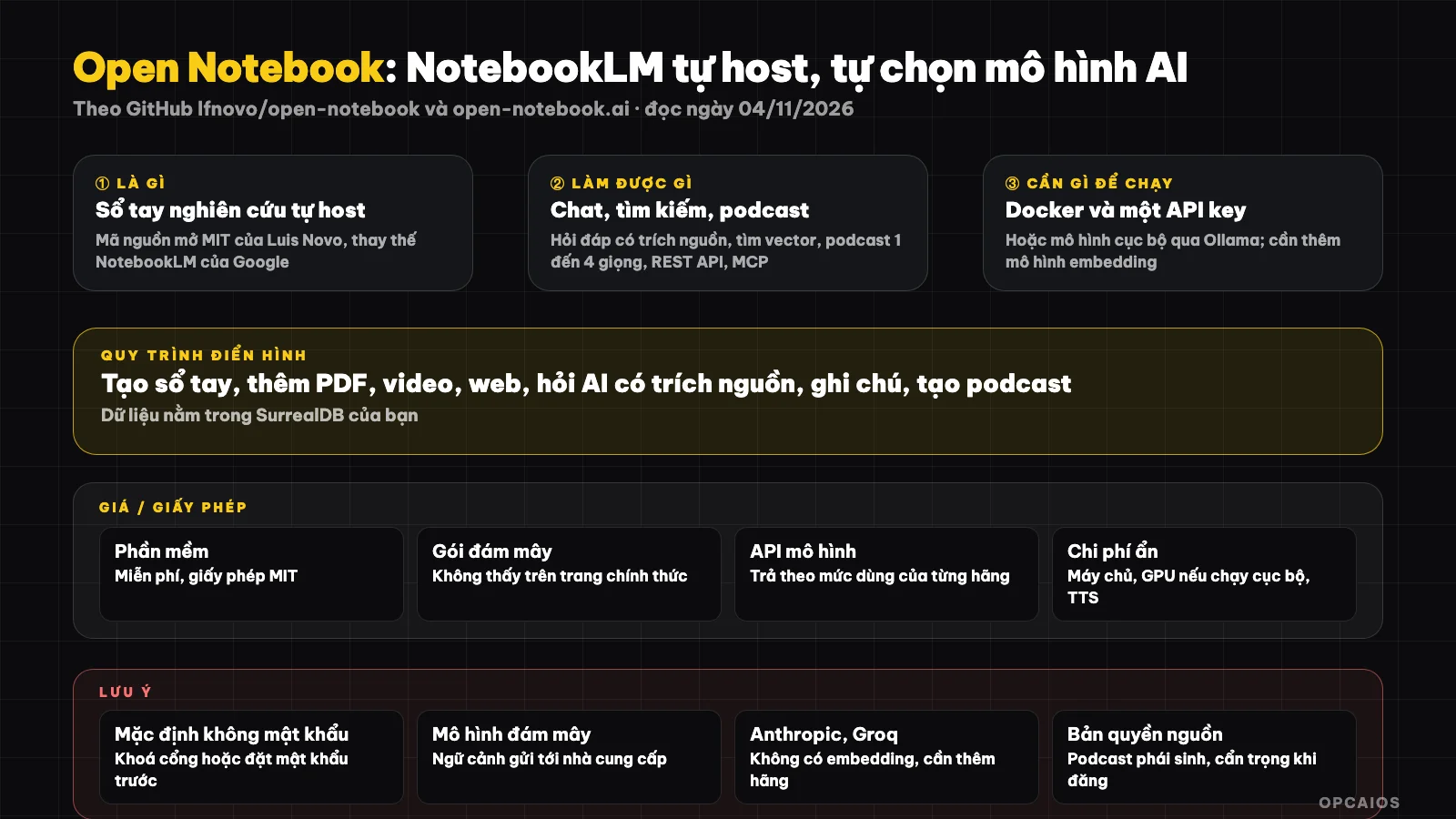
Open Notebook gom tài liệu vào sổ tay, rồi để mô hình AI bạn chọn trả lời có trích nguồn. Sơ đồ: OPCAIOS.
Open Notebook là gì và ai tạo ra?
Open Notebook là phần mềm nghiên cứu cá nhân chạy trên máy hoặc máy chủ của bạn, do Luis Novo (tài khoản GitHub lfnovo) khởi xướng và cộng đồng đóng góp. README trên GitHub (đọc ngày 04/11/2026) tự mô tả đây là lựa chọn mã nguồn mở, đề cao quyền riêng tư, thay cho NotebookLM của Google.
Ý tưởng cốt lõi giống NotebookLM: bạn gom nguồn tài liệu theo dự án, rồi hỏi AI dựa trên chính các nguồn đó. Khác biệt nằm ở quyền kiểm soát. Với NotebookLM, dữ liệu và mô hình đều nằm trên hạ tầng Google. Với Open Notebook, dữ liệu nằm trong cơ sở dữ liệu SurrealDB do bạn chạy, còn mô hình thì bạn tự chọn: OpenAI, Anthropic, Google, Mistral, DeepSeek, OpenRouter, hay mô hình chạy cục bộ qua Ollama và LM Studio. Phần kết nối nhiều nhà cung cấp dựa trên thư viện Esperanto của cùng tác giả.
Về công nghệ, theo README, phần sau dùng Python và FastAPI, giao diện dùng Next.js và React, có LangChain cho phần xử lý AI. Trang chính thức open-notebook.ai (đọc ngày 04/11/2026) nhắm tới nhà nghiên cứu, sinh viên và người làm chuyên môn muốn học sâu mà vẫn giữ kín dữ liệu. Nếu chưa quen cách AI trả lời dựa trên tài liệu, xem RAG là gì?.
Open Notebook có những tính năng chính nào?
Open Notebook gồm sổ tay nhiều nguồn, chat có trích nguồn, tìm kiếm toàn văn và vector, ghi chú có AI hỗ trợ, biến đổi nội dung theo mẫu, tạo podcast 1 đến 4 giọng, REST API và tích hợp MCP. Bảng dưới tóm tắt theo README trên GitHub, đọc ngày 04/11/2026.
| Tính năng | Mô tả ngắn |
|---|---|
| Sổ tay nhiều nguồn | Mỗi dự án nghiên cứu là một sổ tay, chứa PDF, tài liệu Office, video, âm thanh, trang web |
| Chat theo ngữ cảnh | Hỏi đáp dựa trên nguồn đã thêm, câu trả lời trích nguồn, ghi chú đã dùng |
| Kiểm soát ngữ cảnh | Chọn cụ thể nguồn nào được gửi cho mô hình AI |
| Tìm kiếm | Tìm toàn văn và tìm theo vector trên toàn bộ nội dung |
| Ghi chú | Tự viết hoặc nhờ AI tạo ý chính, tóm tắt |
| Biến đổi nội dung | Các thao tác dựng sẵn hoặc tự định nghĩa để tóm tắt, trích ý |
| Podcast | Tạo podcast 1 đến 4 người nói với hồ sơ giọng và kịch bản tuỳ chỉnh |
| Mô hình suy luận | Hỗ trợ các mô hình "thinking" như DeepSeek-R1, Qwen3 |
| REST API và MCP | Tự động hoá qua API; nối với Claude Desktop, VS Code và ứng dụng MCP khác |
| Mật khẩu tuỳ chọn | Bảo vệ khi triển khai công khai |
Một chi tiết quan trọng: mỗi nhà cung cấp hỗ trợ loại mô hình khác nhau. Theo bảng trong README, Anthropic và Groq không có mô hình embedding, nên nếu dùng Claude để chat, bạn vẫn cần thêm một nhà cung cấp có embedding (như OpenAI, Google, Mistral hoặc Ollama) để tìm kiếm vector hoạt động. Podcast thì cần nhà cung cấp có chuyển văn bản thành giọng nói, như OpenAI, Google, ElevenLabs. Tích hợp MCP giúp các tác tử AI đọc sổ tay của bạn; xem MCP là gì?.
How much does Open Notebook cost, what's the license, and what are the limits?
Open Notebook is free, MIT license, with no paid tiers on the official site (as of 04/11/2026). The real costs come from three sources: API calls to AI providers, a server if you want remote access, and hardware if you run models locally.
| Item | Details |
|---|---|
| Software | Free, MIT license (GitHub, as of 04/11/2026) |
| Cloud plans sold by the project | None visible on open-notebook.ai (as of 04/11/2026) |
| Model API | Pay-as-you-go for OpenAI, Anthropic, Google, etc. (pricing per provider, before tax, subject to change) |
| Local models | No API costs, but needs enough RAM, ideally a GPU or Apple Silicon |
| Server | Optional, if you want access from multiple devices |
| Podcast | Extra cost to convert text to speech |
Compared to NotebookLM, the README notes that Open Notebook only charges for AI usage, while NotebookLM has a free tier plus monthly plans. We haven't cross-checked NotebookLM's pricing table in this post. A notable limit: the README says supporting many users is mentioned in VISION.md as a direction, not a feature with a launch date. Right now Open Notebook works best for one person or a small team sharing one installation.
How do I install Open Notebook and get started?
The official way is Docker Compose with two services: surrealdb (the database) and open_notebook (the interface, API, and background processes). You need Docker Desktop or Docker Engine, plus an API key or a local model server. According to the README (as of 04/11/2026), here are the steps.
- First, create a folder and download the official config file:
mkdir open-notebook && cd open-notebook
curl -o docker-compose.yml https://raw.githubusercontent.com/lfnovo/open-notebook/main/docker-compose.yml
- Next, open
docker-compose.ymland change theOPEN_NOTEBOOK_ENCRYPTION_KEYvalue to a long secret string you create yourself. This key encrypts the API keys you save, so keep it safe. - Start the services:
docker compose up -d
- Wait about 30 seconds, then open
http://localhost:8502in your browser. - Go to Models, add a provider setup (paste the API key, or enter a Base URL if using Ollama), click Test to verify the connection.
- Finally, add at least one language model and one embedding model, click Auto-assign Defaults, then create your first notebook.
To run fully locally, the README points to a separate guide using Ollama in Docker; see also What is Ollama? and What is Docker?.
What security and data risks does Open Notebook have?
The biggest risk with Open Notebook is exposing the interface to the network. The README warns that by default the interface (port 8502) and API (port 5055) are open on all network interfaces and have no password. If your machine is on a shared network or is a server, you must restrict both ports to localhost only, or set the OPEN_NOTEBOOK_PASSWORD variable before running.
Second, "self-hosted" doesn't mean your data stays on your machine. When you use cloud models like OpenAI or Anthropic, the document excerpts used as context are sent to that provider and fall under their data policy. Only with local models does the content stay entirely on your machine. For documents with customer personal data, consider current data protection rules; this section is for reference only, not legal advice.
Third is source copyright. Using books, paid articles, or other people's videos in a notebook for personal learning is different from using podcasts you create for public posting. Podcasts derived from copyrighted material could infringe copyright if you publish them. Finally, back up your SurrealDB data and encryption key; if you lose the key, any saved API keys cannot be decrypted.
How Open Notebook compares to other options
Open Notebook is strong in control and model choice, while NotebookLM is strong in needing no setup. The table below is a general description, not a measurement.
| Tool | Strengths | Considerations |
|---|---|---|
| Open Notebook | Self-hosted, over 20 providers, 1 to 4 voice podcasts, REST API, MCP | Requires self-setup, self-security, self-paid API |
| NotebookLM | Use immediately on web, no setup needed | Data on Google, Google models only |
| Open WebUI | Multi-model chat interface, document library | Leans more toward chat than research notebook |
| Obsidian plus AI plugin | Markdown notes, linking, file ownership | AI Q&A depends on plugin |
| Dify | Build RAG apps and chatbots for others to use | Heavier, not a personal note-taking tool |
When to use Open Notebook?
Open Notebook fits when you have many documents to research, want to choose your own model, and don't want to push data to a closed platform. If you only need to summarize a few files occasionally, NotebookLM or a chat assistant is enough.
| Situation | Suggestion |
|---|---|
| Sensitive internal documents, don't want on Google | Open Notebook with local model via Ollama |
| Want Claude or GPT with your own document library | Open Notebook, add an embedding provider |
| Turn learning materials into podcasts to listen while traveling | Open Notebook with TTS provider (for personal use) |
| Don't know Docker, need to use today | NotebookLM first, explore Open Notebook later |
| Need document chatbot for customers | Dify or dedicated RAG tool |
Example (hypothetical): a person doing OPC collects 30 PDF files on household business tax into one notebook, asks "what are the filing deadlines in the year", gets an answer with source excerpts, then double-checks the original text before applying it.
OPCAIOS experience
We recently added Open Notebook to the Repo list in the Utilities section of opcaios.org after reading the README and checking the repository is still being maintained; we have not run it yet, so this section states the criteria we use to consider it, not an assessment after use.
Our main knowledge base is currently an Obsidian vault. When considering adding Open Notebook, we looked at four things. First, is the repository still being updated: it has a commit on 04/11/2026 and version v1.15.0 in October 2026, check. Next, license: MIT, commercial use without worry. Third, hidden costs: must budget API fees for chat, embedding and voice, or invest in a machine to run local models. Finally, can it replace the tool we're using: Open Notebook doesn't replace Obsidian, but can sit alongside as a place to "read and ask" source documents, while Obsidian holds refined notes. We will also lock the network port before running, as the README warns.
Read more: What is NotebookLM?, What is second brain?, What is RAG?, What is PageIndex?, 5 best second brain tools 2026.
Frequently Asked Questions
Is Open Notebook free?
Yes. Open Notebook is open source software under the MIT license, according to GitHub as of 04/11/2026, and the open-notebook.ai site does not sell any paid plans. You don't pay for the software, but you pay for the AI. If you use OpenAI, Anthropic or Google, you pay according to each provider's API usage rates. If you use local models through Ollama, you don't spend on API but need a powerful enough machine. If you want to open it from a phone or another machine, you may need an additional server. Estimate these three costs before switching fully.
How is Open Notebook different from NotebookLM?
The main difference is who holds the data and who chooses the model. NotebookLM runs on Google's infrastructure and uses Google's models. Open Notebook runs on your machine or server, lets you choose from over 20 AI providers, has a REST API and MCP integration. The project's README also mentions podcasts with 1 to 4 speakers, compared to NotebookLM's two-person format. In return, NotebookLM works directly in the browser, while Open Notebook requires you to install Docker, configure the model and manage security yourself. These comparisons come from Open Notebook's README and have not been verified by us.
Does Open Notebook need a GPU?
Not required. If you use cloud models like OpenAI, Anthropic or Google, the heavy computation sits with the provider, your machine only runs the interface, API and SurrealDB database in Docker. GPU is only needed if you want to run language and embedding models locally through Ollama or LM Studio so data doesn't leave your machine. Then a machine with lots of RAM, a GPU or Apple Silicon chip will answer much faster. The README does not specify a minimum configuration, and we have not measured it.
Can someone who doesn't know code use Open Notebook?
Yes, if you're willing to learn a bit about Docker. The entire installation is just downloading a config file, editing one encryption key line and running one command, then all operations are on the web interface: add a provider, choose a model, create a notebook, drag files in. The project also has a GPT assistant that guides you through installation and a Discord channel for support. The hard part for newcomers is securing the network port and understanding why you need a separate embedding model. You can ask an agent like Claude Code to do it step by step with you.
Is using Open Notebook for company data safe?
Safety depends on how you configure it. According to the README, the interface and API have no password by default and are open on all network interfaces, so you must restrict the port or set a password before using it. If you choose a cloud model, document portions sent as context will go to that provider; to keep everything private, use local models. You also need to back up the database and encryption keys. With customer personal data, check current regulations; this is not legal advice. To learn how to bring AI into work safely, see the AI application training course from OPCAIOS.
Source: GitHub lfnovo/open-notebook (README, API, Releases page, read 04/11/2026), official site open-notebook.ai (read 04/11/2026); not read/not verified: VISION.md, detailed security documentation in docs folder, NotebookLM pricing table, comparisons with NotebookLM mentioned by the project itself; star count and pricing may change. Experience is from OPCAIOS.
Translated from Vietnamese with AI. Read the original.
Want to apply this in your business?
Book a free 30-minute call (Vietnam time, in English or Vietnamese).