


What is Open WebUI?
Open WebUI is an open-source, self-hosted AI chat interface that lets you chat with models running on your machine via Ollama or with cloud models via OpenAI-compatible APIs, in an interface like ChatGPT but where you control your data. According to GitHub (API, read 04/11/2026), the open-webui/open-webui repository was created on 06/10/2023, has around 157,700 stars, with the most recent code push on 03/11/2026. The code uses a proprietary "Open WebUI License" from version 0.6.6 (April/2025) with branding requirements; version 0.6.5 and earlier use BSD-3-Clause. This article covers definition, features, licensing, installation, hidden costs, and when a one-person company should use it.
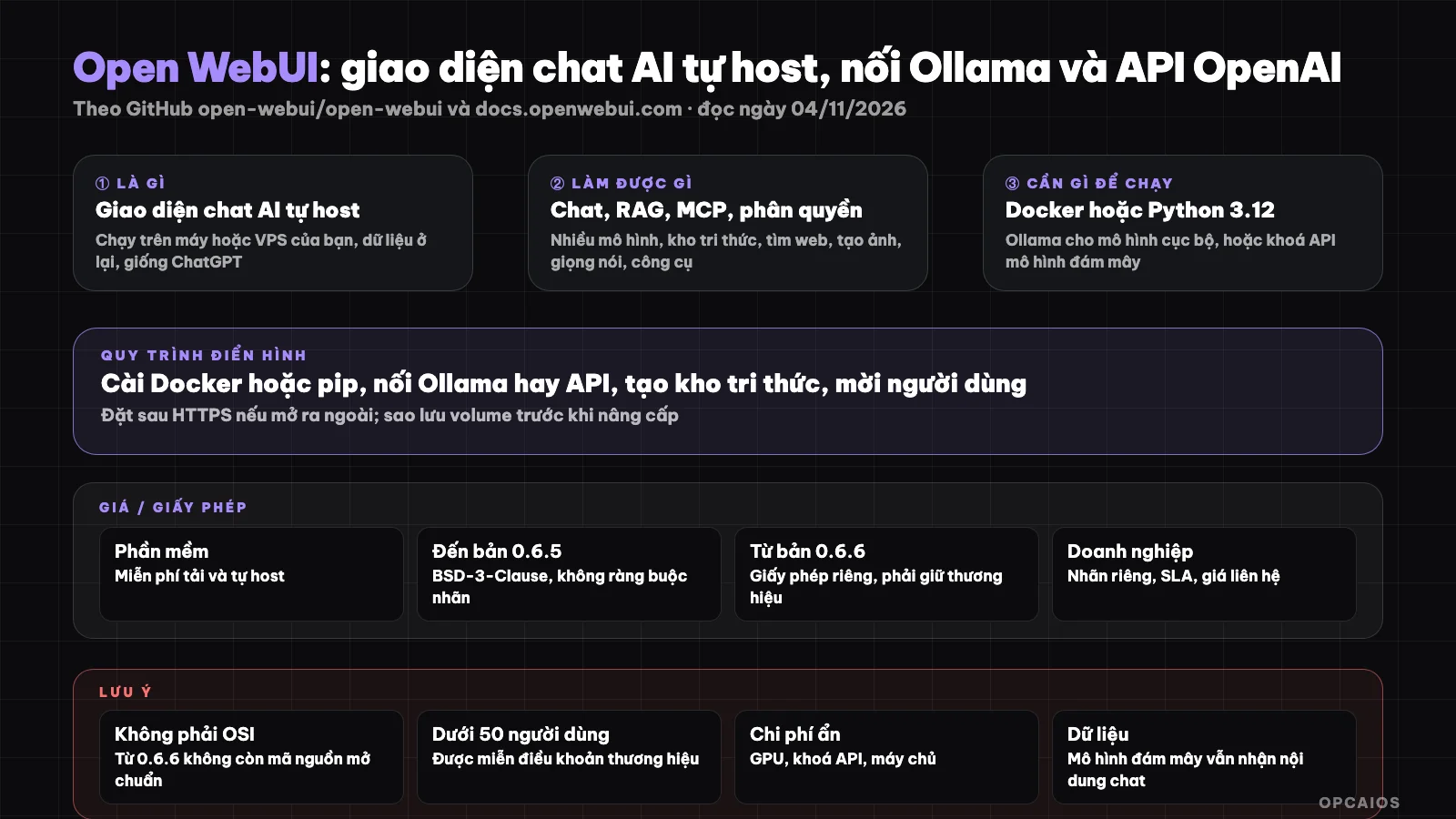
Open WebUI sits between users and AI models, keeping chat history and documents on your server. Diagram: OPCAIOS.
What is Open WebUI and who created it?
Open WebUI is a self-hosted AI chat platform that can run completely offline, connecting to Ollama and any OpenAI-compatible API. The lead author is Timothy Jaeryang Baek (GitHub: tjbck); the project sits under the GitHub organization open-webui and has a company behind it providing enterprise packages.
The project started in late 2023 as Ollama WebUI, a simple web interface for Ollama, then renamed to Open WebUI when it began supporting more model sources. According to README (GitHub, read 04/11/2026), the project now has desktop apps for macOS, Windows, Linux, multiple Docker image variants (:main, :slim, :cuda, :ollama), and a supporting ecosystem: Open Terminal (turns Open WebUI into an agent framework), Knowledge Base Sync (syncs directories and code repositories into knowledge base), and Open WebUI Computer. Around 157,700 stars is among the highest numbers for self-hosted LLM interfaces on GitHub as of the read date.
What can Open WebUI do?
Open WebUI bundles many features familiar to ChatGPT users into one self-hosted version: multiple models, documents and RAG, web search, image generation, voice, Python tools, MCP, and permissions. Summary table from the features page at docs.openwebui.com (read 04/11/2026).
| Feature group | Details from official docs |
|---|---|
| Multiple models | Ollama, OpenAI, Anthropic or OpenAI-compatible providers; switch models mid-conversation; compare two models |
| Documents and RAG | Vector search knowledge base; 13 vector databases (ChromaDB, PGVector officially maintained); hybrid BM25 plus vector search; 8 extractors like Tika, Docling |
| Web search | AI searches the web in real-time, cites sources in chat |
| Image and voice generation | GPT-Image, Gemini or ComfyUI; speech-to-text and vice versa |
| Tools and MCP | Python tools run in chat; MCP servers via Streamable HTTP; OpenAPI endpoints become tools |
| Users and permissions | Roles, groups, model-level permissions; SSO/OIDC/LDAP, SCIM 2.0, API keys, MFA |
For non-coders, the most valuable part is RAG: drag documents into the knowledge base then ask questions. See also What is RAG? and What is MCP?.
Is Open WebUI Free? License and Limits
Open WebUI is free to download and self-host, but from version 0.6.6 the code uses a proprietary license with branding retention terms, and the official license page clarifies this is no longer open source by OSI definition. The real costs lie in servers, GPUs, or API keys.
| Item | Information (docs.openwebui.com/license, read 04/11/2026) |
|---|---|
| Software | Free to download, self-host |
| License up to 0.6.5 | BSD-3-Clause, no branding requirement |
| License from 0.6.6 (19/04/2025) | Cannot remove, hide or change "Open WebUI" branding; cannot add your own organization logo |
| Exceptions | Up to 50 users in 30 days; major contributors have written permission; commercial license |
| Commercial package | White label, SLA, long-term support; official site does not publish pricing |
| Hidden costs | GPU or high-RAM machine if running models locally; API keys if using cloud models; VPS if accessing remotely |
Excludes tax, subject to change. This is a summary, not legal advice. For a one-person company with under 50 accounts, branding terms barely matter; organizations wanting custom labeling should read the LICENSE file carefully.
How to Install Open WebUI, and What GPU or API Keys Do I Need?
Installing Open WebUI has two main paths per the README: Docker or pip with Python 3.12. Open WebUI itself is lightweight; models are the resource hog, so you need a GPU if running locally via Ollama, or API keys if using cloud models.
docker run -d -p 3000:8080 --add-host=host.docker.internal:host-gateway -v open-webui:/app/backend/data --name open-webui --restart always ghcr.io/open-webui/open-webui:main
Or with Python:
pip install open-webui
open-webui serve
Steps per the README and quick start docs (read 04/11/2026):
- First, pick a model source: if your machine has a GPU or Apple Silicon Mac, install Ollama to run models locally; on a weak machine, prepare API keys from OpenAI, Anthropic, or a routing gateway like 9Router.
- Next, run Open WebUI via Docker (open
http://localhost:3000) or pip (openhttp://localhost:8080). Add the flag-e OLLAMA_BASE_URL=...if Ollama is on another machine,-e OPENAI_API_KEY=...for OpenAI,--gpus allwith the:cudaimage if you have an Nvidia GPU. - The first account to sign up becomes admin; go to settings to connect models, enable web search, create knowledge bases.
- Finally, if you want access from outside, put it on a VPS behind an HTTPS proxy; if the VPS has no GPU, use the
:slimimage and call all models via API.
The :slim image is lighter (around 197 MB download, around 300 MiB RAM idle per the project, unverified) but needs external services for embeddings and document extraction. For example (hypothetical): a freelance consultant wants to Q&A across 200 PDF contract files without uploading to an external service. They install Ollama with an 8B model on a MacBook, install Open WebUI via pip, create a knowledge base and drag in the PDFs; data stays on the machine. We have not benchmarked speed or answer quality for this setup. See also installing Ollama and Open WebUI on a personal machine.
Limits, Risks and Security Notes
Self-hosted Open WebUI does not mean data never leaves the machine: if you connect to a cloud model, chat content and RAG documents go to that provider per their policy. Points to weigh:
- Internet exposure: has login, permissions, MFA, but still a web app; put it behind HTTPS, update often. The project accepts vulnerability reports via GitHub Security Advisories.
- Python tools in chat: runs code on your server; enable only for trusted users.
- Prompt injection: documents and web pages the AI reads may hold hidden instructions; see what is prompt injection?.
- License: branding terms matter if over 50 users or you want to rebrand.
- Versions: the project releases frequently; back up the data volume before each upgrade.
The license and personal data sections are for reference only, not legal advice; we have not checked against Vietnamese law.
Open WebUI versus Other Options
Open WebUI is an interface for end users, not a framework for programmers or a workflow building tool. The table below is a general description, not a measurement.
| Tool | Position | How It Differs from Open WebUI |
|---|---|---|
| ChatGPT, Claude.ai | Cloud chat service | No installation needed, but data sits on the provider's server |
| LM Studio | Desktop application running local models | For one person on one machine; no user management |
| Dify | Drag-and-drop LLM application platform | For building chatbots for customers; Open WebUI for internal chat use |
| Ollama | Run local models | It's the backend layer; Open WebUI adds RAG, user management, tools |
| LangChain | Programming library | For writing applications; not a ready-to-use interface |
When Should You Use Open WebUI?
Open WebUI works well when you need a self-hosted chat interface with RAG and user management without wanting to code.
| Scenario | Recommendation |
|---|---|
| One person chatting with a local model, dragging and dropping documents | Use it, install on your personal machine |
| Team under 50 people needing shared chat, user permissions, multiple models | Use it, deploy on a VPS behind HTTPS |
| Chatbot embedded in a website for customers | Consider Dify; Open WebUI is not built for this |
| Multi-step automation workflows | n8n or code agents |
| Branded and resold to customers | Read the license carefully; may require a business plan |
OPCAIOS's Experience
We added Open WebUI to our Repo list in the Utilities section on opcaios.org after reading the README and checking that the repository is still maintained (last code push on 03/11/2026); we have not yet run the new version, so this section outlines the criteria we use to consider it, not an evaluation after use. Four criteria:
- Repository still maintained: yes, frequent releases, large community.
- License: from 0.6.6 there are brand terms; one internal user is not affected, but we note it so we do not mistake it for pure open source.
- Hidden costs: we already have 9Router as a model routing gateway, so in theory we could connect Open WebUI to it; real costs are still model tokens and running hardware, we have not measured yet.
- Can it replace the tools we use: our daily work runs through code agents (Claude Code, Antigravity, Codex) more than a chat interface, so Open WebUI is a supplementary tool for document Q&A.
Read more: What is Ollama?, What is RAG?, free AI tech stack for OPC, 5 best tools for running AI locally in 2026.
Frequently Asked Questions
Does Open WebUI require Ollama?
No, it's not mandatory. Open WebUI connects to Ollama to run models locally, but it can also connect to any OpenAI-compatible API or a routing gateway. According to the README (GitHub, read on 04/11/2026), you set the API key via the OPENAI_API_KEY environment variable or in admin settings. If you don't have a GPU, run the :slim image and call cloud models; in that case you pay tokens to the provider, not to Open WebUI.
Is Open WebUI open source?
The code is public on GitHub, you can download and self-host for free. However, the official license page (read on 04/11/2026) states that from version 0.6.6 the license includes a trademark clause and is no longer recognized by OSI as open source; version 0.6.5 and earlier follow BSD-3-Clause. If you have under 50 users in 30 days, the trademark clause does not apply. This is a summary, not legal advice.
What machine specs can run Open WebUI?
Open WebUI itself is lightweight: the documentation states the :slim image uses around 300 MiB RAM when idle (as announced by the project, unverified by us). The heavy part is the model. Running a 7B to 8B model locally typically requires a GPU with 8 GB VRAM or an Apple Silicon Mac with 16 GB RAM according to general community experience; we haven't measured this ourselves. For weaker machines, run the model via API and use Open WebUI only as an interface.
Does Open WebUI support Vietnamese?
The interface has multiple languages translated by the community; we haven't checked whether the Vietnamese version is complete in the current release. The quality of Vietnamese responses depends on the model you connect, not on Open WebUI. For Vietnamese RAG, choose a multilingual embedding model in the document settings section.
Can someone without coding knowledge use Open WebUI?
Yes, if they're willing to install it once. The hardest step is installing Docker or Python 3.12 and running one command; after that everything is done through a web interface: connecting a model, building a knowledge base, enabling web search, inviting users. Start on your personal machine, get familiar with it, then move to a VPS later. If you want guidance on choosing a model, building RAG for company documents, and setting security rules, see OPCAIOS's AI application training course.
Sources: GitHub open-webui/open-webui (README, API, read on 04/11/2026), docs.openwebui.com (homepage, features, license, read on 04/11/2026); not read/not verified: enterprise package pricing, RAM and storage figures announced by the project, Vietnamese translation, star count and pricing may change. Experience is from OPCAIOS. This post is not legal advice.
Translated from Vietnamese with AI. Read the original.
Want to apply this in your business?
Book a free 30-minute call (Vietnam time, in English or Vietnamese).