


What is Rowboat?
Rowboat is an open source AI assistant that runs on your computer: it indexes your emails, meetings, Slack, and conversations into a Markdown-formatted knowledge graph, then uses that context to compose emails, write meeting notes, control your browser, and delegate coding tasks to Claude Code or Codex. According to the GitHub API (read on 04/11/2026), the rowboatlabs/rowboat repository has approximately 18,129 stars, Apache-2.0 license, was created on 13/01/2025, and still receives new code pushes as of 03/11/2026. The README is tagged Y Combinator S24 (claimed by the project, not verified). This post explains what Rowboat can do, where the real costs lie, how to install it, data risks, how it compares to alternatives, and the criteria we use to evaluate it.
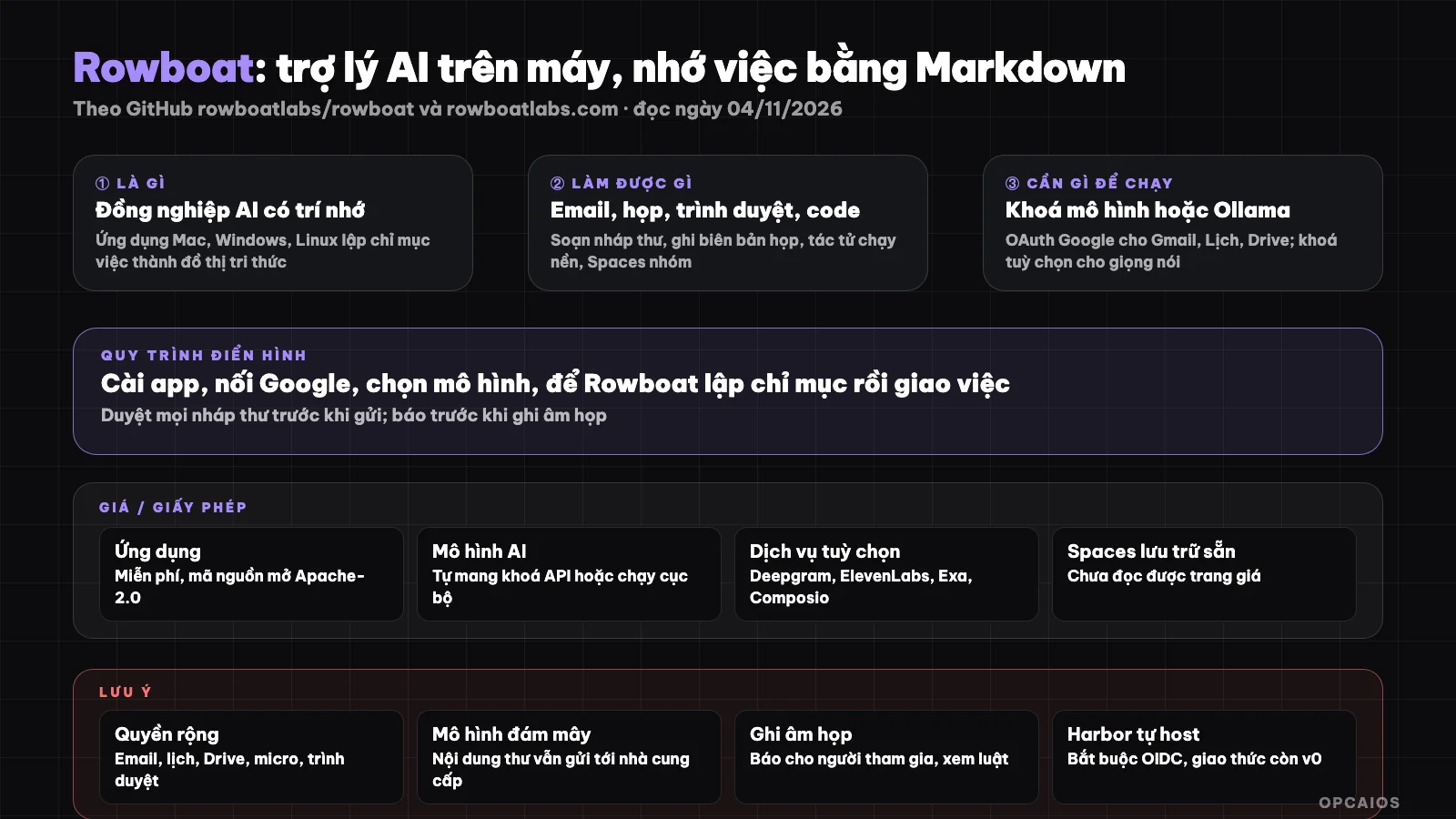
Rowboat keeps your work memory on your machine, only the part you actively post goes to the shared Space. Diagram: OPCAIOS.
What is Rowboat and who created it?
Rowboat is a desktop application (Mac, Windows, Linux) developed by Rowboat Labs, playing the role of "an AI colleague with memory". What sets Rowboat apart is long-term memory: instead of searching for documents each time you ask, Rowboat maintains an accumulating knowledge graph, stored as plain Markdown on your machine.
According to the README on GitHub (read on 04/11/2026), Rowboat Labs describes the product as an open source personal AI assistant with built-in documents, whiteboards and email, usable alone or as a team. The main repository has two parts. First is apps/x: a desktop application written in Electron, with a headless server rowboat-server and a mobile app only for Spaces. Second is apps/harbor: the server for Spaces collaboration features, also open source. The primary language of the repository is TypeScript according to the GitHub API. The latest release on GitHub is v1.0.3 (17/09/2026). See more at What is an AI agent?.
What are Rowboat's main features?
Rowboat brings together many "work surfaces" in one application: knowledge graph, email client, meeting notes, dedicated browser, code mode, and background agents. All share the same context source: the Markdown knowledge graph on your machine. The table below summarizes according to the README, which we have paraphrased.
| Feature | What Rowboat does |
|---|---|
| Brain (knowledge graph) | Indexes emails, meetings, Slack, conversations into backlinking notes like Obsidian |
| Sorts important messages, auto-drafts replies based on work context | |
| Background agents | Run on events (new email) or schedule (for example 8am), call tools, search web, write code |
| Integrated browser | Separate from your main browser, you only log in accounts you want the assistant to use |
| Meeting notes | Records your mic and speaker audio on machine, transcribes in real-time, summarizes to Markdown file |
| Code mode | Run multiple Claude Code or Codex agents in parallel, Rowboat provides context |
| MCP | Connect external MCP servers: search, databases, CRM, internal tools |
| Spaces | Chat channels plus shared file directories, whiteboards, documents with version history |
Spaces deserve careful explanation, as they are the collaboration piece. According to the README (read on 04/11/2026), each team member runs Rowboat separately on their own machine, with their own memory and their own model keys. A Space consists of shared chat channels, Markdown files in wiki format, and whiteboards. When someone types @rowboat in a Space, Rowboat on that person's machine wakes up, pulls context from their personal emails, meetings, and notes, then posts the result with the name "Person Name (via Rowboat)". Spaces run on a small server called Harbor. According to the README, the only thing that crosses the boundary between a personal machine and Harbor is content that the user or agent acting on their behalf chooses to post. Harbor has an MCP port, so other agents like Claude Code can also access the Space. We have not verified this by running it ourselves.
Is Rowboat Free, and Where Are the Real Costs?
Rowboat software is free to download and use under the Apache-2.0 license, but you pay for the AI model and optional services yourself. We couldn't read the pricing page of rowboatlabs.com (the site is built with JavaScript and doesn't display content when read automatically), so we can't list the pricing for Spaces hosting packages.
| Item | Cost and conditions (read on 04/11/2026) |
|---|---|
| Rowboat application | Free, open source Apache-2.0 |
| AI model | Bring your own: local model via Ollama or LM Studio, or API key from a provider |
| Speech input (optional) | Deepgram API key |
| Text-to-speech (optional) | ElevenLabs API key |
| Web search (optional) | Exa API key, or free Parallel Search MCP with rate limits |
| External tools (optional) | Composio API key or any MCP server |
| Spaces hosting | Rowboat account login (Google or Microsoft); couldn't read the pricing |
| Self-host Harbor | Server, Postgres, domain, OIDC that you operate |
All third-party service prices exclude tax and may change. The biggest hidden cost is model tokens: the background agent runs every morning and indexing your entire mailbox will consume tokens continuously if you use a cloud API. Running a local model means you don't pay for tokens but need a powerful enough machine. See Ollama là gì? if you want to go the local route.
How Do I Install Rowboat and Get Started?
The quickest way is to download the installer for Mac, Windows, or Linux from rowboatlabs.com's download page or the Releases section on GitHub. Then you connect Google, add a model key, and add optional keys. The process follows the README: first install, then connect, finally try a small task:
- First, download the installer from the official download page or the GitHub repository's Releases section.
- Next, follow the
google-setup.mddocumentation in the repository: create a Google Cloud project, enable Gmail API, Calendar, Drive, and create an OAuth Client ID and Client Secret. - Choose a model: local via Ollama or LM Studio, or an API key from a provider.
- Optional: add Deepgram, ElevenLabs, Exa, and Composio keys to JSON files in the
~/.rowboat/config/configuration folder, with each file containing anapiKeyfield. - Finally, try a small task like sorting your inbox or recording a meeting note, then open the Markdown folder to see what Rowboat wrote.
If you want to build the installer from source, the README requires Node 22 or 24 and running:
cd apps/harbor && pnpm install --frozen-lockfile && pnpm -r build
cd ../x && pnpm install --frozen-lockfile
cd apps/main && npm run package
To add Claude Code to a Space, the README provides the claude mcp add --transport http command pointing to your organization's /mcp address. See Claude Code là gì? and MCP là gì? to understand these two concepts.
What Limitations, Risks, and Legal Considerations Does Rowboat Have?
The main risk of Rowboat is very broad access: email, calendar, Drive, microphone, speakers, and browser. Data is stored locally, but if you use a cloud model, email content and meeting transcripts are still sent to the model provider for processing. "Stored on the machine" doesn't mean "stays on the machine."
Points to consider before using, according to the README and our reasoning:
- Recording meetings: the meeting note feature captures audio from speakers, meaning other people's voices. In many places, recording others requires consent. Tell participants you're recording. This is for reference only, not legal advice; we haven't checked specific Vietnamese law.
- Personal data: customer emails are personal data. Sending them to a cloud model requires reviewing the provider's data processing terms.
- Spaces: the README lists privacy rules that agents follow, like only reading necessary tasks and only sharing summaries to shared spaces. This is stated behavior by the project, not verified; AI models can still make mistakes.
- Self-host Harbor: the README warns that without the
AUTH_ISSUERvariable, Harbor uses a development token and should never be exposed to the Internet. The Spaces protocol is still at v0; the project warns it may change in breaking ways.
How Rowboat compares to other options
Rowboat sits between AI note-taking apps and agent platforms. The comparison below is a general description based on public documentation, not measurements.
| Option | Strengths | How it differs from Rowboat |
|---|---|---|
| Rowboat | Local Markdown memory, email, meetings, group Spaces | Many features, requires many permissions |
| Obsidian plus AI plugin | Note repository you fully control | Doesn't auto-index email, meetings |
| Claude Code or Codex standalone | Strong at code, runs in terminal | No long-term work memory built in |
| SaaS AI assistant | Quick setup, no key management | Data lives on provider's servers |
When to use Rowboat?
Rowboat suits people who work mainly through email and meetings, want an assistant that remembers long-term context while keeping data as open files. People without coding skills can still use the preset version, but the Google Cloud OAuth step takes patience.
| Situation | Suggestion |
|---|---|
| Overloaded inbox, want assistant to draft replies | Try Rowboat with cloud model, review drafts before sending |
| Sensitive data, don't want to send it out | Use local model via Ollama, accept lower quality |
| Small team wants to chat with an agent | Try Spaces with pre-built storage, self-host Harbor later |
| Just need an agent that writes code | Use Claude Code or Codex directly, no need for Rowboat yet |
| No time to manage API keys | Not ready yet, wait for a simpler version |
Example (hypothetical): an OPC practitioner indexing Rowboat sets up email and calendar indexing, runs an agent in the background at 8am to summarize important emails and tasks to do, then reads the summary as a Markdown file.
OPCAIOS's experience
We added Rowboat to the Repo list in the Utilities section on opcaios.org after reading the README and checking the repository is still maintained; we haven't run it yet, so this section describes the criteria we use to evaluate, not a review after using it. Our main knowledge store is an Obsidian vault, so the idea of Markdown-based memory aligns closely with how we work. We looked at four criteria:
- Is the repository still maintained: yes, latest code push on 03/11/2026 according to GitHub API.
- License: Apache-2.0, allows commercial use, requires keeping the license notice.
- Hidden costs: model tokens for indexing and background agents, plus optional keys.
- Can it replace tools we use, what are the term risks: we already have Obsidian vault and Claude Code; Rowboat is only worth trying if the email and meeting memory part saves real time, and we must carefully weigh giving Gmail permissions and recording meeting audio.
Read more: What is Obsidian?, What is Second Brain?, What is Obsidian Second Brain?, What is Honcho?.
Frequently Asked Questions
Does Rowboat really keep data on my machine?
According to the README (read 04/11/2026), all of Rowboat's personal data is stored locally as plain Markdown, which you can view, edit, back up, or delete anytime. However, if you choose a cloud model via API key, content that needs processing like emails or meeting notes is still sent to that model provider. To keep data from leaving your machine, use a local model via Ollama or LM Studio. When using Spaces, only published content goes up to the Harbor server.
Does Rowboat require coding knowledge?
Not necessarily. Rowboat has pre-built versions for Mac, Windows, and Linux, so people without coding knowledge can still download and open it. The hardest part for newcomers is connecting Google: you have to create a Google Cloud project, enable Gmail API, Calendar, Drive, and create an OAuth Client following the documentation in the repository. Optional keys like Deepgram or ElevenLabs just need to be pasted into a JSON file. Building from source code yourself or self-hosting Harbor for a team does require technical skills, familiarity with Node, pnpm, Postgres, and OIDC login setup.
How is Rowboat different from Obsidian?
Obsidian is a note-taking app where you write and create your own links. Rowboat automatically indexes emails, meetings, Slack, and conversations into a knowledge graph with backlinks in the Obsidian style, then uses that graph to work: composing emails, summarizing meetings, assigning code tasks. Both use Markdown, so in theory you can read Rowboat notes with Obsidian. This has not been verified. Obsidian suits people who want to control every note; Rowboat suits people who want to automate.
Is Rowboat's Spaces safe for teams?
Spaces is designed so each person keeps their memory on their machine, with only published content going to Harbor. The README lists rules like only reading what tasks require, not pasting private emails or messages into a Space, only providing summaries when asked. This is the behavior the project states; the AI model can still misunderstand requests, so teams should test with non-sensitive data first. If you self-host Harbor, you must configure an OIDC provider, since development tokens cannot be exposed to the Internet. The protocol is still at v0 and may change.
Where can I learn how to use an AI assistant like Rowboat?
Start with a small real task like summarizing a meeting, then check the result. You should first understand concepts like language models, MCP, agents, and how to manage API keys. The blog posts What is an LLM? and What is MCP? are a good starting point. If you want a structured roadmap from choosing tools to building workflows with AI agents for a solo company, you can check out OPCAIOS's AI Application Training course.
Source: GitHub rowboatlabs/rowboat (README, google-setup.md, API, Releases, read 04/11/2026), rowboatlabs.com; could not access rowboatlabs.com content and pricing page (built with JavaScript); unverified: Y Combinator S24 badge, Spaces privacy rules, indexing quality; star count and pricing may change. Experience is from OPCAIOS.
Translated from Vietnamese with AI. Read the original.
Want to apply this in your business?
Book a free 30-minute call (Vietnam time, in English or Vietnamese).