


What is Salesforce?
Salesforce is a cloud-based CRM (customer relationship management) platform that includes applications for sales, customer service, marketing and e-commerce, along with a platform for customization and data integration. According to the official pricing page (checked on October 23, 2026), pricing starts at $25 per user per month for Starter Suite and goes up to $550 for the Max plan of Sales Cloud. This 2026 article follows four sections:
- What product lines Salesforce includes and how the different pricing tiers compare.
- How to connect via REST API and real-time events using Pub/Sub API.
- Integration with Claude (Anthropic) and ChatGPT through MCP servers.
- When a small business should choose Salesforce over simpler CRM alternatives like HubSpot.
For example, a team of 10 users trying Starter Suite can get started without paying anything.
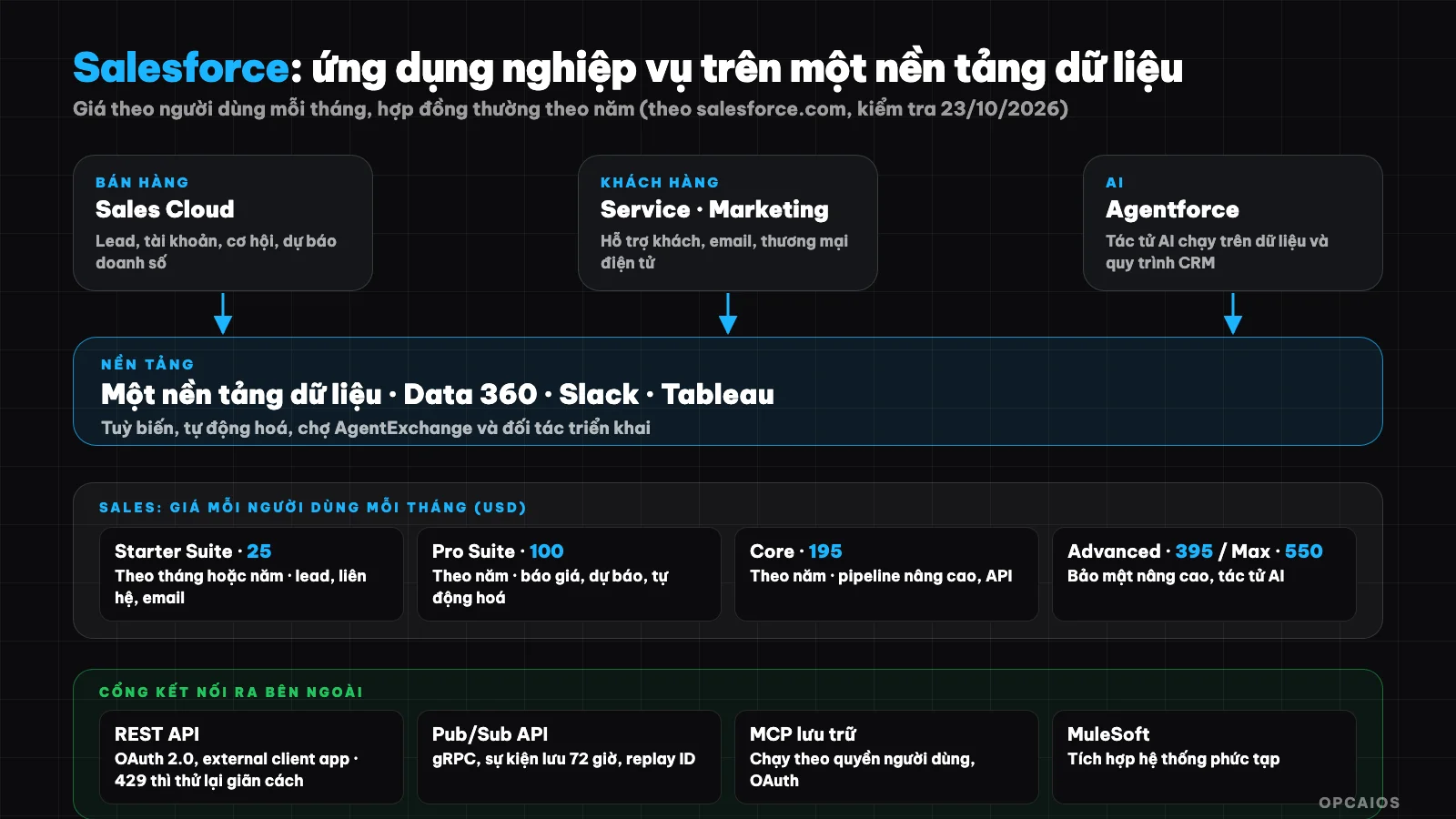
Salesforce consists of business applications on a single data platform, sold by tier per user. Diagram: OPCAIOS.
What is Salesforce?
Salesforce is an enterprise software platform under a subscription model, where CRM is the core. CRM is a database that stores all information about customers and sales opportunities so the entire team can use it together. The homepage describes itself as an "AI CRM" that brings people, AI agents, and data onto a single platform.
Common product lines according to the homepage and pricing page:
| Line | Used for |
|---|---|
| Sales Cloud | Manage leads, accounts, opportunities, sales forecasts |
| Starter Suite and Pro Suite | Compact CRM for small business, including sales, service, marketing, commerce |
| Service | Customer care and support |
| Marketing and Commerce | Email marketing, online sales |
| Agentforce | AI agents that run on Salesforce data and processes |
| Data 360 | Unify data from multiple sources |
| Slack, Tableau | Collaboration and analytics, included with some plans |
| MuleSoft, Heroku | System integration and application platform |
| AgentExchange | Marketplace for partner apps and agents (formerly AppExchange) |
What are the Salesforce Sales tiers and pricing?
Salesforce Sales pricing is five tiers charged per user per month, divided by scale. According to the official Sales pricing page (checked October 23, 2026), Starter Suite is $25 (monthly or yearly), Pro Suite $100, Core (Sales Cloud) $195, Advanced $395, and Max $550; tiers from Pro Suite are billed yearly. Highlights for each tier:
- Starter Suite: manage leads, accounts, contacts, opportunities; pre-built sales flows; email marketing.
- Pro Suite: add customization, automation, quotes, forecasting, and AgentExchange access.
- Core: advanced pipeline, opportunity scoring, API, Slack Business+, Tableau Next.
- Advanced and Max: advanced security, AI agents, and top-tier Sales Cloud benefits.
Add-on products are separately priced: Agentforce for Sales from $125, Sales Programs from $100, Revenue Intelligence from $220, Revenue Cloud from $200 per user per month, and Partner Relationship Management from $10 per login per month. The tier comparison table also notes API access is an add-on of $25 per user per month on some tiers. For example, a team of 5 on Pro Suite costs about 5 × $100 = $500 per month before add-ons, billed yearly. Check the comparison table before purchasing.
The pricing page notes most products use year-long contracts, Sales Cloud offers a free 30-day trial (Starter Suite trial for up to 10 users), and prices are for reference only; see the official pricing page for your region.
When should small businesses choose Salesforce?
Small businesses should choose Salesforce when they need complex sales processes and are ready to invest in configuration and training. The Starter Suite plan ($25 per user per month, according to official pricing checked on 23/10/2026) makes Salesforce more accessible for small teams, but costs increase quickly with plan tier and number of users. There are three situations worth considering:
- Need serious forecasting and pipeline management: many stages, multiple teams, reporting by region or product.
- Need deep customization and a large ecosystem: there's the AppExchange marketplace and many implementation partners.
- Already have or will soon have many systems: need integration via API, events, MuleSoft.
For example, a company with 30 salespeople organized by region and product fits Salesforce better than a shop with 3 people. Conversely, if you only need basic customer and pipeline tracking, a CRM with a free plan or built on existing data might be enough and cheaper; see the comparison in What is HubSpot?.
How do you connect Salesforce via API?
Salesforce has a REST API to read and write data from external systems. According to the developer documentation, the authentication process is typically OAuth 2.0 through an external client app: you enable OAuth settings for the application, use the app's key and secret to get an access token from the /services/oauth2/token endpoint, then send that token in the Authorization header in subsequent requests. For server-to-server integration you can use the client credentials flow; this flow doesn't return a refresh token so when the token expires the client requests a new one.
Key points to remember about limits and error handling:
- Organization-level limits: the number of API calls per 24 hours depends on your edition and license type. Call the
limitsendpoint to see remaining quota. - Code 429: means you sent too many requests in a time window; the documentation recommends retrying with exponential backoff.
- Store the access token: reuse it until it expires instead of requesting a new one for each request.
If you're unfamiliar with the concept, read What is API?. Note: Salesforce's documentation pages block automated access so the technical details in this section are cross-checked against official documentation excerpts; please verify specific numbers in the documentation for your organization's edition.
How does Salesforce report real-time events?
Instead of simple webhooks, Salesforce uses Pub/Sub API to publish and subscribe to events, including platform events and change data capture (CDC, events that report when records change). Four main points, according to Salesforce (developer documentation, checked on 23/10/2026), are:
- Technology: Pub/Sub API uses gRPC and HTTP/2, with messages in binary Avro format.
- Channels: for example the CDC channel for all entities is
/data/ChangeEvents, while custom events have the form/event/EventName__e. - Storage and replay: platform event and CDC messages are kept for 72 hours on the bus; each message has a replay ID so you can read from a point in time.
- Flow control: the client chooses how many events it wants to receive per call to match its processing speed.
For small businesses, this is a more reliable way to report "a record just changed" than constant polling. The handling pattern is still: remember your processing position, prevent duplicate processing, retry with backoff; see What is Webhook?. If you want to connect Salesforce with an automation tool, using n8n, Make, or Zapier is common.
How does Salesforce connect with AI through MCP?
Salesforce has hosted MCP servers maintained by Salesforce, allowing AI agents to access Salesforce data. According to the official announcement (April 2026), this feature has rolled out widely to organizations on Enterprise Edition and above, and Developer Edition is free. There are two types:
- Standard servers: record operations (create, read, update, delete), SOQL queries, search, plus servers for Data 360 and Tableau.
- Custom servers: built in API Catalog, can expose Apex actions, Lightning Flow, Apex REST endpoints and named queries.
Access runs under the permissions of the logged-in user, authenticated via OAuth through an external client app (documentation states Connected App is not used for MCP authentication). Tested clients include Claude (Anthropic), ChatGPT, Cursor and Postman, according to Salesforce documentation. Like any other MCP: start with read permissions, test on a sandbox, and keep manual review before write operations; see What is MCP?. Feature status changes over time, so check the current documentation.
Things to consider before buying Salesforce
- Total cost calculation: price per user multiplied by number of users and number of months, plus add-ons, plus configuration and training costs. Contracts are typically annual.
- Start from process: describe the steps from lead to payment before choosing a plan.
- Clean data: standardize how you record names, customer sources from the start so reporting and AI work.
- Personal data: CRM contains customer personal information; only collect what you need, restrict access by role and comply with current data protection regulations.
- Try before you pay: use the 30-day trial with your team's real data.
- OPCAIOS experience: opcaios.org website does not use Salesforce but builds its own CRM in the same database (customer intake, tasks and processing deadlines, payments, customer sources, Zalo and Messenger inboxes), because order and bank transfer payment data already exist in the website. That is a choice for OPCAIOS's scale and process, not a general recommendation.
Frequently asked questions
What is Salesforce?
Salesforce is a cloud CRM platform consisting of sales, customer service, marketing, e-commerce applications and a data platform, integrated with AI and Agentforce agents, sold by user plan.
How much does Salesforce cost?
According to the official Sales pricing page (23/10/2026): Starter Suite $25, Pro Suite $100, Core $195, Advanced $395, Max $550 per user per month. Add-ons are billed separately and contracts are typically annual.
Does Salesforce offer a free trial?
Yes. The pricing page offers a free 30-day Sales Cloud trial, and Starter Suite trial for up to 10 users. Salesforce does not have a permanent free CRM plan like some competitors.
How does Salesforce connect with AI and other systems?
Through REST API with OAuth 2.0, Pub/Sub API for real-time events, MuleSoft for complex integrations and hosted MCP servers for AI agents to access data under user permissions.
Should small businesses use Salesforce?
Small businesses should use Salesforce if they need complex sales processes, deep customization and a partner ecosystem; Starter Suite $25 per user per month is the entry point. If your needs are simple, compare with HubSpot's free plan or a custom-built CRM. According to the Salesforce pricing page (checked 23/10/2026), Sales Cloud has a free 30-day trial, so the practical approach is to try it with your team's real data before signing an annual contract. First, map your process from lead to payment. Next, count how many users actually need access. Finally, compare the total monthly cost with a simpler CRM. Want to build customer workflows and automation, see OPCAIOS AI application training course.
Source: home page, Sales pricing page and CRM page of Salesforce (checked 23/10/2026); developer documentation (REST API, Pub/Sub API, Hosted MCP Servers) cross-referenced through excerpts since developer.salesforce.com blocks automated access. Prices, limits and features may change; support level for customers in Vietnam not yet checked.
Translated from Vietnamese with AI. Read the original.
Want to apply this in your business?
Book a free 30-minute call (Vietnam time, in English or Vietnamese).