



Should I run both Mac and Windows machines as an AI office for solo work?
You can, if you accept the operating costs: one machine to control and do primary work, one machine to run background tasks, connected via a private network. OPCAIOS does this and has removed many services because they weren't worth maintaining. According to the internal system status log read on 25/10/2026, some services on the Windows machine are stopped or inaccessible. This post describes the architecture at a conceptual level, real incidents, lessons learned, and limitations. Addresses, ports, and keys are not disclosed.
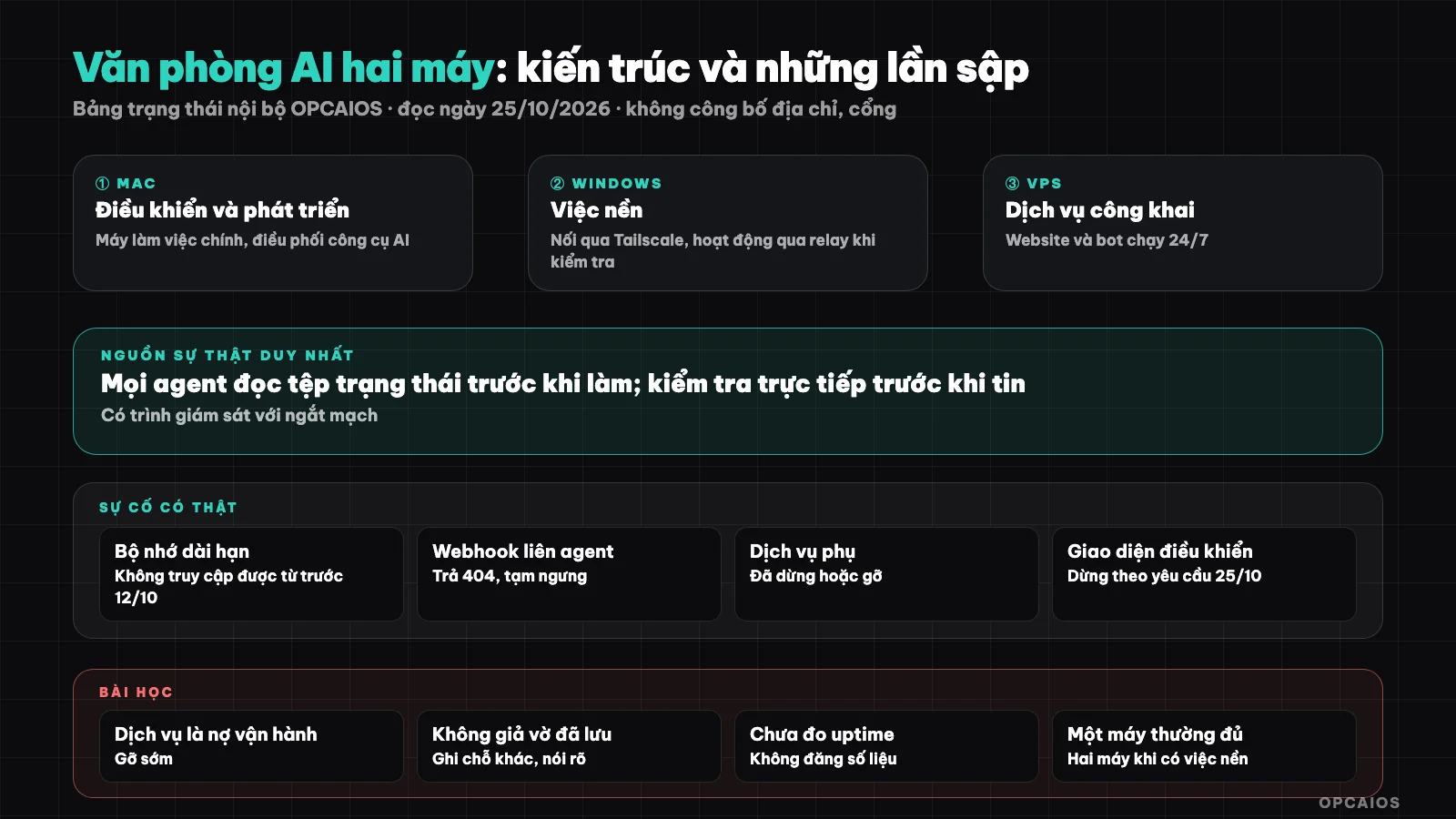
Roles separated by machine, state synced via a log file, monitored by automation. Diagram: OPCAIOS.
How does the two-machine architecture work?
The architecture consists of a Mac playing the controller role (writing code, coordinating, running tools), a Windows machine playing the background task executor role (browser automation, some services), and a virtual server (VPS) running public services. The machines connect via a private network, with no ports exposed to the Internet.
| Component | Role | Notes |
|---|---|---|
| Mac | Control, development, AI tools | Primary work machine |
| Windows | Background tasks, browser automation | Connected via Tailscale |
| VPS | Website, public services, bot | See what is VPS |
| Monitoring tool | Check services, attempt recovery | Has a circuit breaker to stop retrying |
| Shared status file | Source of truth for system state | Every agent reads and writes |
On 25/10/2026, the network status command on Mac lists both the Mac and Windows machine in the same private network, with the Windows machine operating via relay.
Role separation by machine and why
The principle is that each machine has one clear role, and every agent reads the same status file before working. This prevents two agents from claiming different states for the same service.
Benefits: heavy work or browser-dependent tasks run separately from the main work machine; problems on the background machine don't freeze the main one. Costs: more things to update, monitor, and secure than a single machine. For most solo workers, one machine plus a VPS is enough; two machines only make sense when you have real background work.
Real incident log (read on 25/10/2026)
The internal status table records several open incidents and many services already stopped or removed. This is why we say bluntly that the system doesn't always run perfectly; the state may have changed since the read date.
| Incident | Status per table |
|---|---|
| Long-term memory of agent running on Windows machine | Inaccessible since before 12/10; workaround is writing to status file and note repository |
| Control interface on Windows machine | Stopped per system owner request on 25/10 |
| Model AI routing port on Windows machine | Stopped, no longer monitored |
| Inter-agent coordination webhook | Returns 404 because workflow not imported; inter-agent protocol paused, using status file and Telegram |
| Some services on Mac (local vector database and helper tools) | Containers stopped per request on 25/10 |
| Some tools that used to run on Mac | Removed, no longer referenced in new documentation |
Lessons learned
The biggest lesson is that each service you add is an operations debt, and you should remove early what you don't actually use. The second lesson is having a single source of truth for system state, updated by direct checks rather than old logs.
- Check directly before trusting: old logs are only history, not current state.
- Have a fallback when long-term memory breaks: don't pretend you saved it; write elsewhere and be clear.
- Remove extras: unused services waste resources and create noise alerts, see controlling burnout when running solo with AI.
- Set a circuit breaker for recovery attempts: avoid infinite loops trying to fix a broken service.
- Keep machines separate from secrets: keys and passwords don't belong in a note repository; rotate keys after each security review, see security review.
- Back up: apply the 3-2-1 rule to background machines too, not just the website.
When to and when not to run two machines
Do it when you have background work that needs to run long or needs a different environment (browser, operating system) and you're ready to maintain it. Don't do it when your goal is just to "look professional" or to try a new tool; in that case one machine plus cloud services is usually simpler.
| Situation | Recommendation |
|---|---|
| Just starting out, a few automations | One machine + existing services (n8n, Make) |
| Have background work running 24/7 | VPS or background machine, with monitoring |
| Need to run local models | Powerful dedicated machine (Ollama) |
| Don't know what you need yet | Don't buy more; write down what's taking time first |
OPCAIOS's experience
Most of this post comes from our experience. Two more points: agents communicating with each other through state files is practical but manual, and dividing roles by machine only works when everyone follows the practice of reading the state file before acting.
Limitations: we haven't measured uptime or the electricity and maintenance costs of this setup, so the post doesn't include those numbers. The diagram is general; implementation details, addresses and ports are not published. See also the AI system I use to run my work alone and 10 lessons from letting AI agents build and run a website.
Frequently asked questions
Do I need two machines to work with AI?
No. Most people working alone only need one machine and a few cloud services. A second machine is worth it only when you have real background work.
Is it safe to connect two machines over the Internet?
Using a virtual private network like Tailscale helps avoid opening ports, but you still need to protect your accounts and review access permissions, see What is Tailscale.
What if an agent's long-term memory breaks?
Write it temporarily to the state file and note storage, say clearly that it hasn't been saved to the main system yet, and fix the source of the error. Don't claim you've saved it when you haven't.
Does your system always run well?
No, as the incident table shows. The status in this post is as of reading on 25/10/2026 and may have changed.
I want to build a small AI office, where do I start?
Start with one machine, one source of status and one review queue. You need a partner to design it, see AI application training service.
Source: OPCAIOS internal system status table and network private results, read on 25/10/2026; did not re-check each service by direct query at the time of writing, so status may have changed. Addresses, ports, keys or revenue figures are not published. Experience is OPCAIOS's own.
Translated from Vietnamese with AI. Read the original.
Want to apply this in your business?
Book a free 30-minute call (Vietnam time, in English or Vietnamese).