


What is Pipedrive?
Pipedrive is CRM software focused on managing your sales pipeline: each deal is a card on a kanban-style board, moving through stages from leads to closed deals. According to the official website (checked October 23, 2026), Pipedrive offers a 14-day free trial without a credit card, has over 500 integrations, and is used by more than 100,000 companies. This 2026 article has four parts:
- What Pipedrive does, its packages and pricing, from $14 to $79 per user per month based on search results.
- How to connect via API, webhooks, and token limits.
- Connecting with Claude and ChatGPT via MCP.
- When Pipedrive works better than HubSpot or Salesforce.
For example, a team of 5 sales people needing to track deals on one screen would consider Pipedrive first.
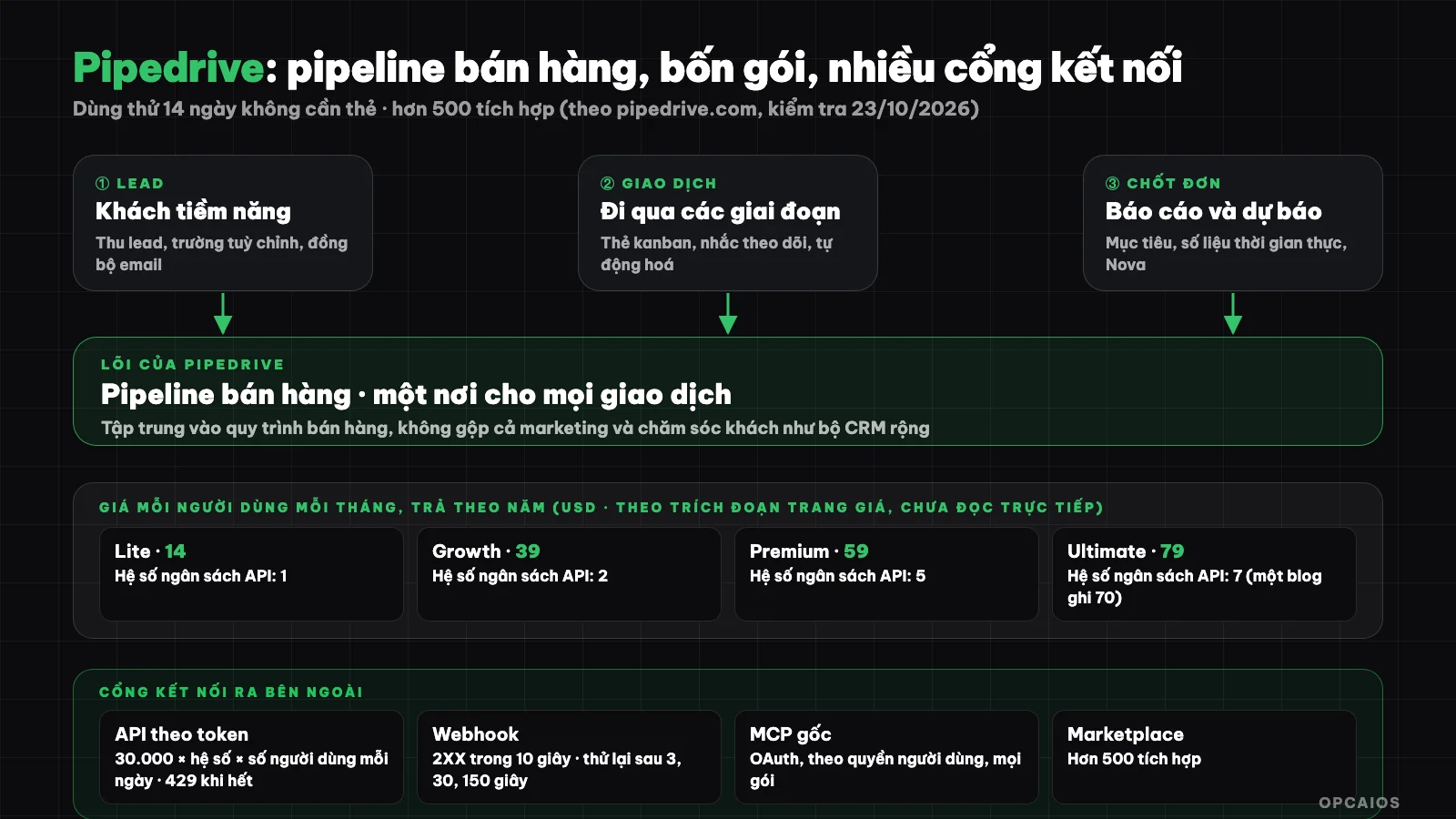
Pipedrive centers on the deal pipeline, priced across four packages per user, opening outward via API, webhooks, MCP. Diagram: OPCAIOS.
What is Pipedrive?
Pipedrive is sales CRM that helps sales teams track each deal on a visual pipeline. CRM is a customer database storing contacts, interactions, and history for the whole team to use. What sets it apart from broader CRM suites like Salesforce or HubSpot is that Pipedrive focuses on the sales process rather than both marketing and customer care.
According to the homepage and features page, the main features include:
| Feature | Used for |
|---|---|
| Pipeline management | Kanban board by stage, customize pipeline to your sales process |
| Lead management | Capture and sort leads, custom fields |
| Sales automation | Automate repetitive steps, follow-up reminders |
| Email sync | Attach emails to customer profiles and deals |
| Reports and analytics | Real-time reports, forecasts, goals |
| Nova (meeting intelligence) | Summaries before, during, and after calls, suggest CRM updates; listed on homepage in all packages at no extra cost |
| LeadBooster, Projects, email marketing | Capture leads, manage projects, send emails |
| Pipedrive MCP | Give AI assistants access to CRM data |
| Marketplace | Over 500 integrations |
What are Pipedrive's packages and pricing?
Pipedrive pricing is four packages charged per user per month, billed annually: Lite $14, Growth $39, Premium $59, and Ultimate $79, according to search results from the pricing page. The official pricing page blocks automated access (returns Cloudflare's blocking page) so we did not read it directly and did not bypass the block. Three things to keep in mind:
- First, according to the same source, annual billing saves up to 42% versus monthly billing, and you can see monthly pricing on the pricing page.
- Next, a post on Pipedrive's blog lists the Ultimate package as $70, different from the $79 above, so these numbers cannot yet be considered definitive.
- Finally, higher packages have larger API limits according to the developer documentation, so your choice of package also affects integration.
For example, a team of 5 people on the Growth plan billed annually would cost around 5 × $39 = $195 per month if the search numbers are correct. Check the official pricing page before deciding.
When should you choose Pipedrive?
Pipedrive works for small to mid-size sales teams who want a CRM focused on pipeline, easy to start, and not too heavy on setup. A few situations:
- Sales in clear stages: consulting, quoting, negotiating, closing; need to see the pipeline on one screen.
- Small team needing something lighter than Salesforce: don't need a massive ecosystem, just need to track deals and reminders.
- Need to integrate with other tools: has API, webhooks, Marketplace, and MCP.
If you need marketing and customer care in one platform with a free plan, check out What is HubSpot?. If you need deep customization for large enterprise, check What is Salesforce?. If your process is very specific and data already lives in your own system, building your own CRM is another option (see the end of this post).
How do I connect Pipedrive via API?
Pipedrive has a public API to read and write CRM data, authenticated using an API key (api token) or OAuth 2.0 for applications. The most notable point is how limits work: Pipedrive uses token-based rate limiting instead of counting requests. According to the official documentation:
- Daily budget: each company has a daily token budget shared across all users, calculated as 30,000 base tokens multiplied by the plan multiplier per number of users (plus additional purchased tokens). The multiplier is 1 for Lite, 2 for Growth, 5 for Premium, 7 for Ultimate.
- Each request costs tokens by weight: fetching one entity costs 2 tokens, fetching a list costs 20, updating one entity costs 10, deleting one entity costs 6, searching costs 40. API v2 endpoints are optimized to use fewer tokens than v1.
- Out of budget: all requests are rejected with code 429 until the budget resets at midnight in server time zone; administrators receive warning emails at 75% and 100% usage.
- Instantaneous (burst) limit: calculated over a 2-second sliding window, with API key limits of 20, 40, 100, 120 requests for Lite, Growth, Premium, Ultimate, and OAuth applications are four times higher (80, 160, 400, 480). The search API has its own separate limit of 10 requests per 2 seconds across all plans.
Quick example to see the scale: a team of 5 people on the Growth plan has a budget of 30,000 × 2 × 5 = 300,000 tokens per day, equivalent to roughly 15,000 list fetches (each costing 20 tokens) if you do nothing else. So batch requests, cache results and prioritize v2 endpoints. If you're new to the concept, read What is an API?.
How do Pipedrive webhooks work?
Pipedrive webhooks are a mechanism to push notifications to your address when changes happen, instead of having you poll constantly. Seven key points, according to Pipedrive (developer documentation, read 23/10/2026), include:
- Sending and format: HTTP POST request with JSON body, containing a
metablock,currentandpreviousstatus of the record, and aretryfield. - Events: filter by action and object, or use
*.*for all; events arise from both the interface and API. - Authentication: address must be a valid public URL; documentation recommends HTTPS with authentication and does not support self-signed certificates.
- Success: any 2XX code; other codes or over 10 seconds count as failure.
- Retry: if the first attempt fails, Pipedrive tries 3 more times after 3, 30 and 150 seconds.
- Blocking mechanism: failure count up to 10 blocks the webhook for 30 minutes and messages during that time are lost; no successful send in 3 consecutive days deletes the webhook.
- Version: Webhooks v2 is the default and will replace v1.
Practical lesson: the receiving machine must return 2XX very quickly and do heavy processing later, since over 10 seconds counts as an error; since messages can be lost when blocked, periodically reconcile using the API. See also What is a webhook?. To connect with other tools without writing code, use n8n, Make or Zapier.
How does Pipedrive connect to AI via MCP?
The Pipedrive MCP server is a gateway for AI assistants to read and edit CRM data, hosted by Pipedrive. According to the official announcement (30/6/2026) and the guide page, this server works with AI assistants that support custom MCP connections like Claude (Anthropic) and ChatGPT (OpenAI), available on all plans, and its use counts toward the plan's token limit (additional purchase available). There are four points on security:
- Authentication via OAuth, no need to write code.
- Assistants can only read and edit data that the Pipedrive user already has access to.
- Actions are logged in the change history.
- Administrators can turn off MCP, which blocks new connections and disconnects old ones without affecting Marketplace applications or API keys.
With Claude, add a custom connector using the server address listed in Pipedrive's guide page. For example, test first on non-critical data, prioritize read permissions, and keep manual review before write operations; see What is MCP?. This information is taken from excerpts of official pages; please check the current connection method again.
When to Build Your Own CRM Instead of Using Pipedrive?
Building your own makes sense when your processes are unique and data already lives in your own systems. This is OPCAIOS's experience: opcaios.org doesn't use Pipedrive but built our own CRM in the same database, covering customer intake, tasks and deadlines, payments, customer sources, Zalo and Messenger inboxes, because orders and bank transfers already lived in the website. That's the choice for OPCAIOS's scale, not a general recommendation.
| Criteria | Pipedrive | Custom-built CRM |
|---|---|---|
| Time to start | A few hours, 14-day trial | A few weeks to months |
| Cost | Per user per month | Development and operations |
| Unique processes | Configuration, custom fields, API | Whatever you want |
| Data | On Pipedrive's platform | On your infrastructure |
| Maintenance | Pipedrive handles it | You handle it |
Things to watch when using Pipedrive or any CRM
- Map your process first: list stages from lead to payment, then build your pipeline.
- Clean data: standardize how you write names and customer sources so reports are trustworthy.
- Personal data: collect only what you need, restrict access by role, follow current data protection rules.
- Watch API limits: if you integrate a lot, check the API usage stats in company settings.
- Test before you buy: use the 14-day trial with real data.
Frequently asked questions
What is Pipedrive?
Pipedrive is CRM software focused on managing your sales pipeline, showing deals as kanban cards by stage, with leads, email, automation, reporting and AI.
How much does Pipedrive cost?
Based on search results from the official pricing page (the page blocks automated access so I haven't read it directly): Lite 14, Growth 39, Premium 59, Ultimate 79 USD per user per month when paid yearly. A Pipedrive blog post listed Ultimate at 70 USD, so check the official pricing page.
Does Pipedrive have a free trial?
Yes. The homepage offers a 14-day trial with no credit card needed.
How does Pipedrive connect to AI and other tools?
Through API (API key or OAuth 2.0, limited per token per day), webhooks (retries 3 times), over 500 integrations on the Marketplace, and native MCP servers using OAuth for Claude and ChatGPT.
Should I pick Pipedrive, HubSpot or Salesforce?
Pipedrive suits small sales teams needing a clean pipeline; HubSpot suits you if you want a free plan and bundled marketing and customer support; Salesforce suits you if you need deep customization and a big ecosystem. Want to build a customer journey and automate it? Check OPCAIOS's AI application training course.
Source: homepage and features page of Pipedrive (checked 23/10/2026); developer docs (limited per token, webhooks) read directly; pricing and MCP info from search snippets because the pricing page blocks automated access. Pricing, limits and features may change; haven't checked support level for customers in Vietnam.
Translated from Vietnamese with AI. Read the original.
Want to apply this in your business?
Book a free 30-minute call (Vietnam time, in English or Vietnamese).