


Shopify is an all-in-one e-commerce platform. The platform allows you to build an online store, receive orders, manage inventory, and sell via website, social media, e-commerce marketplaces, and physical stores without needing to know how to code. According to Shopify's official pricing page (checked on 23/10/2026), the Basic plan costs $19 per month when paid yearly or $25 when paid monthly, plus 2% fee on each order if you use an external payment gateway. Shopify has a Vietnamese language page. Example scenario: someone selling 50 t-shirt designs who needs to manage inventory and sell on both website and Instagram can start with the Basic plan, then add apps from Shopify App Store as needed. This article has four parts: (1) components of Shopify; (2) pricing and payment fees; (3) API and webhooks; (4) when to choose Shopify instead of building your own, based on OPCAIOS's practical experience, an organization that does not use Shopify.
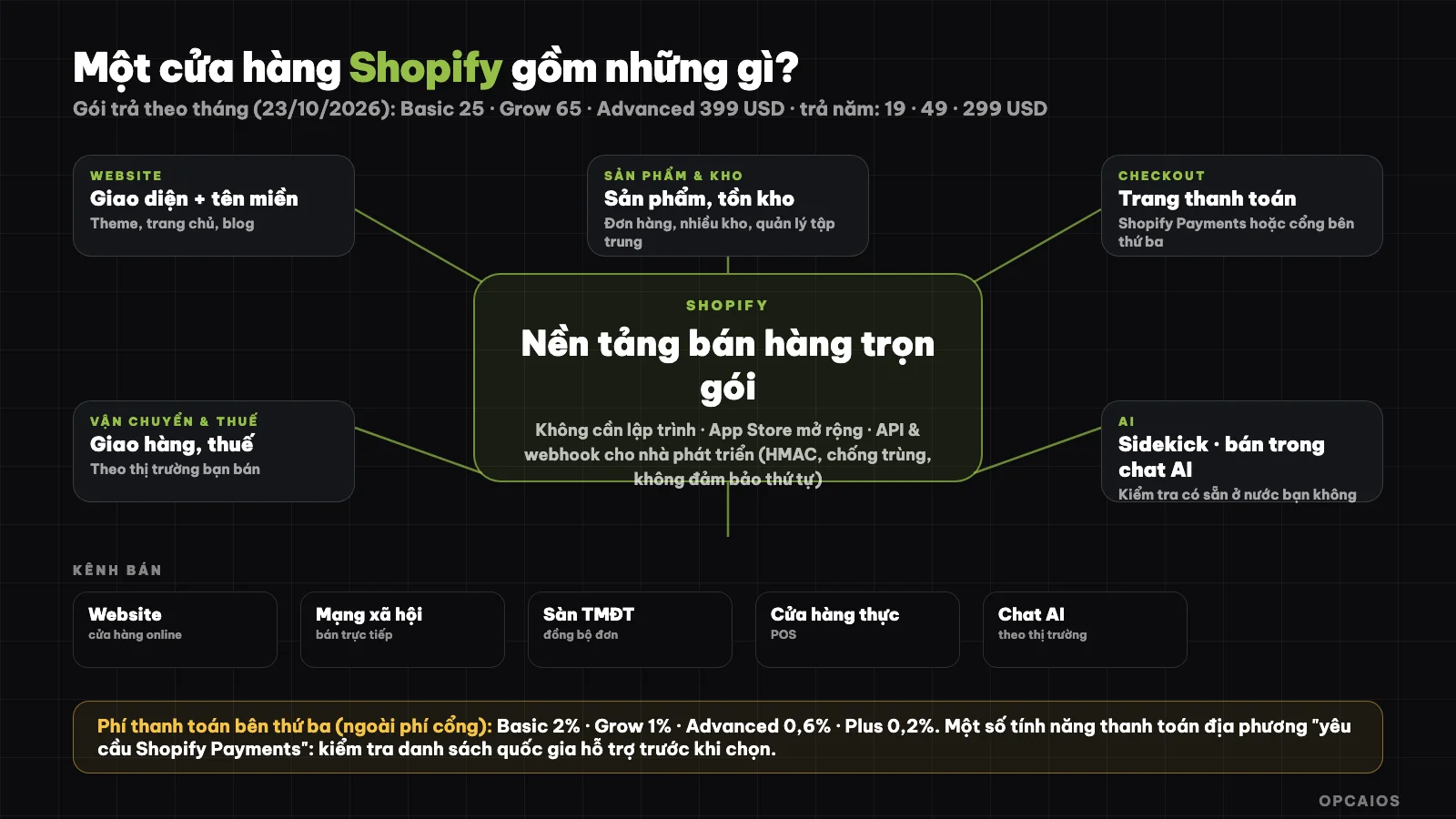
Components of a Shopify store and sales channels. Diagram: OPCAIOS.
What is Shopify?
Shopify is an "all-in-one" e-commerce platform for sellers from individuals to large brands. According to Shopify's official homepage, the platform lets you sell online, in stores, on social media, through e-commerce marketplaces, and in conversations with AI. A Shopify store has four main parts. First, a website builder with template designs and domain. Second, a Checkout page along with order management and inventory. Third, shipping, tax, and marketing tools. Fourth, the Shopify App Store, which Shopify calls the largest commerce ecosystem. Shopify also has an integrated AI assistant called Sidekick and reports around $1.1 trillion in total gross merchandise volume from merchants on the platform; this is a figure disclosed by Shopify itself, which OPCAIOS has not independently verified (checked on 23/10/2026).
What is Shopify's current pricing?
Shopify charges a monthly subscription fee with four main plans. According to the official pricing page (checked on 23/10/2026), pricing in USD:
| Plan | Paid yearly (per month) | Paid monthly | For | Fee when using third-party payment gateway |
|---|---|---|---|---|
| Basic | 19 USD | 25 USD | Solo seller | 2% |
| Grow | 49 USD | 65 USD | Small team, up to 5 staff accounts | 1% |
| Advanced | 299 USD | 399 USD | Global expansion, up to 15 staff accounts | 0.6% |
| Plus | From 2,300 USD | From 2,300 USD | Complex business, unlimited staff | 0.2% |
Shopify offers a free 3-day trial without needing a credit card. After that, most plans cost $1 per month for the first 3 months, then switch to standard pricing. There is no setup fee on any plan. Prices are displayed in US dollars, so your actual cost in Vietnamese dong depends on the exchange rate and how your card processes payment. Prices change over time, see official pricing page.
How do payment fees work in Vietnam?
The third-party gateway fee is an additional charge Shopify collects per order when you use a payment gateway that is not Shopify Payments. According to the official pricing page (checked on 23/10/2026), the fee is 2% on the Basic plan, 1% on Grow, 0.6% on Advanced, and 0.2% on Plus. This adds to the fee that the payment gateway itself charges you. Example scenario: a 1 million dong order on the Basic plan incurs an additional 2% Shopify fee, not including the gateway fee. Sellers in Vietnam need to check three things:
- On the pricing page, the features for accepting local payment methods and displaying prices in local currency both note "requires Shopify Payments".
- Shopify Payments is only available in certain countries; Shopify's help center blocks automatic access so OPCAIOS has not been able to verify this for Vietnam, so please check the list of supported countries yourself.
- For QR codes, bank transfers, or digital wallets, compare the total fee per order including subscription fee, third-party fee, and gateway fee.
For how a payment gateway reports results back to your store, read the article What is Stripe?.
How to Open Your First Shopify Store
I can set up my first store in a few hours by following these steps:
- Sign up and try free for 3 days, then choose the Basic plan if I'm selling alone.
- Pick a theme and customize my logo, colors, and homepage.
- Add products: name, images, description, price, inventory quantity.
- Set up payment and shipping: choose how to receive payments and shipping options for my market.
- Set up taxes and policies: returns, shipping, privacy.
- Attach a custom domain so my store has a branded address.
- Place a test order from start to finish before going live, checking confirmation emails and the payment process.
Principle: start with few products, clear images and clear policies, then add apps later. Each app I add may have its own fee and can slow down my store.
Does Shopify have API and webhooks for developers?
Yes. Shopify provides GraphQL Admin API to build apps and integrations that extend the admin panel, with the latest version currently 2026-10. According to the pricing page, data access via API depends on my plan. Basic has limited access for custom apps, while Grow and higher plans have full access. API call rate limits are higher—up to 2x on Advanced and up to 10x on Plus for some APIs. If I'm not familiar with the concept, read What is API?.
On webhooks, the Shopify developer documentation at shopify.dev lists three things worth remembering. Step 1, verify the signature: each time it sends an X-Shopify-Hmac-Sha256 header, so I should check the HMAC signature before trusting the data. Step 2, prevent duplicate processing with X-Shopify-Webhook-Id. Step 3, don't assume order, because Shopify doesn't guarantee event order within the same topic.
This is also the general pattern for all webhooks; see What is a Webhook?. To automate after I get an order (write to a spreadsheet, send notifications, create invoices), use n8n, Zapier, or Make; put Cloudflare in front of my own website if I receive webhooks myself.
Shopify and AI: what does selling in AI conversations mean?
According to Shopify's homepage and pricing page, plans allow me to sell not just on my website but also "in AI conversations," meaning my products can be found and bought right within an AI assistant. Shopify also introduces Sidekick (an AI assistant for store owners) and a toolkit for developers (Shopify AI Toolkit, tools for agents). This feature is developing rapidly and depends on market and plan, so I should check the official page to see if it's available for my store and country before planning around it. With the concept of AI connecting systems, see What is MCP?.
Shopify or build my own store on my own website?
I choose Shopify when I sell physical goods that need inventory, shipping, and multiple sales channels, and I want to start fast without writing code. Building my own only makes sense when my needs are very specific and I have a programmer. This is OPCAIOS' real experience: we don't use Shopify but built our own digital product store right on opcaios.org, because selling digital products (documents, courses) needs no inventory or shipping, and needs tight integration with local payment gateways like PayOS and SePay, plus our own customer system. In return, we handle security, automatic delivery, and payment reconciliation ourselves.
Quick comparison of Shopify and building your own
| Criteria | Shopify | Building on your own website |
|---|---|---|
| Time to start | A few hours to days | Weeks or more |
| Suits | Physical goods, multiple sales channels, inventory and shipping | Digital products, custom workflows |
| Fixed cost | Subscription by plan | Programming and operation cost |
| Local payment | Depends on gateway and country support | Integrate the gateway you choose |
| Maintenance and security | Shopify handles the platform | You handle it |
If I sell physical goods in Vietnam, I should also check local sales platforms to compare on payment, shipping, and Vietnamese language support, then choose based on total cost and my actual workflow.
When to and When Not to Use Shopify
You should use Shopify when you sell physical products, need inventory and order management, want to sell across multiple channels from one place, and don't have a programmer. It works well for people just starting to sell and for stores that need to scale quickly.
You shouldn't use it when you only sell a few digital products and already have your own website (subscription fees and transaction fees may not be worth it), when you can't use a payment gateway suitable for your market, or when your budget is very tight compared to subscription fees plus transaction fees. With any platform, calculate the total cost per order before committing.
Frequently Asked Questions
What is Shopify and what is it used for?
Shopify is an all-in-one e-commerce platform to build an online store, receive orders, manage inventory, process payments and shipping, and sell across multiple channels like websites, social media, marketplaces, and physical stores. You don't need to know how to code.
How much does Shopify cost?
According to the official pricing page (23/10/2026), the Basic plan is $19 per month when paid annually or $25 when paid monthly, Grow is $49/$65, Advanced is $299/$399, and Plus starts at $2,300. You get a free 3-day trial, then $1 per month for the first 3 months. Check the pricing page for current rates.
What is Shopify's third-party transaction fee?
The third-party transaction fee is an extra amount Shopify charges per order when you use a payment gateway other than Shopify Payments. According to the official pricing page (checked 23/10/2026), the rate is 2% on Basic, 1% on Grow, 0.6% on Advanced, and 0.2% on Plus. This is in addition to the payment gateway's own fees. Example: with a 1 million đồng order on the Basic plan, Shopify's fee is 2%, not including the gateway fee. The Basic plan costs $19 per month when paid annually, so add up all fixed fees and per-order fees before choosing a plan. First, calculate the subscription fee; next, calculate the third-party transaction fee; finally, add the fee of the payment gateway you choose.
Can Shopify be used in Vietnam?
Shopify has a Vietnamese language page and support specifically for sellers in Vietnam. However, the native payment feature (Shopify Payments) is only available in certain countries; check the official list in Shopify's help center before deciding.
Should I use Shopify or build my own e-commerce website?
Use Shopify for physical products that need inventory, shipping, and multiple sales channels; build your own when selling digital products or when your process is very specific and you have a programmer. To build a sales system and automation for small businesses, see OPCAIOS's AI application training course.
Source: official homepage, pricing page (English and Vietnamese versions), and developer documentation (shopify.dev) of Shopify (checked 23/10/2026); OPCAIOS's own experience building online stores. Shopify's help center blocks automated access so the list of countries that support Shopify Payments could not be verified. Prices and features may change; platform revenue figures are self-reported by Shopify.
Translated from Vietnamese with AI. Read the original.
Want to apply this in your business?
Book a free 30-minute call (Vietnam time, in English or Vietnamese).