


What is LangChain?
LangChain is an open source framework in Python and JavaScript for programming applications that use large language models (LLM), providing a standard interface for models, embeddings, vector stores and tools, so you can switch providers without rewriting your application. According to GitHub (API, read 04/11/2026), the langchain-ai/langchain repository was created on 17/10/2022, has around 149,000 stars, MIT license, most recent code push on 03/11/2026. According to PyPI (read 04/11/2026), the latest version is 1.4.8, released 02/11/2026, requires Python 3.10 or higher. This post explains what LangChain consists of, how it differs from LangGraph and LangSmith, how much is free, how to install it, risks, and when a company or solo worker should use it.
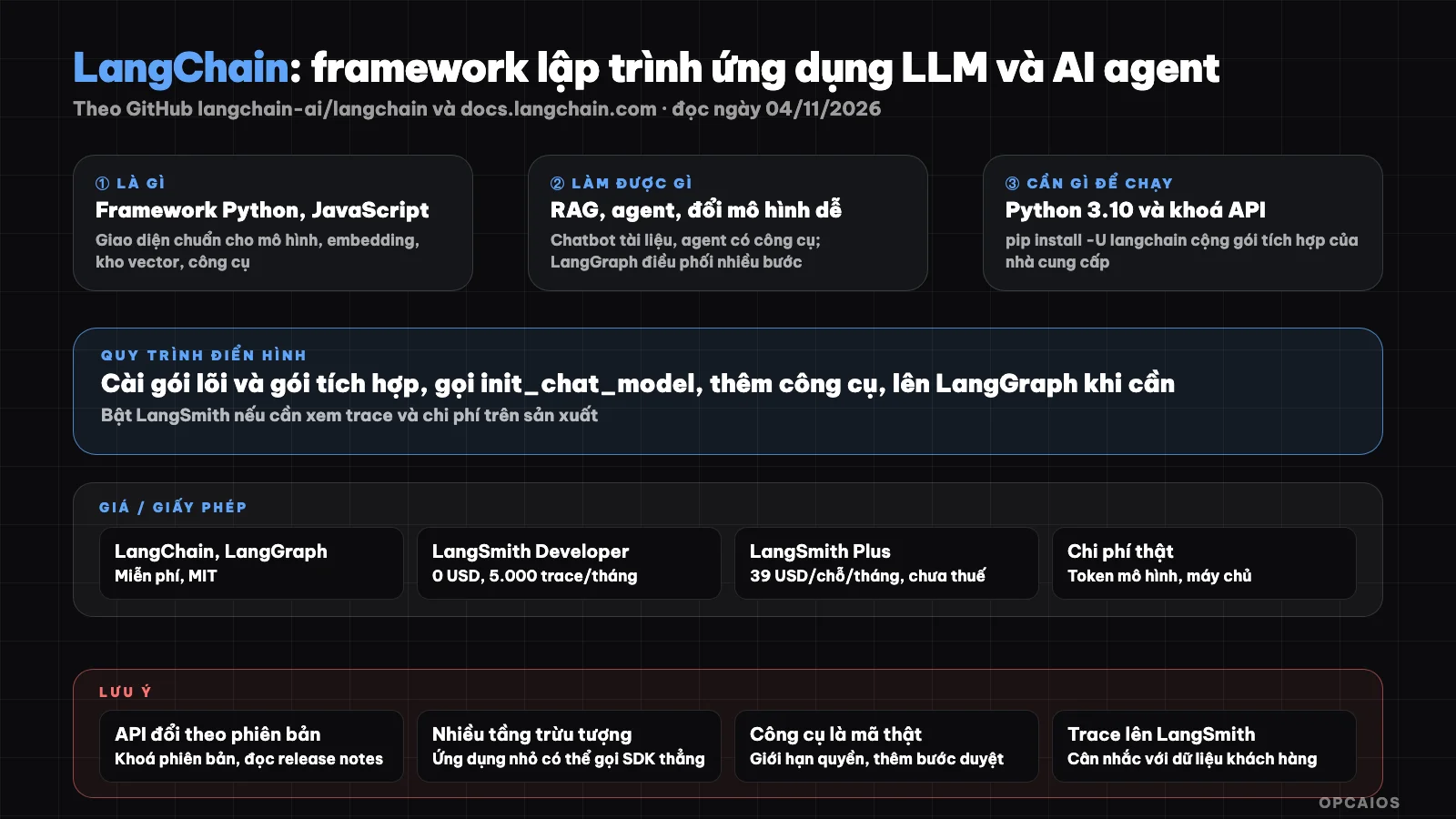
LangChain is an abstraction layer between application and multiple model providers; LangGraph and LangSmith are two pieces alongside it. Diagram: OPCAIOS.
What is LangChain and who created it?
LangChain is a framework for building applications and agents based on LLM, born in October 2022 from a personal project by Harrison Chase, now developed by LangChain, Inc. company together with the community. GitHub describes the repository as "The agent engineering platform". The goal is to keep applications adaptive as models and providers change.
According to README (GitHub, read 04/11/2026), LangChain's main selling points are standard interfaces for three things: chat models, embedding models and vector stores. You write init_chat_model("openai:gpt-5.5") today, tomorrow switch to Anthropic or Gemini just by changing the model name string. On top of that are abstraction layers by level: high level for quick start, low level for detailed control. LangChain has a Python version (main repository) and LangChain.js for TypeScript. With 25,000 forks and 707 open issues (GitHub API, read 04/11/2026), this is one of the largest projects in the LLM framework group. The concepts of chain, agent, retriever in AI documentation are mostly popular thanks to LangChain.
What components does LangChain consist of?
LangChain consists of core package langchain, integration packages specific to each provider, and an ecosystem around it: LangGraph for orchestrating agents, LangSmith for monitoring and evaluation, Deep Agents for planning agents. Table from README (read 04/11/2026).
| Component | Role |
|---|---|
| langchain (core package) | Standard interface for chat models, embeddings, vector stores; functions to create agents and chains |
| Integration packages | langchain-openai, langchain-anthropic, langchain-ollama... install each package separately |
| Tools and retriever | Python functions as tools for agents to call; RAG components: load, chunk, embed, retrieve |
| LangGraph | Low-level orchestration framework for long-running agents, multiple steps, with state |
| Deep Agents | Higher-level package for planning agents, calling subagents, using file systems |
| LangSmith | Observation, evaluation, debugging service; has agent deployment platform |
| LangChain.js | Equivalent TypeScript/JavaScript version |
People who don't know code won't use LangChain directly, but understanding these pieces helps you read the architecture of no-code tools like Dify or Flowise, which wrap similar concepts.
Is LangChain free? License and hidden costs
LangChain, LangGraph and integration packages are free under MIT license; the paid part is LangSmith, the cloud service of LangChain company. Real cost is model provider token fees and infrastructure you run.
| Item | Information (langchain.com/pricing, read 04/11/2026) |
|---|---|
| LangChain, LangGraph libraries | Free, MIT, can use commercially |
| LangSmith Developer | 0 USD/seat/month, 1 seat, 5,000 basic traces/month, overage then pay per use |
| LangSmith Plus | 39 USD/seat/month, 10,000 basic traces/month, 1 small serverless deployment free |
| LangSmith Enterprise | Custom pricing, self-hosted or hybrid, SLA |
| Additional unit | LSU (LangChain Standard Unit) 1 USD/unit for deployment service |
| Hidden costs | OpenAI, Anthropic, Google API keys and tokens; vector store; VPS; GPU if running models locally |
Not including tax, may change. LangSmith is optional: you build and run LangChain applications without needing a LangSmith account. Summary of license here is not legal advice.
How to Install LangChain and Write Your First Application?
Installing LangChain requires Python 3.10 or higher and two pip commands: the core package and the integration package for your provider, according to the installation guide at docs.langchain.com (read on 04/11/2026). You don't need a GPU; GPU is only necessary when running local models through Ollama.
pip install -U langchain
pip install -U langchain-anthropic
- First, create a Python virtual environment and install the two packages above (or
uv add langchain). Replacelangchain-anthropicwithlangchain-openaiif you use OpenAI. - Next, put your API key into an environment variable, not hardcoded in your code.
- Call the model: the README shows
init_chat_model("openai:gpt-5.5")thenmodel.invoke("..."); change the model name string to switch providers. - Add tools: write Python functions and attach them to an agent using the core package's agent builder function.
- Finally, when you need multi-step workflows with state or human review steps, move the orchestration logic to LangGraph.
We haven't tested with version 1.4.8; the commands come from official documentation. LangChain has gone through many major API changes (0.1, 0.2, 0.3, then 1.0); old sample code and even AI-generated code may use deprecated functions. Give the correct version documentation to your code agent before asking it to write, as explained in AI writes code with wrong version.
How are LangChain, LangGraph, and LangSmith Different?
LangChain is a component library, LangGraph is an orchestration engine, and LangSmith is an observability service. The three names are confusing because the same company makes them, but their roles are different and only LangSmith has a paid tier.
- First, LangChain: call models, embed documents, define tools, build simple agents. Enough for most chatbot RAGs and internal assistants.
- Next, LangGraph: agents need multiple stateful steps, branching, loops, waiting for human review, or long-running with recovery.
- Finally, LangSmith: your application goes to production and you need to see each model call, measure costs, run evaluators.
Example (hypothetical): a shop owner wants an assistant to answer return policies and check order status. The policy answers use LangChain with a vector store; order checking is a tool that calls the shop's API; when a customer requests a refund, the LangGraph workflow pauses waiting for the shop owner to approve. LangSmith logs the conversation so you can see where the assistant went wrong. We haven't built this system, just showing how to split roles.
Limitations, Risks, and Security Notes
The biggest risk of LangChain is not the license but the complexity and rate of change: many layers of abstraction make errors hard to trace, API changes per version break old code.
- Over-abstraction: for small apps, calling OpenAI or Anthropic SDKs directly is sometimes shorter; this is a common opinion in the community, not a measurement.
- API changes per version: pin versions in
requirements.txt, read release notes before upgrading. - Tools are real running code: an agent can call functions that delete files, send emails, or call paid APIs; limit permissions per tool, add a review step for irreversible actions.
- Prompt injection: documents loaded into RAG and web search results are untrusted data; see what is prompt injection?.
- Where does your data go: LangChain runs on your machine but content goes to your model provider; turn on LangSmith and traces (with prompts and answers) go to LangChain's service. The personal data parts are for reference only, not legal advice.
- Token costs: multi-step agents multiply the number of calls fast; set step limits and budgets.
LangChain vs Other Options
LangChain competes with other agent frameworks and with calling SDKs directly; it's entirely different from drag-and-drop tools because it requires writing code. The table is a general description, not a measurement.
| Option | Positioning | vs LangChain |
|---|---|---|
| Direct SDK (OpenAI, Anthropic) | Call one provider's API | Fewer layers, but switching providers means rewriting; no built-in RAG, agents |
| LlamaIndex | Framework focused on RAG and data | Strong document loading and retrieval; LangChain broader on agents |
| Agent SDK from provider | Agent tools tied to one company | Compact, but locked into one provider; LangChain is neutral |
| Dify, Flowise | Drag-and-drop, no code | For non-programmers; LangChain for developers and code agents |
| n8n | Workflow automation with AI nodes | Good for connecting business services; not an app framework |
| Open WebUI | Self-hosted chat interface | Use immediately, no coding |
When Should You Use LangChain?
LangChain works well when you (or your code agent) are building an AI application that needs flexible model switching, has RAG and tools, and wants a path to LangGraph as things get more complex.
| Situation | Suggestion |
|---|---|
| Internal RAG chatbot, willing to write Python | LangChain core plus an integration package |
| Multi-step agent, with human review steps, long-running | LangChain plus LangGraph |
| Small application, single provider, single call | Calling the SDK directly might be simpler |
| Don't know code, want to build fast | Dify or n8n; ask your code agent to write on LangChain when you need customization |
| Just need to chat with documents for one person | Open WebUI, no programming needed |
OPCAIOS's Experience
We recently added LangChain to the Repo list in the Tools section on opcaios.org after reading the README and checking that the repository is still being maintained (version 1.4.8 as of 02/11/2026); we haven't tried running version 1.x in any project yet, so this section lays out the criteria we use to weigh it, not an assessment after using it. Four criteria:
- Repository is still being updated: yes, thick release cadence, passed the 1.0 milestone so the API is more stable than the 0.x phase.
- License: MIT, nothing holding back commercial use.
- Hidden costs: tokens from the model provider; we route models through 9Router so we can point LangChain to the same OpenAI-compatible gateway.
- Can we swap out the tools we're using: the AI features on opcaios.org's website currently call model APIs directly using code written by a code agent; LangChain is a choice when we need a multi-step stateful agent, not yet at that point.
Read more: What is an AI agent?, What is MCP?, What is Flowise?.
Frequently Asked Questions
What is LangChain used for?
LangChain is used to program applications that call large language models: chatbots that answer from documents (RAG), assistants with tools to query data, multi-step agents. The core value according to the README (GitHub, read 04/11/2026) is a standard interface for models, embeddings, and vector stores, so you can switch from OpenAI to Anthropic or Gemini without rewriting logic. It's for programmers or for a code agent to write instead of you, not a tool to use right away.
Is LangChain free?
The LangChain and LangGraph libraries are free under the MIT license, you can use them commercially. You only pay tokens to the model provider and the infrastructure you run. LangSmith has a Developer tier at 0 USD with 5,000 traces/month and a Plus tier at 39 USD/seat/month per langchain.com/pricing (read 04/11/2026, not including tax, may change), but completely optional.
How are LangChain and LangGraph different?
LangChain is a component library: models, embeddings, tools, retrievers, functions to build simple agents. LangGraph is a low-level orchestration framework for long-running, multi-step, stateful agents, for example pausing to wait for human review then continuing. The two packages usually work together: LangChain provides the pieces, LangGraph connects the pieces into a graph. Simple applications only need LangChain.
Do you need a GPU to use LangChain?
No. LangChain is a lightweight Python library that runs on regular machines. A GPU is only needed if you run a local model through Ollama then connect LangChain to it using the langchain-ollama package. Most users call cloud models through an API key, in which case the cost is tokens, not hardware. The only requirement per PyPI (read 04/11/2026) is Python 3.10 or later.
Should someone who doesn't know code learn LangChain?
No need to learn to write it, but worth understanding the concepts. A solo business owner will benefit from knowing the pieces (models, tools, retrievers, agents, traces) to give the right orders to a code agent like Claude Code or to pick between Dify, n8n, and writing code. Ask a code agent to build a small RAG chatbot on LangChain, then read the code it writes. This path is part of OPCAIOS's AI application training course.
Source: GitHub langchain-ai/langchain (README, API, read 04/11/2026), PyPI langchain (version 1.4.8, read 04/11/2026), docs.langchain.com (setup page, read 04/11/2026), langchain.com/pricing (read 04/11/2026); not read/not verified: detailed 1.x release notes, LangGraph and Deep Agents separate documentation, current state of LlamaIndex and competing agent SDKs; star count and pricing may change. The experience is OPCAIOS's. This post is not legal advice.
Translated from Vietnamese with AI. Read the original.
Want to apply this in your business?
Book a free 30-minute call (Vietnam time, in English or Vietnamese).